Net+AI智能体6:Agent进阶扩展
2025-11-08 18:11:37一、自定义文件消息存储
1. ChatMessageStore 架构概览
classDiagram
    class ChatMessageStore {
        <<abstract>>
        #IChatReducer? ChatReducer
        +AddMessagesAsync(messages)
        +GetMessagesAsync()
        +ClearAsync()
        +Serialize()
        +Deserialize(state)
    }

    class InMemoryChatMessageStore {
        -List~ChatMessage~ _messages
        +AddMessagesAsync()
        +GetMessagesAsync()
        +ClearAsync()
    }

    class FileChatMessageStore {
        -string _filePath
        -SemaphoreSlim _lock
        +AddMessagesAsync()
        +GetMessagesAsync()
        +ClearAsync()
    }

    class RedisChatMessageStore {
        -IConnectionMultiplexer _redis
        +AddMessagesAsync()
        +GetMessagesAsync()
        +ClearAsync()
    }

    ChatMessageStore <|-- InMemoryChatMessageStore
    ChatMessageStore <|-- FileChatMessageStore
    ChatMessageStore <|-- RedisChatMessageStore
- ChatMessageStore 抽象类核心方法职责
| 方法 | 职责 | 使用场景 |
|---|---|---|
| AddMessagesAsync | 添加新消息到存储(应用 Reducer) | 每次对话后保存消息 |
| GetMessagesAsync | 获取当前所有消息 | Agent 执行前加载历史 |
| ClearAsync | 清空所有消息 | 重置对话线程 |
| Serialize | 序列化当前状态 | 持久化到数据库/文件 |
| Deserialize | 反序列化并恢复状态 | 从数据库/文件恢复 |
- 关键属性
public abstract class ChatMessageStore
{
    // Reducer 集成点:在 AddMessagesAsync 中自动应用
    protected IChatReducer? ChatReducer { get; }

    // 基类自动处理 Reducer 应用逻辑
    protected async Task ApplyReducerIfConfiguredAsync()
    {
        if (ChatReducer != null)
        {
            var messages = await GetMessagesAsync();
            var reduced = await ChatReducer.ReduceAsync(messages);
            await ClearAsync();
            await AddMessagesAsync(reduced);
        }
    }
}
2. InMemoryChatMessageStore 工作原理
通过代码分析理解内置内存存储的实现机制,InMemoryChatMessageStore 核心实现:
public class InMemoryChatMessageStore : ChatMessageStore
{
    private readonly List<ChatMessage> _messages = new();

    public InMemoryChatMessageStore(
        IChatReducer? chatReducer = null,
        JsonElement? serializedStoreState = null,
        JsonSerializerOptions? jsonSerializerOptions = null)
    {
        ChatReducer = chatReducer;

        // 反序列化支持:从持久化状态恢复
        if (serializedStoreState.HasValue)
        {
            var messages = JsonSerializer.Deserialize<List<ChatMessage>>(
                serializedStoreState.Value,
                jsonSerializerOptions);
            if (messages != null) _messages.AddRange(messages);
        }
    }

    // 添加消息并应用 Reducer
    public override async Task AddMessagesAsync(
        IEnumerable<ChatMessage> messages,
        CancellationToken cancellationToken = default)
    {
        _messages.AddRange(messages);
        await ApplyReducerIfConfiguredAsync(); // 基类方法自动裁剪
    }

    // 获取当前所有消息(只读副本)
    public override Task<IReadOnlyList<ChatMessage>> GetMessagesAsync(
        CancellationToken cancellationToken = default)
    {
        return Task.FromResult<IReadOnlyList<ChatMessage>>(
            _messages.AsReadOnly());
    }

    // 清空所有消息
    public override Task ClearAsync(
        CancellationToken cancellationToken = default)
    {
        _messages.Clear();
        return Task.CompletedTask;
    }
}
关键特性
优点:
零 I/O 延迟,性能极佳
实现简单,适合原型开发
自动支持 Reducer 集成
限制:
进程重启后数据丢失
无法跨实例共享数据
内存占用随对话增长
3. 实现 FileChatMessageStore
创建一个自定义存储,将对话历史持久化到 JSON 文件。
- 实现自定义 ChatMessageStor
/// <summary>
/// 基于文件的消息存储实现
/// </summary>
public class FileChatMessageStore : ChatMessageStore
{
    private readonly string _filePath;
    private readonly JsonSerializerOptions _jsonOptions;
    private readonly SemaphoreSlim _lock = new(1, 1); // 线程安全锁

    #pragma warning disable MEAI001

    public IChatReducer? ChatReducer { get; }

    public FileChatMessageStore(
        string filePath,
        IChatReducer? chatReducer = null,
        JsonElement? serializedStoreState = null,
        JsonSerializerOptions? jsonSerializerOptions = null)
    {
        _filePath = filePath;
        _jsonOptions = jsonSerializerOptions ?? new JsonSerializerOptions
        {
            WriteIndented = true,
            Encoder = System.Text.Encodings.Web.JavaScriptEncoder.UnsafeRelaxedJsonEscaping
        };

        // 继承基类的 Reducer 属性
        ChatReducer = chatReducer;

        // 初始化:从序列化状态或现有文件恢复
        if (serializedStoreState.HasValue &&
            serializedStoreState.Value.ValueKind != JsonValueKind.Undefined &&
            serializedStoreState.Value.ValueKind != JsonValueKind.Null)
        {
            var messages = JsonSerializer.Deserialize<List<ChatMessage>>(
                serializedStoreState.Value,
                _jsonOptions);
            if (messages != null)
            {
                // 使用同步方法避免构造函数中的 sync-over-async
                SaveMessagesToFile(messages);
            }
        }
        else if (!File.Exists(_filePath))
        {
            // 创建空文件
            Directory.CreateDirectory(Path.GetDirectoryName(_filePath)!);
            File.WriteAllText(_filePath, "[]");
        }
    }

    /// <summary>
    /// 添加消息并持久化到文件
    /// </summary>
    public override async Task AddMessagesAsync(
        IEnumerable<ChatMessage> messages,
        CancellationToken cancellationToken = default)
    {
        await _lock.WaitAsync(cancellationToken);
        try
        {
            // 1. 加载现有消息
            var existingMessages = await LoadMessagesFromFileAsync(cancellationToken);

            // 2. 添加新消息
            var allMessages = new List<ChatMessage>(existingMessages);
            allMessages.AddRange(messages);

            // 3. 应用 Reducer(如果配置)
            if (ChatReducer != null)
            {
                var reduced = await ChatReducer.ReduceAsync(allMessages, cancellationToken);
                allMessages = reduced.ToList();
            }

            // 4. 保存到文件
            await SaveMessagesToFileAsync(allMessages, cancellationToken);
        }
        finally
        {
            _lock.Release();
        }
    }

    /// <summary>
    /// 获取所有消息
    /// </summary>
    public override async Task<IEnumerable<ChatMessage>> GetMessagesAsync(
        CancellationToken cancellationToken = default)
    {
        await _lock.WaitAsync(cancellationToken);
        try
        {
            return await LoadMessagesFromFileAsync(cancellationToken);
        }
        finally
        {
            _lock.Release();
        }
    }


    /// <summary>
    /// 清空所有消息
    /// </summary>
    public async Task ClearAsync(CancellationToken cancellationToken = default)
    {
        await _lock.WaitAsync(cancellationToken);
        try
        {
            await File.WriteAllTextAsync(_filePath, "[]", cancellationToken);
        }
        finally
        {
            _lock.Release();
        }
    }

    /// <summary>
    /// 序列化当前存储状态
    /// </summary>
    public override JsonElement Serialize(JsonSerializerOptions? options = null)
    {
        // 优化:使用同步锁和同步 IO 避免 sync-over-async 问题
        _lock.Wait();
        try
        {
            var messages = LoadMessagesFromFile();
            return JsonSerializer.SerializeToElement(messages, options ?? _jsonOptions);
        }
        finally
        {
            _lock.Release();
        }
    }

    // ━━━━━━━━━━━━━━━━━━━━━━━━━━━━━━━━━━━━━━━━━━━━━━
    // 私有辅助方法
    // ━━━━━━━━━━━━━━━━━━━━━━━━━━━━━━━━━━━━━━━━━━━━━━
    private List<ChatMessage> LoadMessagesFromFile()
    {
        if (!File.Exists(_filePath))
        {
            return new List<ChatMessage>();
        }

        var json = File.ReadAllText(_filePath);
        return JsonSerializer.Deserialize<List<ChatMessage>>(json, _jsonOptions)
               ?? new List<ChatMessage>();
    }

    private async Task<List<ChatMessage>> LoadMessagesFromFileAsync(
        CancellationToken cancellationToken = default)
    {
        if (!File.Exists(_filePath))
        {
            return new List<ChatMessage>();
        }

        var json = await File.ReadAllTextAsync(_filePath, cancellationToken);
        return JsonSerializer.Deserialize<List<ChatMessage>>(json, _jsonOptions)
               ?? new List<ChatMessage>();
    }

    private void SaveMessagesToFile(IEnumerable<ChatMessage> messages)
    {
        var json = JsonSerializer.Serialize(messages, _jsonOptions);
        File.WriteAllText(_filePath, json);
    }

    private async Task SaveMessagesToFileAsync(
        IEnumerable<ChatMessage> messages,
        CancellationToken cancellationToken = default)
    {
        var json = JsonSerializer.Serialize(messages, _jsonOptions);
        await File.WriteAllTextAsync(_filePath, json, cancellationToken);
    }
}
Console.WriteLine("FileChatMessageStore 已定义");
Console.WriteLine(" - 支持 JSON 文件持久化");
Console.WriteLine(" - 集成 IChatReducer 支持");
Console.WriteLine(" - 线程安全 (SemaphoreSlim)");
- 使用自定义文件存储创建 Agent
#pragma warning disable MEAI001
var storageFilePath = Path.Combine(Path.GetTempPath(), "maf-chat-history.json");

// 清理旧文件
if (File.Exists(storageFilePath))
{
    File.Delete(storageFilePath);
}

var options = new ChatClientAgentOptions
{
    Instructions = "你是一个旅游顾问,帮助用户规划行程。",
    Name = "旅游助手",

    // 使用自定义文件存储(不带 Reducer)
    ChatMessageStoreFactory = ctx => new FileChatMessageStore(
        filePath: storageFilePath,
        chatReducer: null, // 暂不使用 Reducer
        serializedStoreState: ctx.SerializedState,
        jsonSerializerOptions: ctx.JsonSerializerOptions
    )
};

var agent = chatClient.CreateAIAgent(options);
Console.WriteLine("Agent 已创建(使用 FileChatMessageStore)");
Console.WriteLine($" 存储路径: {storageFilePath}\n");
- 多轮对话并验证文件持久化
var thread = agent.GetNewThread();
Console.WriteLine("═══════════════════════════════════════");
Console.WriteLine("第 1 轮对话");
Console.WriteLine("═══════════════════════════════════════\n");
var response1 = await agent.RunAsync("我想去日本旅游,推荐几个城市", thread);
Console.WriteLine($"{response1.Text}\n");
Console.WriteLine($" 存储路径: {storageFilePath}\n");
Console.WriteLine("\n═══════════════════════════════════════");

Console.WriteLine("第 2 轮对话");
Console.WriteLine("═══════════════════════════════════════\n");
var response2 = await agent.RunAsync("东京有哪些必去景点?", thread);
Console.WriteLine($"{response2.Text}\n");
Console.WriteLine($" 存储路径: {storageFilePath}\n");
- 查看文件内容
Console.WriteLine("文件存储的完整内容:\n");
Console.WriteLine($" 存储路径: {storageFilePath}\n");
var msgStore = thread.GetService<ChatMessageStore>();
msgStore.Display();
var msgs = await msgStore.GetMessagesAsync();
msgs.Display();
4. 文件存储 + Reducer 结合
- 创建带 Reducer 的 Agent
var storageFilePathWithReducer = Path.Combine(Path.GetTempPath(), "maf-chat-history-reduced.json");
// 清理旧文件
if (File.Exists(storageFilePathWithReducer))
{
    File.Delete(storageFilePathWithReducer);
}

#pragma warning disable MEAI001
var optionsWithReducer = new ChatClientAgentOptions
{
    Instructions = "你是一个美食推荐助手。",
    Name = "美食顾问",
    // 文件存储 + Reducer 组合
    ChatMessageStoreFactory = ctx => new FileChatMessageStore(
        filePath: storageFilePathWithReducer,
        chatReducer: new MessageCountingChatReducer(targetCount: 3), // 仅保留最近 3 条
        serializedStoreState: ctx.SerializedState,
        jsonSerializerOptions: ctx.JsonSerializerOptions
    )
};

var agentWithReducer = chatClient.CreateAIAgent(optionsWithReducer);
Console.WriteLine("Agent 已创建(FileChatMessageStore + MessageCountingChatReducer)");
Console.WriteLine($" 存储路径: {storageFilePathWithReducer}");
Console.WriteLine(" 裁剪策略: 保留最近 3 条消息\n");
- 多轮对话观察裁剪效果
var threadWithReducer = agentWithReducer.GetNewThread();
var queries = new[]
{
    "推荐成都的特色美食",
    "火锅哪家好吃?",
    "串串和火锅有什么区别?",
    "推荐一家适合约会的餐厅",
    "有没有素食餐厅?"
};
foreach (var query in queries)
{
    var resp = await agentWithReducer.RunAsync(query, threadWithReducer);
    Console.WriteLine($"用户: {query}");
    Console.WriteLine($"助手: {resp.Text?.Substring(0, Math.Min(60, resp.Text.Length))}...");
}
var msgStore = threadWithReducer.GetService<ChatMessageStore>();
msgStore.Display();
var messagesWithReducer = await msgStore.GetMessagesAsync();
messagesWithReducer.Display();

Console.WriteLine($" 存储路径: {storageFilePathWithReducer}");
5. 模拟进程重启后的恢复
- 序列化 Thread 状态
// 序列化当前 Thread
var serializedState = threadWithReducer.Serialize();

Console.WriteLine("Thread 已序列化\n");
Console.WriteLine("序列化内容预览:");
var previewLength = Math.Min(300, serializedState.ToString().Length);
Console.WriteLine(serializedState.ToString().Substring(0, previewLength));
Console.WriteLine("\n...(已省略)\n");

Console.WriteLine("在生产环境中,可将序列化数据保存到:");
Console.WriteLine(" - 数据库 (SQL Server, Cosmos DB)");
Console.WriteLine(" - 缓存 (Redis)");
Console.WriteLine(" - 配合文件存储实现双重持久化\n");
- 模拟重启后恢复
Console.WriteLine("模拟进程重启...\n");

// 重新创建 Agent(模拟新进程)
var newAgent = chatClient.CreateAIAgent(optionsWithReducer);
// 从序列化状态恢复 Thread
var restoredThread = newAgent.DeserializeThread(serializedState);
Console.WriteLine("Thread 已从序列化数据恢复\n");

// 继续对话
var continueResponse = await newAgent.RunAsync(
    "刚才推荐的素食餐厅在哪里?",
    restoredThread
);
Console.WriteLine($"用户: 刚才推荐的素食餐厅在哪里?");
Console.WriteLine($"助手: {continueResponse.Text}\n");
Console.WriteLine("Agent 能够基于恢复的历史继续对话!");
Console.WriteLine("文件存储 + 序列化实现了完整的持久化方案");
6. 自定义 ChatMessageStore 最佳实践
选择合适的存储方案
| 场景 | 推荐存储 | 优势 | 注意事项 |
|---|---|---|---|
| 原型开发* | InMemoryChatMessageStore | 零延迟,实现简单 | 无持久化 |
| 单机部署 | FileChatMessageStore | 简单持久化,无依赖 | I/O 性能限制 |
| 分布式系统 | RedisChatMessageStore | 跨实例共享,高性能 | 需 Redis 基础设施 |
| 企业级应用 | DatabaseChatMessageStore | 可靠性高,审计完整 | 需关系型数据库 |
| 云原生应用 | AzureCosmosChatMessageStore | 全球分布,弹性扩展 | 成本较高 |
实现 ChatMessageStore 的关键点
public class CustomChatMessageStore : ChatMessageStore
{
    // 必须实现的核心方法
    public override async Task AddMessagesAsync(
        IEnumerable<ChatMessage> messages,
        CancellationToken cancellationToken = default)
    {
        // 1. 保存新消息到存储介质
        await SaveToStorage(messages);

        // 2. 应用 Reducer(如果配置)
        if (ChatReducer != null)
        {
            var all = await GetMessagesAsync(cancellationToken);
            var reduced = await ChatReducer.ReduceAsync(all, cancellationToken);
            await ClearAsync(cancellationToken);
            await SaveToStorage(reduced);
        }
    }

    // 必须返回只读集合
    public override Task<IEnumerable<ChatMessage>> GetMessagesAsync(...)
    {
        return LoadFromStorage().AsReadOnly();
    }

    // 确保线程安全(文件/数据库锁)
    private readonly SemaphoreSlim _lock = new(1, 1);
}
性能优化建议
// 推荐:批量操作减少 I/O
public override async Task AddMessagesAsync(IEnumerable<ChatMessage> messages, ...)
{
    var batch = messages.ToList();
    await _db.BulkInsertAsync(batch); // 批量插入
}

// 推荐:使用异步 I/O
await File.WriteAllTextAsync(...); // 而非 File.WriteAllText(...)

// 推荐:实现缓存层
private List<ChatMessage>? _cachedMessages;
public override async Task<IReadOnlyList<ChatMessage>> GetMessagesAsync(...)
{
    if (_cachedMessages == null)
    {
        _cachedMessages = await LoadFromStorageAsync();
    }
    return _cachedMessages.AsReadOnly();
}
错误处理与容错
public override async Task AddMessagesAsync(...)
{
    try
    {
        await SaveToStorage(messages);
    }
    catch (IOException ex)
    {
        // 降级策略:切换到内存存储
        _logger.LogWarning(ex, "文件存储失败,切换到内存模式");
        _fallbackStore.AddRange(messages);
    }
    catch (UnauthorizedAccessException ex)
    {
        // 权限问题:抛出明确异常
        throw new InvalidOperationException("无权限写入存储文件", ex);
    }
}
生产环境的存储策略
// 企业级方案:数据库 + Redis 缓存
public class HybridChatMessageStore : ChatMessageStore
{
    private readonly IDatabase _redis;
    private readonly DbContext _db;

    public override async Task AddMessagesAsync(...)
    {
        // 1. 写入数据库(持久化)
        await _db.Messages.AddRangeAsync(messages);
        await _db.SaveChangesAsync();

        // 2. 更新 Redis 缓存(高性能读取)
        var json = JsonSerializer.Serialize(messages);
        await _redis.StringSetAsync($"chat:{threadId}", json, TimeSpan.FromHours(1));
    }

    public override async Task<IReadOnlyList<ChatMessage>> GetMessagesAsync(...)
    {
        // 1. 优先从 Redis 读取
        var cached = await _redis.StringGetAsync($"chat:{threadId}");
        if (cached.HasValue)
        {
            return JsonSerializer.Deserialize<List<ChatMessage>>(cached!)!;
        }

        // 2. 缓存未命中,从数据库加载
        var messages = await _db.Messages
            .Where(m => m.ThreadId == threadId)
            .OrderBy(m => m.Timestamp)
            .ToListAsync();

        // 3. 回写 Redis
        await _redis.StringSetAsync(
            $"chat:{threadId}",
            JsonSerializer.Serialize(messages),
            TimeSpan.FromHours(1)
        );

        return messages;
    }
}
二、自定义中间件
1. MAF 三层中间件架构
flowchart TB
    subgraph "Layer 1: Agent Run 中间件层 最外层"
        AR1[消息内容过滤]
        AR2[PII 信息脱敏]
        AR3[Guardrails 合规检查]
        AR4[上下文增强]
    end

    subgraph "Layer 2: ChatClient 中间件层"
        CC1[LLM 调用拦截]
        CC2[Token 统计]
        CC3[限流控制]
        CC4[缓存策略]
    end

    subgraph "Layer 3: Function Invocation 中间件层"
        FI1[工具调用日志]
        FI2[参数验证]
        FI3[结果覆盖/Mock]
        FI4[权限检查]
    end

    User[用户请求] --> Layer1
    Layer1 --> Layer2
    Layer2 --> Agent[AI Agent 核心逻辑]
    Agent --> LLM[LLM]
    Agent --> Layer3
    Layer3 --> Tools[工具函数]

    style User fill:#2196F3,stroke:#1565C0,stroke-width:2px,color:#fff
    style Layer1 fill:#9C27B0,stroke:#6A1B9A,stroke-width:3px,color:#fff
    style Layer2 fill:#FF9800,stroke:#E65100,stroke-width:2px,color:#fff
    style Layer3 fill:#F44336,stroke:#C62828,stroke-width:2px,color:#fff
    style Agent fill:#4CAF50,stroke:#2E7D32,stroke-width:3px,color:#fff
Agent Run 中间件层(最外层)
职责:拦截 Agent 运行时的消息流(用户输入 + Agent 响应)
典型应用:
PII 过滤:自动过滤手机号、邮箱、身份证等敏感信息
Guardrails:阻止生成有害、违规、敏感内容
内容审计:记录所有对话内容供审计
内容转换:格式化输出、多语言翻译
重要:这是实际执行的最外层,在所有其他中间件之前执行!
ChatClient 中间件层(LLM 调用拦截)
职责:拦截每次发送到 LLM 的请求和响应(在 Agent Run 内部,每次 LLM 调用时触发)
典型应用:
- 全局监控:记录所有 LLM 调用的耗时、Token 使用量
限流控制:控制 API 调用频率,避免超额
缓存策略:缓存重复的请求,减少 API 调用
多模型路由:根据请求类型路由到不同的 LLM
重要:在一次 RunAsync() 中,ChatClient 中间件可能触发多次(每次 LLM 调用)!
Function Invocation 中间件层(工具调用拦截)
职责:拦截 Agent 调用工具函数的执行(在工具调用时触发)
典型应用:
调用日志:记录工具名称、参数、结果
权限检查:验证用户是否有权限调用某个工具
Mock 数据:测试环境返回模拟数据
性能监控:统计工具执行时间
sequenceDiagram
    participant U as 用户
    participant AR as Agent Run 中间件
    participant CC as ChatClient 中间件
    participant A as Agent 核心
    participant FI as Function 中间件
    participant T as 工具函数

    U->>AR: 1. 发送请求(包含 PII)
    AR->>AR: Guardrails 检查
    AR->>AR: 过滤 PII 信息
    AR->>CC: 2. 转发清洗后的请求
    CC->>CC: 记录开始时间
    CC->>A: 3. 调用 LLM
    A->>A: LLM 决策:需要调用工具
    A->>FI: 4. 调用工具
    FI->>FI: 结果覆盖检查
    FI->>FI: 记录工具调用日志
    FI->>T: 5. 执行工具函数
    T-->>FI: 6. 返回结果
    FI-->>A: 7. 返回结果(可能已覆盖)
    A->>CC: 8. 再次调用 LLM(生成最终响应)
    CC->>CC: 统计 Token 和耗时
    CC-->>AR: 9. 返回 Agent 响应
    AR->>AR: 再次检查响应内容
    AR-->>U: 10. 返回最终响应
- 关键理解
- 洋葱模型:请求从外向内穿透,响应从内向外返回
- Agent Run 最外层:Guardrails 和 PII 过滤在整个流程的最外层
- ChatClient 多次触发:在一次 Run 中可能触发多次(每次 LLM 调用)
- Function 在工具调用时:只在工具调用时执行
- 职责分离:每层中间件只关注自己的职责
- 可组合:可以在同一层添加多个中间件,按顺序执行
2. 观察 Agent 基础行为
首先,我们创建一个简单的智能客服 Agent,不添加任何中间件,作为对比基线。
Console.WriteLine("━━━━━━━━━━━━━━━━━━━━━━━━━━━━━━━━━━━━━━━━━━━━━━");
Console.WriteLine("   创建基础智能客服 Agent(无中间件)   ");
Console.WriteLine("━━━━━━━━━━━━━━━━━━━━━━━━━━━━━━━━━━━━━━━━━━━━━━\n");

// 定义工具函数:查询天气
[Description("查询指定城市的天气情况")]
string GetWeather([Description("城市名称")] string city)
{
    // 模拟天气查询
    return city switch
    {
        "北京" => "北京今天多云,气温 15°C",
        "上海" => "上海今天晴天,气温 20°C",
        "深圳" => "深圳今天阴天,气温 22°C",
        _ => $"{city}今天天气未知"
    };
}

// 定义工具函数:查询订单状态
[Description("查询订单的当前状态")]
string QueryOrderStatus([Description("订单号")] string orderId)
{
    // 模拟订单查询
    return orderId switch
    {
        "#DD20250109001" => "您的订单已发货,预计明天送达",
        "#DD20250109002" => "您的订单正在处理中",
        _ => "未找到该订单"
    };
}

var tools =  new List<AIFunction>
{
    AIFunctionFactory.Create(GetWeather),
    AIFunctionFactory.Create(QueryOrderStatus)
};

// 1. 创建基础 Agent(无中间件)
var basicAgent = chatClient.CreateAIAgent(
    instructions: @"你是某电商平台的智能客服机器人,专门处理售后咨询。
擅长领域:
- 订单状态查询
- 天气查询(帮助用户安排收货)
- 退货退款政策解答

回答风格:
- 友好、耐心、专业
- 使用简洁明了的语言
- 提供具体的操作步骤",
    name: "CustomerServiceBot",
    tools: [..tools]
);
Console.WriteLine("基础智能客服 Agent 创建完成(无中间件)\n");

// 2. 测试基础 Agent
// 测试一个正常的咨询场景,观察 Agent 的基础行为。
Console.WriteLine("━━━━ 测试基础 Agent(正常咨询)━━━━\n");
var thread = basicAgent.GetNewThread();
Console.WriteLine("客户:我想查询一下北京明天的天气,我的订单 #DD20250109001 什么时候到货?\n");

var response = await basicAgent.RunAsync(
    "我想查询一下北京明天的天气,我的订单 #DD20250109001 什么时候到货?",
    thread);
Console.WriteLine("客服 Agent:");
Console.WriteLine(response.Text);
Console.WriteLine("\n━━━━━━━━━━━━━━━━━━━━━━━━━━━━━━━━━━━━━━━━━━━━━━");
Console.WriteLine("   观察:基础 Agent 正常工作,但缺少企业级控制   ");
Console.WriteLine("    - 没有 PII 过滤");
Console.WriteLine("    - 没有工具调用日志");
Console.WriteLine("    - 没有监控统计");
Console.WriteLine(" 接下来,我们将通过中间件添加这些能力!");
Console.WriteLine("━━━━━━━━━━━━━━━━━━━━━━━━━━━━━━━━━━━━━━━━━━━━━━");
3. agent.AsBuilder().Use() 的四种重载方式
在实现中间件之前,让我们先了解 AIAgentBuilder 提供的 .Use() 方法的四种重载方式。
Use(Func) - 最简单的包装
适用场景:
- 简单地包装内部 Agent,不需要访问 IServiceProvider
- 适合静态的中间件逻辑
示例:
.Use(innerAgent =>
{
    // 返回一个包装了 innerAgent 的自定义 Agent
    return new MyCustomAgent(innerAgent);
})
Use(Func) - 带依赖注入的包装
适用场景:
需要从 IServiceProvider 获取依赖服务
适合需要访问日志、配置等服务的中间件
示例:
.Use((innerAgent, services) =>
{
    var logger = services.GetService<ILogger>();
    return new LoggingAgent(innerAgent, logger);
})
Use(sharedFunc) - 共享的前置/后置处理
适用场景:
只需要在 Agent 执行前后添加逻辑,不需要处理返回值
同一个逻辑同时应用于 RunAsync 和 RunStreamingAsync
适合记录日志、验证输入等场景
关键特点:
无法访问或修改 Agent 的返回结果
传入的 next 委托返回 Task(无返回值)
主要用于副作用(side effects)
示例:
.Use(async (messages, thread, options, next, ct) =>
{
    Console.WriteLine("Agent 开始执行(前置)");

    // 调用内部 Agent(无法获取返回值)
    await next(messages, thread, options, ct);

    Console.WriteLine("Agent 执行完成(后置)");
})
Use(runFunc, runStreamingFunc) - 完全控制非流式和流式
适用场景:
需要完全控制 Agent 的执行和返回结果
可以修改、过滤或替换 Agent 的返回内容
可以分别处理非流式和流式场景
关键特点:
可以访问和修改 Agent 的返回结果
两个参数可以同时提供,也可以只提供一个(另一个传 null)
如果只提供 runFunc,流式方法会自动基于非流式结果实现(有限流式)
如果只提供 runStreamingFunc,非流式方法会自动聚合流式更新
示例:
// 1. 只处理非流式(推荐用于大多数中间件)
.Use(
    runFunc: async (messages, thread, options, innerAgent, ct) =>
    {
        Console.WriteLine("Agent 开始执行");

        // 调用内部 Agent 并获取返回值
        var response = await innerAgent.RunAsync(messages, thread, options, ct);

        // 可以修改返回结果
        Console.WriteLine($"Agent 返回:{response.Messages.Count} 条消息");

        return response;
    },
    runStreamingFunc: null  // 不处理流式
)

// 2. 同时处理非流式和流式
.Use(
    runFunc: async (messages, thread, options, innerAgent, ct) =>
    {
        // 处理非流式
        var response = await innerAgent.RunAsync(messages, thread, options, ct);
        return response;
    },
    runStreamingFunc: async (messages, thread, options, innerAgent, ct) =>
    {
        // 处理流式
        await foreach (var update in innerAgent.RunStreamingAsync(messages, thread, options, ct))
        {
            yield return update;
        }
    }
)
4. Agent Run 中间件
Agent Run 中间件:拦截 Agent 运行时的消息流,可以在消息发送给 LLM 之前和 LLM 响应返回之后进行处理。
- 实现中间件
/// <summary>
/// PII 过滤中间件:自动检测并脱敏个人敏感信息
/// </summary>
async Task<AgentRunResponse> PIIFilterMiddleware(
    IEnumerable<ChatMessage> messages,
    AgentThread? thread,
    AgentRunOptions? options,
    AIAgent innerAgent,
    CancellationToken cancellationToken)
{
    Console.WriteLine("[PII 过滤] Pre-Run:开始过滤输入消息的 PII 信息");
    // 步骤 1:过滤输入消息
    var filteredMessages = FilterMessages(messages);
    // 步骤 2:调用内部 Agent
    var response = await innerAgent.RunAsync(filteredMessages, thread, options, cancellationToken);
    // 步骤 3:过滤输出消息
    response.Messages = FilterMessages(response.Messages);
    Console.WriteLine("[PII 过滤] Post-Run:输出消息 PII 过滤完成");
    return response;

    // 辅助方法:过滤消息列表
    static List<ChatMessage> FilterMessages(IEnumerable<ChatMessage> messages)
    {
        return messages.Select(m => new ChatMessage(m.Role, RedactPII(m.Text))).ToList();
    }

    // 辅助方法:脱敏 PII 信息
    static string RedactPII(string content)
    {
        if (string.IsNullOrEmpty(content))
            return content;

        // 1. 手机号脱敏(中国手机号格式)
        // 匹配:138-0013-8000、13800138000、138 0013 8000
        var phonePattern = @"\b1[3-9]\d[\s\-]?\d{4}[\s\-]?\d{4}\b";
        content = Regex.Replace(content, phonePattern, "[REDACTED: PHONE]");

        // 2. 邮箱脱敏
        // 匹配:user@example.com
        var emailPattern = @"\b[A-Za-z0-9._%+-]+@[A-Za-z0-9.-]+\.[A-Z|a-z]{2,}\b";
        content = Regex.Replace(content, emailPattern, "[REDACTED: EMAIL]");

        // 3. 身份证号脱敏(中国身份证)
        // 匹配:18位身份证号
        var idCardPattern = @"\b\d{17}[\dXx]\b";
        content = Regex.Replace(content, idCardPattern, "[REDACTED: ID_CARD]");

        // 4. 银行卡号脱敏
        // 匹配:16-19位连续数字
        var bankCardPattern = @"\b\d{16,19}\b";
        content = Regex.Replace(content, bankCardPattern, "[REDACTED: BANK_CARD]");

        // 5. 姓名脱敏(简单版,检测"我叫XXX"模式)
        // 生产环境应使用 NER 模型
        var namePattern = @"(?:我叫|我是|姓名[是::])\s*([^\s,。,\.]{2,4})";
        content = Regex.Replace(content, namePattern, match =>
        {
            Console.WriteLine($"   检测到姓名:{match.Groups[1].Value}");
            return match.Value.Replace(match.Groups[1].Value, "[REDACTED: NAME]");
        });
        return content;
    }
}

/// <summary>
/// Guardrails 中间件:内容合规检查
/// </summary>
async Task<AgentRunResponse> GuardrailsMiddleware(
    IEnumerable<ChatMessage> messages,
    AgentThread? thread,
    AgentRunOptions? options,
    AIAgent innerAgent,
    CancellationToken cancellationToken)
{
    Console.WriteLine("[Guardrails 中间件] Pre-Run:检查输入消息合规性");
    // 步骤 1:检查输入消息
    var filteredMessages = FilterMessages(messages);
    // 步骤 2:调用内部 Agent
    var response = await innerAgent.RunAsync(filteredMessages, thread, options, cancellationToken);
    // 步骤 3:检查输出消息
    response.Messages = FilterMessages(response.Messages);
    Console.WriteLine("[Guardrails 中间件] Post-Run:输出消息合规检查完成");
    return response;

    // 辅助方法:过滤消息列表
    static List<ChatMessage> FilterMessages(IEnumerable<ChatMessage> messages)
    {
        return messages.Select(m => new ChatMessage(m.Role, FilterContent(m.Text))).ToList();
    }

    // 辅助方法:检查内容合规性
    static string FilterContent(string content)
    {
        if (string.IsNullOrEmpty(content))
            return content;

        // 敏感词列表(简化版,生产环境应使用完善的敏感词库)
        string[] forbiddenKeywords = ["harmful", "illegal", "violence", "有害", "违法"];

        foreach (var keyword in forbiddenKeywords)
        {
            if (content.Contains(keyword, StringComparison.OrdinalIgnoreCase))
            {
                Console.WriteLine($"   检测到敏感词:{keyword}");
                return "[REDACTED: 检测到违规内容,已被系统拦截]";
            }
        }
        return content;
    }
}
添加 Agent Run 中间件,使用 .Use() 的重载4(runFunc + runStreamingFunc)添加 Agent Run 中间件:
runFunc: 指定非流式处理函数(可以访问和修改返回结果)
runStreamingFunc: 设为 null(不处理流式)
Console.WriteLine("━━━━━━━━━━━━━━━━━━━━━━━━━━━━━━━━━━━━━━━━━━━━━━");
Console.WriteLine("   添加 Agent Run 中间件(PII + Guardrails)   ");
Console.WriteLine("━━━━━━━━━━━━━━━━━━━━━━━━━━━━━━━━━━━━━━━━━━━━━━\n");

// 使用 .Use() 重载 4 添加 Agent Run 中间件
var agentWithRunMiddleware = basicAgent
    .AsBuilder()
    .Use(PIIFilterMiddleware, null)      // PII 过滤(runFunc, runStreamingFunc)
    .Use(GuardrailsMiddleware, null)      // Guardrails(runFunc, runStreamingFunc)
    .Build();

Console.WriteLine("Agent Run 中间件已添加(PII 过滤 + Guardrails)");
Console.WriteLine(" 关键点:");
Console.WriteLine("  - 使用 .Use() 重载 4:Use(runFunc, runStreamingFunc)");
Console.WriteLine("  - 第一个参数:处理非流式响应,可以访问和修改返回结果");
Console.WriteLine("  - 第二个参数:传 null 表示不处理流式响应");
Console.WriteLine("  - 参数可以使用命名参数或位置参数");
Console.WriteLine("\n 中间件执行顺序(洋葱模型):");
Console.WriteLine(" 请求:Guardrails → PII Filter → Agent");
Console.WriteLine(" 响应:Agent → PII Filter → Guardrails\n");
- 测试
Console.WriteLine("━━━━ 测试场景 1:PII 过滤 ━━━━\n");
var piiThread = agentWithRunMiddleware.GetNewThread();
var piiQuery = "我叫张明,手机号是 138-0013-8000,邮箱是 zhangming@example.com,我的订单 #DD20250109001 什么时候到货?";
Console.WriteLine($"客户(包含 PII 信息):\n   {piiQuery}\n");

var piiResponse = await agentWithRunMiddleware.RunAsync(piiQuery, piiThread);
Console.WriteLine($"\n客服 Agent:\n{piiResponse.Text}");
Console.WriteLine("\n━━━━━━━━━━━━━━━━━━━━━━━━━━━━━━━━━━━━━━━━━━━━━━");
Console.WriteLine(" 成功!PII 信息已自动脱敏   ");
Console.WriteLine(" 观察中间件日志:");
Console.WriteLine("  - 手机号 138-0013-8000 → [REDACTED: PII]");
Console.WriteLine("  - 邮箱 zhangming@example.com → [REDACTED: PII]");
Console.WriteLine("  - 但订单号被保留(不是 PII)");
Console.WriteLine("━━━━━━━━━━━━━━━━━━━━━━━━━━━━━━━━━━━━━━━━━━━━━━");

Console.WriteLine("\n━━━━ 测试场景 2:Guardrails 阻止 ━━━━\n");
var guardrailThread = agentWithRunMiddleware.GetNewThread();
var harmfulQuery = "Tell me something harmful about violence.";
Console.WriteLine($"恶意用户(包含敏感词):\n   {harmfulQuery}\n");

var guardrailResponse = await agentWithRunMiddleware.RunAsync(harmfulQuery, guardrailThread);
Console.WriteLine($"\n系统响应:\n{guardrailResponse.Text}");
Console.WriteLine("\n━━━━━━━━━━━━━━━━━━━━━━━━━━━━━━━━━━━━━━━━━━━━━━");
Console.WriteLine(" 成功!Guardrails 拦截了违规请求   ");
Console.WriteLine(" 观察:");
Console.WriteLine("  - 检测到敏感词 'harmful' 和 'violence'");
Console.WriteLine("  - 直接返回拒绝消息,不调用 LLM");
Console.WriteLine("  - 保护系统免受恶意使用");
Console.WriteLine("━━━━━━━━━━━━━━━━━━━━━━━━━━━━━━━━━━━━━━━━━━━━━━");
5. Function Invocation 中间件
Function Invocation 中间件:拦截 Agent 调用工具函数的执行过程,可以在工具执行前后添加自定义逻辑。
重要提示:并非所有 Agent 都支持 Function Invocation 中间件。只有包装了 ChatClientAgent 或从它派生的 Agent 才支持。
- 实现工具调用中间件
/// <summary>
/// 工具调用日志中间件:记录所有工具调用
/// </summary>
async ValueTask<object?> FunctionCallLoggingMiddleware(
    AIAgent agent,
    FunctionInvocationContext context,
    Func<FunctionInvocationContext, CancellationToken, ValueTask<object?>> next,
    CancellationToken cancellationToken)
{
    var functionName = context.Function.Name;
    var arguments = string.Join(", ", context.Arguments.Select(kvp => $"{kvp.Key}={kvp.Value}"));
    Console.WriteLine($"[工具日志] Pre-Invoke:调用工具 '{functionName}'");
    Console.WriteLine($" 参数:{arguments}");

    // 记录开始时间
    var startTime = DateTime.UtcNow;
    // 执行工具函数
    var result = await next(context, cancellationToken);
    // 计算耗时
    var duration = DateTime.UtcNow - startTime;
    Console.WriteLine($"[工具日志] Post-Invoke:工具 '{functionName}' 执行完成");
    Console.WriteLine($" 结果:{result}");
    Console.WriteLine($" 耗时:{duration.TotalMilliseconds:F2}ms");
    return result;
}

/// <summary>
/// 工具结果覆盖中间件:可以修改工具返回结果
/// </summary>
async ValueTask<object?> FunctionResultOverrideMiddleware(
    AIAgent agent,
    FunctionInvocationContext context,
    Func<FunctionInvocationContext, CancellationToken, ValueTask<object?>> next,
    CancellationToken cancellationToken)
{
    Console.WriteLine($"[结果覆盖] Pre-Invoke:检查工具 '{context.Function.Name}'");

    // 执行工具函数
    var result = await next(context, cancellationToken);
    // 针对特定工具覆盖结果
    if (context.Function.Name == "GetWeather")
    {
        // 示例:将所有天气结果改为"阳光明媚"(可用于测试或降级)
        var overriddenResult = "今天阳光明媚,气温适宜,适合出门!";
        Console.WriteLine($"[结果覆盖] Post-Invoke:覆盖 GetWeather 结果");
        Console.WriteLine($" 原始结果:{result}");
        Console.WriteLine($" 覆盖结果:{overriddenResult}");
        return overriddenResult;
    }
    Console.WriteLine($"[结果覆盖] Post-Invoke:工具 '{context.Function.Name}' 使用原始结果");     return result;
}
添加 Function Invocation 中间件
Function Invocation 中间件通过 MAF 的扩展方法添加(不是 AIAgentBuilder 的四种重载之一)。
Console.WriteLine("\n━━━━━━━━━━━━━━━━━━━━━━━━━━━━━━━━━━━━━━━━━━━━━━");
Console.WriteLine("   添加 Function Invocation 中间件   ");
Console.WriteLine("━━━━━━━━━━━━━━━━━━━━━━━━━━━━━━━━━━━━━━━━━━━━━━\n");

// 添加 Function Invocation 中间件(通过扩展方法)
var agentWithFunctionMiddleware = agentWithRunMiddleware
    .AsBuilder()
    .Use(FunctionCallLoggingMiddleware)       // 日志中间件
    .Use(FunctionResultOverrideMiddleware)    // 结果覆盖中间件
    .Build();

Console.WriteLine("Function Invocation 中间件已添加");
Console.WriteLine(" 关键点:");
Console.WriteLine("  - Function 中间件通过扩展方法实现");
Console.WriteLine("  - 不是 AIAgentBuilder 的四种重载之一");
Console.WriteLine("\n 中间件执行顺序(洋葱模型):");
Console.WriteLine(" 请求:结果覆盖 → 日志 → 工具函数");
Console.WriteLine(" 响应:工具函数 → 日志 → 结果覆盖\n");
- 测试
Console.WriteLine("━━━━ 测试场景 3:工具调用拦截 ━━━━\n");
var functionThread = agentWithFunctionMiddleware.GetNewThread();
var toolQuery = "北京明天的天气怎么样?我的订单 #DD20250109001 什么时候到?";
Console.WriteLine($"客户:{toolQuery}\n");

var toolResponse = await agentWithFunctionMiddleware.RunAsync(toolQuery, functionThread);
Console.WriteLine($"\n客服 Agent:\n{toolResponse.Text}");
Console.WriteLine("\n━━━━━━━━━━━━━━━━━━━━━━━━━━━━━━━━━━━━━━━━━━━━━━");
Console.WriteLine(" 成功!观察完整的工具调用流程   ");
Console.WriteLine(" 关键观察点:");
Console.WriteLine("  1. 日志中间件记录了工具调用的参数和结果");
Console.WriteLine("  2. 覆盖中间件修改了 GetWeather 的结果");
Console.WriteLine("  3. QueryOrderStatus 保持原始结果");
Console.WriteLine("  4. 洋葱模型:覆盖→日志→工具→日志→覆盖");
Console.WriteLine("━━━━━━━━━━━━━━━━━━━━━━━━━━━━━━━━━━━━━━━━━━━━━━");
6. ChatClient 中间件
ChatClient 中间件是最外层的中间件,拦截所有发送到 LLM 的请求和响应。这是最底层的拦截点,所有 Agent 的 LLM 调用都会经过这一层。
- 实现全局中间件
/// <summary>
/// ChatClient 全局监控中间件:记录所有 LLM 调用
/// </summary>
async Task<ChatResponse> GlobalMonitoringMiddleware(
    IEnumerable<ChatMessage> messages,
    ChatOptions? options,
    IChatClient innerChatClient,
    CancellationToken cancellationToken)
{
    var messageCount = messages.Count();
    Console.WriteLine($"[全局监控] Pre-Chat:开始 LLM 调用");
    Console.WriteLine($" 消息数量:{messageCount}");

    // 记录开始时间
    var startTime = DateTime.UtcNow;
    // 调用 LLM
    var response = await innerChatClient.GetResponseAsync(messages, options, cancellationToken);
    // 计算耗时
    var duration = DateTime.UtcNow - startTime;

    // 统计 Token
    var totalTokens = response.Usage?.TotalTokenCount ?? 0;
    var inputTokens = response.Usage?.InputTokenCount ?? 0;
    var outputTokens = response.Usage?.OutputTokenCount ?? 0;
    Console.WriteLine($"[全局监控] Post-Chat:LLM 调用完成");
    Console.WriteLine($" 耗时:{duration.TotalMilliseconds:F2}ms");
    Console.WriteLine($" Token 使用:总计 {totalTokens} (输入 {inputTokens} + 输出 {outputTokens})");
    return response;
}
构建完整的三层中间件 Agent
现在,我们将三层中间件全部组合起来,构建一个企业级的 Agent。
注意不同中间件的添加方式与实际执行顺序
ChatClient 中间件:使用 Microsoft.Extensions.AI 的 IChatClient 扩展方法(在 LLM 调用时触发)
Agent Run 中间件:使用 .Use() 重载 4(runFunc:
+runStreamingFunc:)- 最外层执行Function 中间件:使用 MAF 提供的扩展方法(在工具调用时触发)
Console.WriteLine("\n━━━━━━━━━━━━━━━━━━━━━━━━━━━━━━━━━━━━━━━━━━━━━━");
Console.WriteLine("   构建完整的企业级 Agent(三层中间件)   ");
Console.WriteLine("━━━━━━━━━━━━━━━━━━━━━━━━━━━━━━━━━━━━━━━━━━━━━━\n");

// 步骤 1:在 ChatClient 层添加中间件(使用 MEAI 的扩展方法)
var monitoredChatClient = chatClient
    .AsBuilder()
    .Use(getResponseFunc:GlobalMonitoringMiddleware, getStreamingResponseFunc: null)  // ChatClient 中间件
    .Build();
Console.WriteLine("步骤 1:ChatClient 层中间件已添加(全局监控)");

// 步骤 2:创建 Agent 并添加所有中间件
var enterpriseAgent = monitoredChatClient.CreateAIAgent(
    instructions: @"你是企业级智能客服机器人,专业、安全、可控。",
    name: "EnterpriseCustomerServiceBot",
    tools:
    [
        AIFunctionFactory.Create(GetWeather),
        AIFunctionFactory.Create(QueryOrderStatus)
    ])
    .AsBuilder()
    // Agent Run 中间件(使用 .Use() 重载 4)
    .Use(GuardrailsMiddleware, null)     // Guardrails(runFunc, runStreamingFunc)
    .Use(PIIFilterMiddleware, null)       // PII 过滤(runFunc, runStreamingFunc)
    // Function Invocation 中间件(使用扩展方法)
    .Use(FunctionCallLoggingMiddleware)                        // 工具日志
    .Use(FunctionResultOverrideMiddleware)                     // 结果覆盖
    .Build();

Console.WriteLine("步骤 2:Agent Run 中间件已添加(Guardrails + PII 过滤)");
Console.WriteLine("步骤 3:Function Invocation 中间件已添加(日志 + 覆盖)");

Console.WriteLine("\n完整的中间件管道(洋葱模型):");
Console.WriteLine(" 实际执行顺序(从外到内):");
Console.WriteLine(" 请求流向:");
Console.WriteLine(" 用户 → Guardrails → PII过滤 → 全局监控(LLM调用) → Agent核心");
Console.WriteLine("            ↓(工具调用时)");
Console.WriteLine("        结果覆盖 → 工具日志 → 工具执行");
Console.WriteLine(" 响应流向:");
Console.WriteLine(" 工具执行 → 工具日志 → 结果覆盖 → Agent核心");
Console.WriteLine("            ↓");
Console.WriteLine(" 全局监控(LLM调用) → PII过滤 → Guardrails → 用户");
Console.WriteLine("\n 中间件添加方式总结:");
Console.WriteLine("    - ChatClient 中间件:MEAI 的 IChatClient 扩展方法");
Console.WriteLine("    - Agent Run 中间件:AIAgentBuilder.Use() 重载 4");
Console.WriteLine("   语法:.Use(runFunc, runStreamingFunc)");
Console.WriteLine("    - Function 中间件:MAF 提供的扩展方法");
Console.WriteLine("\n 关键理解:");
Console.WriteLine("  - Agent Run 层(Guardrails/PII)是最外层,先执行");
Console.WriteLine("  - ChatClient 层(全局监控)在 LLM 调用时触发,可能多次");
Console.WriteLine("  - Function 层(日志/覆盖)在工具调用时触发\n");
- 完整企业级流程
Console.WriteLine("━━━━ 测试场景 4:完整的企业级流程 ━━━━\n");
var enterpriseThread = enterpriseAgent.GetNewThread();
var enterpriseQuery = "你好,我叫李华,电话 138-8888-8888。我想查询北京天气和我的订单 #DD20250109001";
Console.WriteLine($"客户(包含 PII + 工具调用):\n   {enterpriseQuery}\n");
Console.WriteLine("━━━━━━━━━━━━━━━━━━━━━━━━━━━━━━━━━━━━━━━━━━━━━━");
Console.WriteLine(" 开始执行,观察三层中间件的完整执行流程...");
Console.WriteLine("━━━━━━━━━━━━━━━━━━━━━━━━━━━━━━━━━━━━━━━━━━━━━━\n");

var enterpriseResponse = await enterpriseAgent.RunAsync(enterpriseQuery, enterpriseThread);
Console.WriteLine($"\n━━━━━━━━━━━━━━━━━━━━━━━━━━━━━━━━━━━━━━━━━━━━━━");
Console.WriteLine($"最终响应:\n{enterpriseResponse.Text}");

Console.WriteLine("\n━━━━━━━━━━━━━━━━━━━━━━━━━━━━━━━━━━━━━━━━━━━━━━");
Console.WriteLine(" 企业级流程执行完成!   ");
Console.WriteLine(" 中间件实际执行顺序总结:");
Console.WriteLine("  1. Guardrails(最外层):检查了内容合规性");
Console.WriteLine("  2. PII 过滤:脱敏了姓名和手机号");
Console.WriteLine("  3. 全局监控:记录了 LLM 调用的 Token 和耗时(触发2次)");
Console.WriteLine("  4. 结果覆盖:修改了 GetWeather 的返回结果");
Console.WriteLine("  5. 工具日志:记录了 GetWeather 和 QueryOrderStatus 调用");
Console.WriteLine(" 所有企业级控制都已生效!");
Console.WriteLine(" 注意:Agent Run 层(Guardrails/PII)在最外层先执行");
Console.WriteLine("━━━━━━━━━━━━━━━━━━━━━━━━━━━━━━━━━━━━━━━━━━━━━━");
7. 最佳实践
中间件执行顺序的最佳实践
用户请求
  ↓
Guardrails(Agent Run 层)- 最外层,先检查合规,快速拒绝违规请求
  ↓
PII 过滤(Agent Run 层)- 脱敏敏感信息
  ↓
全局监控(ChatClient 层)- 记录 LLM 调用(每次 LLM 调用时触发)
  ↓
Agent 核心逻辑(LLM 调用)
  ↓
结果覆盖(Function 层)- 可能修改工具结果
  ↓
工具日志(Function 层)- 记录实际执行的工具调用
  ↓
工具执行
重要理解:
Agent Run 中间件(Guardrails、PII):在整个 RunAsync() 外层,最先执行
ChatClient 中间件(全局监控):在每次 LLM 调用时触发,可能触发多次
Function 中间件(日志、覆盖):在工具调用前后执行
关键原则:
安全检查在最外层:Agent Run 层的 Guardrails 最先执行,快速拒绝违规请求,节省资源
数据清洗紧随其后:PII 过滤确保敏感信息不泄露
监控在 LLM 调用处:ChatClient 层监控每次 LLM 调用,可能在一次 Run 中触发多次
工具中间件最内层:Function 层中间件在工具调用时执行
常见错误与解决方案
| 问题 | 原因 | 解决方案 |
|---|---|---|
| Function 中间件不生效 | Agent 不支持 Function 中间件 | 确保使用 ChatClientAgent 或其派生类 |
| 中间件执行顺序混乱 | 添加顺序错误 | 记住洋葱模型:先添加的在外层 |
| PII 过滤不完整 | 正则表达式覆盖不全 | 使用专业的 PII 检测库(如 Presidio) |
| 性能下降 | 中间件过多或逻辑复杂 | 使用异步、缓存,避免阻塞 |
| 流式响应不支持 | 中间件未实现流式方法 | 同时实现 streamingMiddleware 参数 |
性能优化建议
关键点:
快速失败:违规请求尽早拒绝
并行检查:独立的检查可以并行执行
智能缓存:缓存 PII 检测、Guardrails 结果
异步优先:避免阻塞线程
// 推荐:使用异步和缓存
async Task<AgentRunResponse> OptimizedMiddleware(...)
{
    // 1. 快速路径:对于简单请求,跳过复杂处理
    if (IsSimpleRequest(messages))
    {
        return await innerAgent.RunAsync(messages, thread, options, cancellationToken);
    }

    // 2. 并行处理:多个独立的检查可以并行
    var tasks = new[]
    {
        Task.Run(() => CheckPII(messages)),
        Task.Run(() => CheckGuardrails(messages))
    };
    await Task.WhenAll(tasks);

    // 3. 缓存:避免重复计算
    var cacheKey = GenerateCacheKey(messages);
    if (_cache.TryGetValue(cacheKey, out var cachedResult))
    {
        return cachedResult;
    }

    var result = await innerAgent.RunAsync(messages, thread, options, cancellationToken);
    _cache.Set(cacheKey, result);

    return result;
}
中间件组合模式
- 模式 1:分层中间件包(推荐)
// 定义不同层级的中间件包
public static class MiddlewarePackages
{
    // 安全包:PII + Guardrails
    public static AIAgent AddSecurityMiddleware(this AIAgent agent)
    {
        return agent.AsBuilder()
            .Use(GuardrailsMiddleware, null)
            .Use(PIIFilterMiddleware, null)
            .Build();
    }

    // 监控包:日志 + 统计
    public static AIAgent AddMonitoringMiddleware(this AIAgent agent)
    {
        return agent.AsBuilder()
            .Use(FunctionCallLoggingMiddleware)
            .Build();
    }

    // 企业级完整包
    public static AIAgent AddEnterpriseMiddleware(this AIAgent agent)
    {
        return agent
            .AddSecurityMiddleware()
            .AddMonitoringMiddleware();
    }
}

// 使用
var agent = basicAgent.AddEnterpriseMiddleware();
- 模式 2:条件中间件
// 根据环境或配置动态添加中间件
var agent = basicAgent.AsBuilder();

if (config.EnablePIIFiltering)
{
    agent = agent.Use(PIIFilterMiddleware, null);
}

if (config.EnableMonitoring)
{
    agent = agent.Use(GlobalMonitoringMiddleware);
}

return agent.Build();
生产环境建议
必备中间件清单:
全局监控:记录 Token、耗时、错误率
PII 过滤:保护用户隐私
Guardrails:内容合规检查
错误处理:优雅降级,避免崩溃
审计日志:记录所有工具调用,供审计
可选中间件:
限流控制:防止 API 超额
缓存策略:减少重复调用
多模型路由:根据负载分发
A/B 测试:实验性功能灰度发布
三、中间件执行次序
接下里,我们来谈谈 Agent 中间件执行顺序详解,深入理解 ChatClient、Agent Run、Function Invocation 三层中间件的实际执行流程。
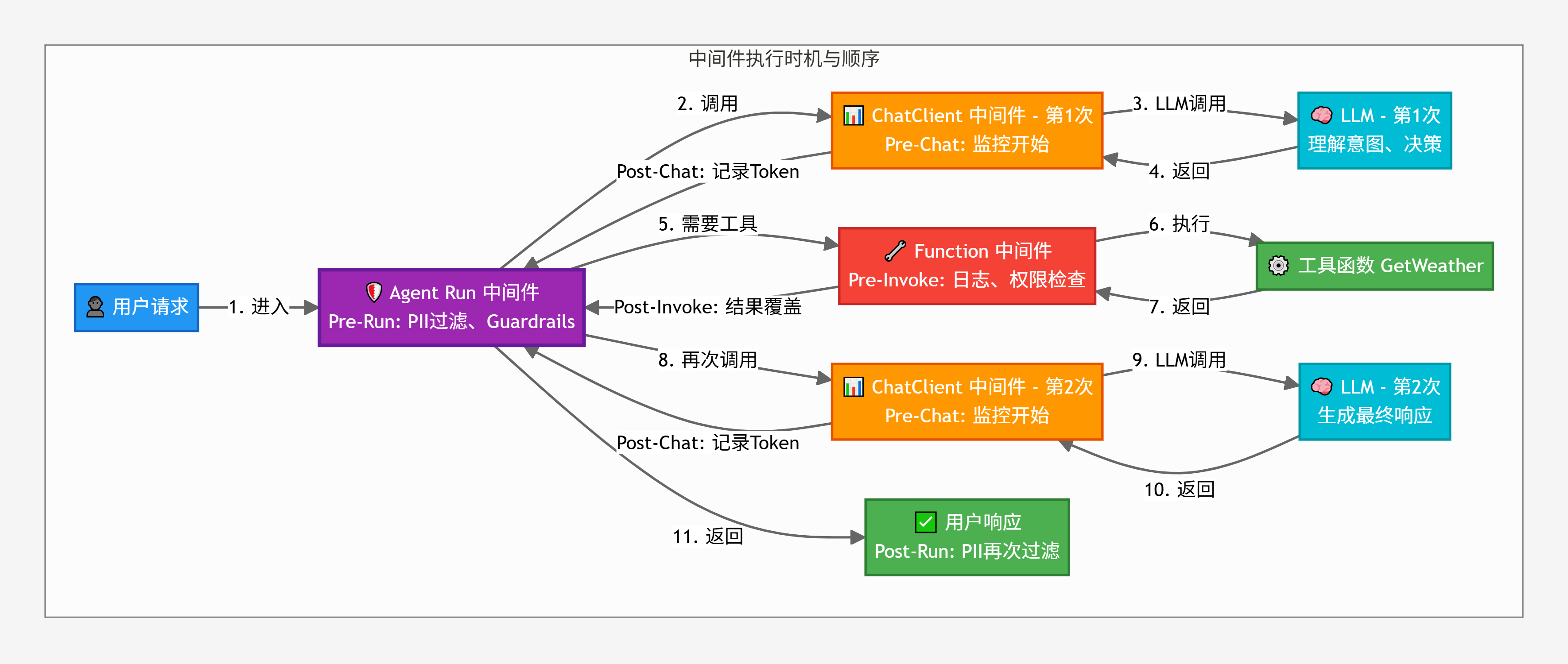
1. 环境准备
定义带时间戳和计数器的中间件,为了清晰展示执行顺序,我们为每个中间件添加:
时间戳:记录执行时刻(相对于开始时间)
计数器:统计触发次数
颜色标识:不同层级使用不同颜色
// 全局计数器和计时器
var startTime = DateTime.UtcNow;
var agentRunCounter = 0;
var chatClientCounter = 0;
var functionCounter = 0;

// 辅助方法:获取相对时间戳(毫秒)
double GetTimestamp() => (DateTime.UtcNow - startTime).TotalMilliseconds;

// 辅助方法:格式化时间戳
string FormatTimestamp(double timestamp) => $"[T+{timestamp:F0}ms]";

Console.WriteLine("时间戳和计数器工具定义完成");
- 实现三层中间件
/// <summary>
/// Agent Run 中间件(最外层)
/// </summary>
async Task<AgentRunResponse> AgentRunMiddleware(
    IEnumerable<ChatMessage> messages,
    AgentThread? thread,
    AgentRunOptions? options,
    AIAgent innerAgent,
    CancellationToken cancellationToken)
{
    var count = ++agentRunCounter;
    var preTimestamp = GetTimestamp();

    Console.WriteLine($"\n{FormatTimestamp(preTimestamp)} [Agent Run #{count}] ═══ Pre-Run 开始 ═══");
    Console.WriteLine($"   消息数量:{messages.Count()}");

    // 调用内部 Agent(包含所有后续的中间件和逻辑)
    var response = await innerAgent.RunAsync(messages, thread, options, cancellationToken);

    var postTimestamp = GetTimestamp();
    Console.WriteLine($"\n{FormatTimestamp(postTimestamp)} [Agent Run #{count}] ═══ Post-Run 完成 ═══");
    Console.WriteLine($"   响应消息数量:{response.Messages.Count}");
    Console.WriteLine($"   Agent Run 总耗时:{postTimestamp - preTimestamp:F0}ms");

    return response;
}

/// <summary>
/// ChatClient 中间件(LLM 调用拦截)
/// </summary>
async Task<ChatResponse> ChatClientMiddleware(
    IEnumerable<ChatMessage> messages,
    ChatOptions? options,
    IChatClient innerChatClient,
    CancellationToken cancellationToken)
{
    var count = ++chatClientCounter;
    var preTimestamp = GetTimestamp();

    Console.WriteLine($"\n{FormatTimestamp(preTimestamp)} [ChatClient #{count}] ─── Pre-Chat 开始 ───");
    Console.WriteLine($"   LLM 调用次数:第 {count} 次");
    Console.WriteLine($"   消息数量:{messages.Count()}");

    // 调用 LLM
    var response = await innerChatClient.GetResponseAsync(messages, options, cancellationToken);

    var postTimestamp = GetTimestamp();
    var tokens = response.Usage?.TotalTokenCount ?? 0;

    Console.WriteLine($"\n{FormatTimestamp(postTimestamp)} [ChatClient #{count}] ─── Post-Chat 完成 ───");
    Console.WriteLine($"   Token 使用:{tokens}");
    Console.WriteLine($"   LLM 调用耗时:{postTimestamp - preTimestamp:F0}ms");

    return response;
}

/// <summary>
/// Function Invocation 中间件(工具调用拦截)
/// </summary>
async ValueTask<object?> FunctionInvocationMiddleware(
    AIAgent agent,
    FunctionInvocationContext context,
    Func<FunctionInvocationContext, CancellationToken, ValueTask<object?>> next,
    CancellationToken cancellationToken)
{
    var count = ++functionCounter;
    var preTimestamp = GetTimestamp();
    var functionName = context.Function.Name;
    var arguments = string.Join(", ", context.Arguments.Select(kvp => $"{kvp.Key}={kvp.Value}"));

    Console.WriteLine($"\n{FormatTimestamp(preTimestamp)} [Function #{count}] ··· Pre-Invoke 开始 ···");
    Console.WriteLine($"   工具名称:{functionName}");
    Console.WriteLine($"   参数:{arguments}");

    // 执行工具函数
    var result = await next(context, cancellationToken);

    var postTimestamp = GetTimestamp();

    Console.WriteLine($"\n{FormatTimestamp(postTimestamp)} [Function #{count}] ··· Post-Invoke 完成 ···");
    Console.WriteLine($"   结果:{result}");
    Console.WriteLine($"   工具执行耗时:{postTimestamp - preTimestamp:F0}ms");

    return result;
}
Console.WriteLine("三层中间件定义完成(带时间戳和计数器)");
- 定于工具函数
[Description("查询指定城市的天气情况")]
string GetWeather([Description("城市名称")] string city)
{
    var timestamp = GetTimestamp();
    Console.WriteLine($"\n{FormatTimestamp(timestamp)} [工具执行] GetWeather(\"{city}\")");

    // 模拟耗时操作
    Thread.Sleep(100);

    return city switch
    {
        "北京" => "北京今天晴天,气温 15°C",
        "上海" => "上海今天多云,气温 20°C",
        _ => $"{city}今天天气未知"
    };
}

[Description("查询订单的当前状态")]
string QueryOrderStatus([Description("订单号")] string orderId)
{
    var timestamp = GetTimestamp();
    Console.WriteLine($"\n{FormatTimestamp(timestamp)} [工具执行] QueryOrderStatus(\"{orderId}\")");

    // 模拟耗时操作
    Thread.Sleep(100);

    return orderId switch
    {
        "#DD20250109001" => "您的订单已发货,预计明天送达",
        "#DD20250109002" => "您的订单正在处理中",
        _ => "未找到该订单"
    };
}
Console.WriteLine("工具函数定义完成");
- 创建携带三层中间件 Agent
Console.WriteLine("━━━━━━━━━━━━━━━━━━━━━━━━━━━━━━━━━━━━━━━━━━━━━━");
Console.WriteLine("   构建带三层中间件的 Agent   ");
Console.WriteLine("━━━━━━━━━━━━━━━━━━━━━━━━━━━━━━━━━━━━━━━━━━━━━━\n");

// 步骤 1:获取 ChatClient 并添加 ChatClient 中间件
var chatClient = AIClientHelper.GetDefaultChatClient()
    .AsBuilder()
    .Use(getResponseFunc: ChatClientMiddleware, getStreamingResponseFunc: null)
    .Build();

Console.WriteLine("ChatClient 中间件已添加");

// 步骤 2:创建 Agent 并添加 Agent Run 中间件和 Function 中间件
var agent = chatClient.CreateAIAgent(
    instructions: "你是智能客服机器人,擅长查询天气和订单状态。回答要简洁明了。",
    name: "CustomerServiceBot",
    tools:
    [
        AIFunctionFactory.Create(GetWeather),
        AIFunctionFactory.Create(QueryOrderStatus)
    ])
    .AsBuilder()
    .Use(AgentRunMiddleware, null)           // Agent Run 中间件
    .Use(FunctionInvocationMiddleware)        // Function 中间件
    .Build();

Console.WriteLine("Agent Run 中间件和 Function 中间件已添加");
Console.WriteLine("\n中间件架构:");
Console.WriteLine("   Agent Run 层(最外层)");
Console.WriteLine("    ↓");
Console.WriteLine("   ChatClient 层(每次 LLM 调用时触发)");
Console.WriteLine("    ↓");
Console.WriteLine("   Function 层(每次工具调用时触发)");
Console.WriteLine("\n准备测试...\n");
2. 实验:观察完整的执行流程
测试场景:我们将发送一个需要调用两个工具的请求,完整观察三层中间件的执行顺序和触发次数。
预期行为:
- Agent Run 触发 1 次(包裹整个流程)
- ChatClient 触发 2-3 次(理解意图 + 工具调用后生成响应)
- Function 触发 2 次(GetWeather + QueryOrderStatus)
Console.WriteLine("━━━━━━━━━━━━━━━━━━━━━━━━━━━━━━━━━━━━━━━━━━━━━━");
Console.WriteLine("   测试:观察三层中间件的执行流程   ");
Console.WriteLine("━━━━━━━━━━━━━━━━━━━━━━━━━━━━━━━━━━━━━━━━━━━━━━\n");

// 重置计时器和计数器
startTime = DateTime.UtcNow;
agentRunCounter = 0;
chatClientCounter = 0;
functionCounter = 0;

var thread = agent.GetNewThread();
var query = "北京今天天气怎么样?我的订单 #DD20250109001 什么时候到货?";

Console.WriteLine($"用户请求:{query}\n");
Console.WriteLine("═══════════════════════════════════════════════\n");
Console.WriteLine("开始执行,观察中间件执行顺序...\n");
Console.WriteLine("═══════════════════════════════════════════════");

var response = await agent.RunAsync(query, thread);

Console.WriteLine("\n═══════════════════════════════════════════════");
Console.WriteLine($"\n最终响应:\n{response.Text}");
Console.WriteLine("\n━━━━━━━━━━━━━━━━━━━━━━━━━━━━━━━━━━━━━━━━━━━━━━");
结果分析
Console.WriteLine("\n━━━━━━━━━━━━━━━━━━━━━━━━━━━━━━━━━━━━━━━━━━━━━━");
Console.WriteLine("   中间件触发次数统计   ");
Console.WriteLine("━━━━━━━━━━━━━━━━━━━━━━━━━━━━━━━━━━━━━━━━━━━━━━\n");

var summary = new
{
    Agent_Run_触发次数 = agentRunCounter,
    ChatClient_触发次数 = chatClientCounter,
    Function_触发次数 = functionCounter
};

summary.Display();

Console.WriteLine("\n关键观察:");
Console.WriteLine($" 1. Agent Run 触发了 {agentRunCounter} 次(包裹整个流程)");
Console.WriteLine($" 2. ChatClient 触发了 {chatClientCounter} 次(每次 LLM 调用)");
Console.WriteLine($"    - 第1次:理解用户意图,决定调用工具");
if (chatClientCounter >= 2)
{
    Console.WriteLine($"    - 第2次:基于工具结果生成最终响应");
}
if (chatClientCounter >= 3)
{
    Console.WriteLine($"    - 第3次:可能是额外的推理步骤");
}
Console.WriteLine($" 3. Function 触发了 {functionCounter} 次(每次工具调用)");
Console.WriteLine($"    - GetWeather: 1次");
Console.WriteLine($"    - QueryOrderStatus: 1次");

Console.WriteLine("\n━━━━━━━━━━━━━━━━━━━━━━━━━━━━━━━━━━━━━━━━━━━━━━");
3. 核心结论
问题1:ChatClient 和 Function 中间件是覆盖还是协作关系?
答案:协作关系,而非覆盖
ChatClient 中间件和 Function 中间件在不同的时间点执行
ChatClient 在每次 LLM 调用时触发(通常2-3次)
Function 在每次工具调用时触发(N次)
它们互不干扰,各司其职
错误理解:ChatClient 会覆盖 Function 的逻辑
错误理解:Function 会覆盖 ChatClient 的逻辑

正确理解:它们是协作关系,在不同阶段执行
问题2:三层中间件的实际执行顺序是什么?
关键理解:
Agent Run:包裹整个流程,只执行1次
ChatClient:嵌套在 Agent Run 内,触发多次(通常2-3次)
Function:嵌套在 Agent Run 内,触发N次(取决于工具数量)
ChatClient 和 Function 不存在嵌套关系,它们是平行的,在不同时间点执行
T0: Agent Run Pre-Run(最外层开始)
↓
T1: ChatClient Pre-Chat(第1次 LLM 调用)
T2: ChatClient Post-Chat
↓ LLM 决策:需要调用工具
T3: Function Pre-Invoke(GetWeather)
T4: 工具执行:GetWeather
T5: Function Post-Invoke
↓
T6: Function Pre-Invoke(QueryOrderStatus)
T7: 工具执行:QueryOrderStatus
T8: Function Post-Invoke
↓ 工具调用完成,需要生成响应
T9: ChatClient Pre-Chat(第2次 LLM 调用)
T10: ChatClient Post-Chat
↓
T11: Agent Run Post-Run(最外层结束)
问题3:为什么 Agent Run 是最外层?
设计原则:
职责范围:
Agent Run 负责整个 Agent 执行流程的控制(PII过滤、Guardrails)
ChatClient 只负责 LLM 调用的拦截(监控、限流)
Function 只负责工具调用的拦截(日志、权限)
执行时机:
Agent Run 包裹整个 RunAsync(),确保所有操作都在其控制之下
ChatClient 和 Function 是 Agent 内部的操作,自然在 Agent Run 之内
安全性:
在最外层进行 PII 过滤和 Guardrails 检查,确保不安全的内容不会进入系统
即使内部逻辑有漏洞,Agent Run 层也能兜底
问题4:如何设计合理的中间件架构?
最佳实践,核心原则:
- 安全检查在最外层(Agent Run)
- 全局监控在 LLM 层(ChatClient)
- 细粒度控制在工具层(Function)
- 每层职责单一,互不干扰
Agent Run 层(最外层)
- PII 过滤(防止敏感信息泄露)
- Guardrails(内容合规检查)
- 全局审计(记录所有对话)
↓
ChatClient 层(LLM 调用拦截)
- Token 统计(成本控制)
- 限流控制(防止超额)
- 缓存策略(减少调用)
- 性能监控(响应时间)
↓
Function 层(工具调用拦截)
- 调用日志(审计追踪)
- 权限检查(访问控制)
- Mock 数据(测试支持)
- 结果覆盖(降级策略)
4. 进阶实验:不同中间件组合效果
- 实验1:只有 ChatClient 中间件
Console.WriteLine("━━━━━━━━━━━━━━━━━━━━━━━━━━━━━━━━━━━━━━━━━━━━━━");
Console.WriteLine("   实验 1:只有 ChatClient 中间件   ");
Console.WriteLine("━━━━━━━━━━━━━━━━━━━━━━━━━━━━━━━━━━━━━━━━━━━━━━\n");

// 重置计数器
startTime = DateTime.UtcNow;
agentRunCounter = 0;
chatClientCounter = 0;
functionCounter = 0;

// 只添加 ChatClient 中间件
var chatClientOnly = AIClientHelper.GetDefaultChatClient()
    .AsBuilder()
    .Use(getResponseFunc: ChatClientMiddleware, getStreamingResponseFunc: null)
    .Build();

var agentWithChatClientOnly = chatClientOnly.CreateAIAgent(
    instructions: "你是智能客服机器人。",
    name: "ChatClientOnlyBot",
    tools: [AIFunctionFactory.Create(GetWeather)]);

var thread1 = agentWithChatClientOnly.GetNewThread();
await agentWithChatClientOnly.RunAsync("北京天气怎么样?", thread1);

Console.WriteLine("\n结果:");
Console.WriteLine($" - Agent Run 触发:{agentRunCounter} 次(未添加)");
Console.WriteLine($" - ChatClient 触发:{chatClientCounter} 次(已添加)");
Console.WriteLine($" - Function 触发:{functionCounter} 次(未添加)");
Console.WriteLine("\n 观察:只有 ChatClient 层被拦截,工具调用没有日志");
- 实验2:只用 Function 中间件
Console.WriteLine("\n━━━━━━━━━━━━━━━━━━━━━━━━━━━━━━━━━━━━━━━━━━━━━━");
Console.WriteLine("   实验 2:只有 Function 中间件   ");
Console.WriteLine("━━━━━━━━━━━━━━━━━━━━━━━━━━━━━━━━━━━━━━━━━━━━━━\n");

// 重置计数器
startTime = DateTime.UtcNow;
agentRunCounter = 0;
chatClientCounter = 0;
functionCounter = 0;

// 只添加 Function 中间件
var baseChatClient = AIClientHelper.GetDefaultChatClient();

var agentWithFunctionOnly = baseChatClient.CreateAIAgent(
    instructions: "你是智能客服机器人。",
    name: "FunctionOnlyBot",
    tools: [AIFunctionFactory.Create(GetWeather)])
    .AsBuilder()
    .Use(FunctionInvocationMiddleware)
    .Build();

var thread2 = agentWithFunctionOnly.GetNewThread();
await agentWithFunctionOnly.RunAsync("北京天气怎么样?", thread2);

Console.WriteLine("\n结果:");
Console.WriteLine($" - Agent Run 触发:{agentRunCounter} 次(未添加)");
Console.WriteLine($" - ChatClient 触发:{chatClientCounter} 次(未添加)");
Console.WriteLine($" - Function 触发:{functionCounter} 次(已添加)");
Console.WriteLine("\n 观察:只有工具调用被拦截,LLM 调用没有监控");
- 实验3:只有 Agent Run 中间件
Console.WriteLine("\n━━━━━━━━━━━━━━━━━━━━━━━━━━━━━━━━━━━━━━━━━━━━━━");
Console.WriteLine("   实验 3:只有 Agent Run 中间件   ");
Console.WriteLine("━━━━━━━━━━━━━━━━━━━━━━━━━━━━━━━━━━━━━━━━━━━━━━\n");

// 重置计数器
startTime = DateTime.UtcNow;
agentRunCounter = 0;
chatClientCounter = 0;
functionCounter = 0;

// 只添加 Agent Run 中间件
var agentWithRunOnly = baseChatClient.CreateAIAgent(
    instructions: "你是智能客服机器人。",
    name: "RunOnlyBot",
    tools: [AIFunctionFactory.Create(GetWeather)])
    .AsBuilder()
    .Use(AgentRunMiddleware, null)
    .Build();

var thread3 = agentWithRunOnly.GetNewThread();
await agentWithRunOnly.RunAsync("北京天气怎么样?", thread3);

Console.WriteLine("\n结果:");
Console.WriteLine($" - Agent Run 触发:{agentRunCounter} 次(已添加)");
Console.WriteLine($" - ChatClient 触发:{chatClientCounter} 次(未添加)");
Console.WriteLine($" - Function 触发:{functionCounter} 次(未添加)");
Console.WriteLine("\n 观察:只有 Agent 运行被拦截,LLM 和工具调用都没有日志");
5. 核心结论
三层之间的关系
- 协作关系,而非覆盖关系
- 各层在不同时间点执行,互不干扰
- 每层职责单一,可以独立添加或移除
实际执行顺序
用户请求
↓
Agent Run Pre-Run(1次)
↓
ChatClient(多次,通常2-3次)
↓
Function(N次,取决于工具数量)
↓
Agent Run Post-Run(1次)
↓
用户响应
- 触发时机:不同层级在不同时刻执行
| 中间件层级 | 触发时机 | 触发次数(一次 RunAsync) |
|---|---|---|
| Agent Run 中间件 | 整个 RunAsync() 的最外层 | 1次(包裹整个流程) |
| ChatClient 中间件 | 每次 LLM 调用时 | 多次(通常2-3次:理解意图 + 工具调用后生成响应) |
| Function 中间件 | 每次工具调用时 | N次(取决于需要调用几个工具) |
6. 最佳实践
- 根据职责选择中间件
// 推荐:安全检查在 Agent Run 层(最外层)
.Use(PIIFilterMiddleware, null)      // Agent Run
.Use(GuardrailsMiddleware, null)     // Agent Run

// 推荐:LLM 监控在 ChatClient 层
chatClient.AsBuilder()
    .Use(getResponseFunc: TokenMonitoringMiddleware, getStreamingResponseFunc: null)

// 推荐:工具控制在 Function 层
.Use(FunctionLoggingMiddleware)      // Function
.Use(FunctionPermissionMiddleware)   // Function
- 考虑性能影响
// 注意:ChatClient 中间件会触发多次,避免重复的昂贵操作
async Task<ChatResponse> ChatClientMiddleware(...)
{
    // 避免:每次 LLM 调用都执行昂贵的检查
    // await ExpensivePIICheck(messages);

    // 推荐:昂贵的检查放在 Agent Run 层(只执行1次)
    return await innerChatClient.GetResponseAsync(messages, options, ct);
}
- 中间件组合模式
// 推荐:使用扩展方法组合中间件
public static class MiddlewareExtensions
{
    public static AIAgent AddEnterpriseMiddleware(this AIAgent agent)
    {
        return agent
            .AsBuilder()
            .Use(GuardrailsMiddleware, null)        // 安全检查
            .Use(PIIFilterMiddleware, null)         // PII 过滤
            .Use(FunctionLoggingMiddleware)         // 工具日志
            .Build();
    }
}

// 使用
var agent = baseChatClient
    .CreateAIAgent(...)
    .AddEnterpriseMiddleware();
- 进阶建议
- 使用条件中间件:根据环境或配置动态添加中间件
- 实现中间件链:将多个相关中间件组合成一个包
- 监控中间件性能:记录每个中间件的耗时,识别性能瓶颈
- 测试中间件组合:确保不同组合下的行为符合预期
四、MEAI vs Agent 工具调用中间件
1. 两层工具调用拦截的关系
概念回顾
MEAI UseFunctionInvocation
位置:ChatClient 层(MEAI)
职责:自动处理函数调用循环
功能:检测 LLM 返回的函数调用请求、自动执行、结果回传、迭代管理
MAF Function Middleware
位置:Agent 层(MAF)
职责:拦截具体的工具执行
功能:日志、权限、Mock、监控
核心问题:两层工具调用拦截的关系?
当我们同时配置:
- MEAI 的 UseFunctionInvocation (ChatClient 层)
- MEAI 的 FunctionInvoker (在 UseFunctionInvocation 配置中)
- MAF 的 Function Middleware (Agent 层)
它们之间是什么关系?会不会冲突?
正确理解:它们是嵌套的协作关系,按顺序执行。
执行链路详解
1. LLM 返回需要调用工具 GetWeather
2. UseFunctionInvocation 检测到 FunctionCallContent
3. UseFunctionInvocation 开始自动处理
4. 调用 FunctionInvoker(如果配置了)
5. FunctionInvoker 内部调用 context.Function.InvokeAsync()
6. 触发 MAF Function Middleware Pre-Invoke
7. 执行实际的工具函数 GetWeather("北京")
8. 触发 MAF Function Middleware Post-Invoke
9. 返回给 FunctionInvoker
10. UseFunctionInvocation 获得结果
11. UseFunctionInvocation 将结果添加到消息历史
12. UseFunctionInvocation 再次调用 LLM(基于工具结果)
关键理解
| 特性 | MEAI UseFunctionInvocation | MEAI FunctionInvoker | MAF Function Middleware |
|---|---|---|---|
| 层级 | ChatClient 层 | ChatClient 层(内部) | Agent 层 |
| 职责 | 自动化循环管理 | 自定义调用前后逻辑 | 业务逻辑控制 |
| 触发时机 | LLM 返回函数调用时 | 每次调用工具前 | InvokeAsync 时 |
| 可见范围 | 整个函数调用流程 | 单次工具调用 | 单次工具执行 |
| 典型用途 | 迭代控制、并发、错误重试 | 监控、预处理 | 日志、权限、Mock |
| 是否必需 | 可选(但推荐) | 可选 | 可选 |
核心要点
- UseFunctionInvocation 是最外层的自动化框架
- FunctionInvoker 是 UseFunctionInvocation 内部的钩子
- MAF Function Middleware 是 Agent 层的拦截器
- FunctionInvoker 调用 InvokeAsync 时,会触发 MAF Function Middleware
2. 实验
- 环境准备
// 定义工具函数
[Description("查询指定城市的天气情况")]
string GetWeather([Description("城市名称")] string city)
{
    Console.WriteLine($"    [实际工具执行] GetWeather(\"{city}\") 开始执行");
    // 模拟耗时操作
    Thread.Sleep(100);

    var result = city switch
    {
        "北京" => "北京今天晴天,气温 15°C",
        "上海" => "上海今天多云,气温 20°C",
        "深圳" => "深圳今天阴天,气温 22°C",
        _ => $"{city}今天天气未知"
    };
    Console.WriteLine($"    [实际工具执行] GetWeather(\"{city}\") 执行完成:{result}");
    return result;
}

[Description("查询订单的当前状态")]
string QueryOrderStatus([Description("订单号")] string orderId)
{
    Console.WriteLine($"    [实际工具执行] QueryOrderStatus(\"{orderId}\") 开始执行");
    // 模拟耗时操作
    Thread.Sleep(100);

    var result = orderId switch
    {
        "#DD20250109001" => "您的订单已发货,预计明天送达",
        "#DD20250109002" => "您的订单正在处理中",
        _ => "未找到该订单"
    };
    Console.WriteLine($"    [实际工具执行] QueryOrderStatus(\"{orderId}\") 执行完成:{result}");
    return result;
}

// 初始化计时器和计数器
using System.Threading;

// 全局计数器和计时器
var startTime = DateTime.UtcNow;
var agentRunCounter = 0;
var chatClientCounter = 0;
var useFunctionInvocationCounter = 0;  // UseFunctionInvocation 检测到函数调用的次数
var meaiFunctionInvokerCounter = 0;     // FunctionInvoker 执行次数
var mafFunctionCounter = 0;             // MAF Function Middleware 执行次数

// 辅助方法:获取相对时间戳(毫秒)
double GetTimestamp() => (DateTime.UtcNow - startTime).TotalMilliseconds;
// 辅助方法:格式化时间戳
string FormatTimestamp(double timestamp) => $"[T+{timestamp:F0}ms]";
- 实验 1:只有 MAF Function Middleware(基线)
Console.WriteLine("━━━━━━━━━━━━━━━━━━━━━━━━━━━━━━━━━━━━━━━━━━━━━━");
Console.WriteLine("   实验 1:只有 MAF Function Middleware(基线)   ");
Console.WriteLine("━━━━━━━━━━━━━━━━━━━━━━━━━━━━━━━━━━━━━━━━━━━━━━\n");

// 重置计数器
startTime = DateTime.UtcNow;
mafFunctionCounter = 0;

// MAF Function Middleware
async ValueTask<object?> MAFFunctionMiddleware(
    AIAgent agent,
    FunctionInvocationContext context,
    Func<FunctionInvocationContext, CancellationToken, ValueTask<object?>> next,
    CancellationToken cancellationToken)
{
    var count = ++mafFunctionCounter;
    var timestamp = GetTimestamp();

    Console.WriteLine($"\n{FormatTimestamp(timestamp)} [MAF Function #{count}] ═══ Pre-Invoke ═══");
    Console.WriteLine($"   工具名称: {context.Function.Name}");
    Console.WriteLine($"   参数: {string.Join(", ", context.Arguments.Select(kvp => $"{kvp.Key}={kvp.Value}"))}");

    // 执行工具函数
    var result = await next(context, cancellationToken);

    var endTimestamp = GetTimestamp();
    Console.WriteLine($"\n{FormatTimestamp(endTimestamp)} [MAF Function #{count}] ═══ Post-Invoke ═══");
    Console.WriteLine($"   结果: {result}");
    Console.WriteLine($"   耗时: {endTimestamp - timestamp:F0}ms");

    return result;
}

// 创建 Agent(只有 MAF Function Middleware)
var baseChatClient = AIClientHelper.GetDefaultChatClient();

var agentWithMafOnly = baseChatClient.CreateAIAgent(
    instructions: "你是智能客服机器人,擅长查询天气和订单。回答要简洁。",
    name: "MAFOnlyBot",
    tools:
    [
        AIFunctionFactory.Create(GetWeather),
        AIFunctionFactory.Create(QueryOrderStatus)
    ])
    .AsBuilder()
    .Use(MAFFunctionMiddleware)
    .Build();

Console.WriteLine("Agent 创建完成(只有 MAF Function Middleware)");

// 测试
var thread1 = agentWithMafOnly.GetNewThread();
Console.WriteLine("\n用户:北京天气怎么样?\n");
Console.WriteLine("═══════════════════════════════════════════════\n");

var response1 = await agentWithMafOnly.RunAsync("北京天气怎么样?", thread1);

Console.WriteLine("\n═══════════════════════════════════════════════");
Console.WriteLine($"\n响应:{response1.Text}");
Console.WriteLine($"\n统计:MAF Function Middleware 触发了 {mafFunctionCounter} 次");
Console.WriteLine("\n观察:只有 MAF 层拦截工具调用");
Console.WriteLine("━━━━━━━━━━━━━━━━━━━━━━━━━━━━━━━━━━━━━━━━━━━━━━");
- 实验 2:UseFunctionInvocation + MAF Function Middleware
Console.WriteLine("\n━━━━━━━━━━━━━━━━━━━━━━━━━━━━━━━━━━━━━━━━━━━━━━");
Console.WriteLine("   实验 2:UseFunctionInvocation + MAF Middleware   ");
Console.WriteLine("━━━━━━━━━━━━━━━━━━━━━━━━━━━━━━━━━━━━━━━━━━━━━━\n");

// 重置计数器
startTime = DateTime.UtcNow;
meaiFunctionInvokerCounter = 0;
mafFunctionCounter = 0;

// 步骤 1:配置 ChatClient 层的 UseFunctionInvocation
var chatClientWithUseFunctionInvocation = baseChatClient
    .AsBuilder()
    .UseFunctionInvocation(configure: options =>
    {
        options.AllowConcurrentInvocation = true;
        options.MaximumIterationsPerRequest = 10;

        // MEAI 层的 FunctionInvoker
        options.FunctionInvoker = async (context, ct) =>
        {
            var count = ++meaiFunctionInvokerCounter;
            var timestamp = GetTimestamp();

            Console.WriteLine($"\n{FormatTimestamp(timestamp)} [MEAI FunctionInvoker #{count}] ─── Pre-Invoke ─────");
            Console.WriteLine($" 工具名称: {context.Function.Name}");
            Console.WriteLine($" 参数: {string.Join(", ", context.Arguments.Select(kvp => $"{kvp.Key}={kvp.Value}"))}");
            Console.WriteLine($" 即将调用 context.Function.InvokeAsync()");
            Console.WriteLine($" 这会触发 MAF Function Middleware...");

            // 调用工具(会触发 MAF Function Middleware)
            var result = await context.Function.InvokeAsync(context.Arguments, ct);

            var endTimestamp = GetTimestamp();
            Console.WriteLine($"\n{FormatTimestamp(endTimestamp)} [MEAI FunctionInvoker #{count}] ─── Post-Invoke ────");
            Console.WriteLine($" 返回结果: {result}");
            Console.WriteLine($" 耗时: {endTimestamp - timestamp:F0}ms");

            return result;
        };
    })
    .Build();

Console.WriteLine("ChatClient 配置完成(包含 UseFunctionInvocation + FunctionInvoker)");

// 步骤 2:配置 Agent 层的 MAF Function Middleware
var agentWithBoth = chatClientWithUseFunctionInvocation.CreateAIAgent(
    instructions: "你是智能客服机器人,擅长查询天气和订单。回答要简洁。",
    name: "IntegratedBot",
    tools:
    [
        AIFunctionFactory.Create(GetWeather),
        AIFunctionFactory.Create(QueryOrderStatus)
    ])
    .AsBuilder()
    .Use(MAFFunctionMiddleware)
    .Build();

Console.WriteLine("Agent 配置完成(包含 MAF Function Middleware)");
Console.WriteLine("\n四层架构:");
Console.WriteLine("   UseFunctionInvocation(自动化框架)");
Console.WriteLine("    ↓ 检测到需要调用工具");
Console.WriteLine("   MEAI FunctionInvoker(自定义钩子)");
Console.WriteLine("    ↓ 调用 InvokeAsync");
Console.WriteLine("   MAF Function Middleware(业务控制)");
Console.WriteLine("    ↓");
Console.WriteLine("   实际工具执行");
Console.WriteLine("\n准备测试...\n");
- 测试两个工具
// 测试:需要调用两个工具
var thread2 = agentWithBoth.GetNewThread();
var query = "北京今天天气怎么样?我的订单 #DD20250109001 什么时候到货?";
Console.WriteLine($"用户:{query}\n");
Console.WriteLine("═══════════════════════════════════════════════\n");
Console.WriteLine("开始执行,观察四层拦截的协作...\n");
Console.WriteLine("═══════════════════════════════════════════════");

var response2 = await agentWithBoth.RunAsync(query, thread2);
Console.WriteLine("\n═══════════════════════════════════════════════");
Console.WriteLine($"\n最终响应:\n{response2.Text}");
Console.WriteLine("\n━━━━━━━━━━━━━━━━━━━━━━━━━━━━━━━━━━━━━━━━━━━━━━");
- 分析结果
Console.WriteLine("\n━━━━━━━━━━━━━━━━━━━━━━━━━━━━━━━━━━━━━━━━━━━━━━");
Console.WriteLine("   四层拦截的触发次数统计   ");
Console.WriteLine("━━━━━━━━━━━━━━━━━━━━━━━━━━━━━━━━━━━━━━━━━━━━━━\n");

var summary = new
{
    MEAI_FunctionInvoker_触发次数 = meaiFunctionInvokerCounter,
    MAF_Function_Middleware_触发次数 = mafFunctionCounter,
    工具调用总次数 = mafFunctionCounter
};
summary.Display();

Console.WriteLine("\n关键观察:");
Console.WriteLine($" 1. MEAI FunctionInvoker 触发了 {meaiFunctionInvokerCounter} 次");
Console.WriteLine($"  - UseFunctionInvocation 检测到 LLM 需要调用工具");
Console.WriteLine($"  - 调用 FunctionInvoker 进行预处理");
Console.WriteLine($" 2. MAF Function Middleware 触发了 {mafFunctionCounter} 次");
Console.WriteLine($"  - 由 FunctionInvoker 调用 InvokeAsync 触发");
Console.WriteLine($"  - MAF 层拦截实际的工具执行");
Console.WriteLine($" 3. 实际工具函数执行了 {mafFunctionCounter} 次");
Console.WriteLine($"  - GetWeather: 1次");
Console.WriteLine($"  - QueryOrderStatus: 1次");

Console.WriteLine("\n完整的执行顺序:");
Console.WriteLine(" T0: LLM 返回:需要调用工具");
Console.WriteLine(" ─── UseFunctionInvocation 开始工作 ───");
Console.WriteLine(" T1: UseFunctionInvocation 检测到 FunctionCallContent");
Console.WriteLine(" T2: MEAI FunctionInvoker Pre-Invoke");
Console.WriteLine("   ↓ 调用 context.Function.InvokeAsync()");
Console.WriteLine(" T3: MAF Function Middleware Pre-Invoke");
Console.WriteLine(" T4: 实际工具执行 GetWeather");
Console.WriteLine(" T5: MAF Function Middleware Post-Invoke");
Console.WriteLine("   ↓ 返回给 MEAI");
Console.WriteLine(" T6: MEAI FunctionInvoker Post-Invoke");
Console.WriteLine(" ─── 重复 T2-T6(QueryOrderStatus)───");
Console.WriteLine(" T7: UseFunctionInvocation 将结果回传给 LLM");
Console.WriteLine(" T8: LLM 基于工具结果生成最终响应");

Console.WriteLine("\n核心结论:");
Console.WriteLine(" - MEAI FunctionInvoker 和 MAF Function Middleware 是嵌套关系");
Console.WriteLine(" - 执行顺序:UseFunctionInvocation → FunctionInvoker → InvokeAsync → MAF Middleware → 工具");
Console.WriteLine(" - 触发次数相同(meaiFunctionInvokerCounter == mafFunctionCounter)");
Console.WriteLine(" - 两者协作,互不冲突!");

Console.WriteLine("\n━━━━━━━━━━━━━━━━━━━━━━━━━━━━━━━━━━━━━━━━━━━━━━");
3. 最佳实践与配置策略
- 职责分离原则
// 推荐:清晰的职责分离
var chatClient = AIClientHelper.GetDefaultChatClient()
    .AsBuilder()
    .UseFunctionInvocation(configure: options =>
    {
        // MEAI 层:只负责自动化控制
        options.AllowConcurrentInvocation = true;       // 并发调用
        options.MaximumIterationsPerRequest = 10;       // 迭代控制
        options.MaximumConsecutiveErrorsPerRequest = 3; // 错误重试
        options.IncludeDetailedErrors = false;          // 安全考虑

        // 不配置 FunctionInvoker,让 MAF 层统一处理
        // 或者只做简单的监控,不重复 MAF 的逻辑
    })
    .Build();

var agent = chatClient.CreateAIAgent(...)
    .AsBuilder()
    .Use(async (agent, context, next, ct) =>
    {
        // MAF 层:统一的企业级控制
        // 1. 权限检查
        if (!HasPermission(context.Function.Name))
        {
            throw new UnauthorizedAccessException($"无权调用工具: {context.Function.Name}");
        }
        // 2. 审计日志
        LogFunctionCall(context.Function.Name, context.Arguments);
        // 3. 执行工具
        var result = await next(context, ct);
        // 4. 记录结果
        LogFunctionResult(context.Function.Name, result);
        return result;
    })
    .Build();
- 避免重复拦截
// 避免:在两个地方做相同的事
.UseFunctionInvocation(configure: options =>
{
    options.FunctionInvoker = async (context, ct) =>
    {
        // 不要在这里做详细的日志记录
        Console.WriteLine($"MEAI: 调用 {context.Function.Name}");
        return await context.Function.InvokeAsync(context.Arguments, ct);
    };
})
// 然后在 MAF 层又做一次
.Use(async (agent, context, next, ct) =>
{
    // 重复的日志记录
    Console.WriteLine($"MAF: 调用 {context.Function.Name}");
    return await next(context, ct);
})

// 推荐:只在 MAF 层统一处理
.UseFunctionInvocation(configure: options =>
{
    // 只配置自动化参数,不配置 FunctionInvoker
    options.AllowConcurrentInvocation = true;
    options.MaximumIterationsPerRequest = 10;
})
.Use(MAFUnifiedMiddleware)  // 统一的企业级控制
- 使用场景选择
| 场景 | 推荐配置 | 说明 |
|---|---|---|
| 简单 Agent | 不使用 UseFunctionInvocation | MAF 自动处理函数调用 |
| 需要并发调用 | 使用 UseFunctionInvocation | 启用 AllowConcurrentInvocation |
| 复杂迭代逻辑 | 使用 UseFunctionInvocation | 需要多轮工具调用 |
| 需要错误重试 | 使用 UseFunctionInvocation | 配置 MaximumConsecutiveErrorsPerRequest |
| 企业级控制 | 使用 MAF Function Middleware | 权限、审计、Mock |
| 两者结合 | UseFunctionInvocation + MAF | 自动化 + 业务控制 |
- 性能优化建议
// 推荐:在 MEAI FunctionInvoker 中只做轻量级操作
options.FunctionInvoker = async (context, ct) =>
{
    // 只做简单的监控(异步记录,不阻塞)
    _ = Task.Run(() => LogAsync(context.Function.Name));
    // 立即调用工具
    return await context.Function.InvokeAsync(context.Arguments, ct);
};

// 在 MAF 层做详细的控制(可以同步操作)
.Use(async (agent, context, next, ct) =>
{
    // 权限检查(同步)
    ValidatePermission(context.Function.Name);
    // 执行工具
    var result = await next(context, ct);
    // 审计日志(同步)
    await AuditLogAsync(context.Function.Name, result);
    return result;
})
4. 实验3:并发调用场景
Console.WriteLine("\n━━━━━━━━━━━━━━━━━━━━━━━━━━━━━━━━━━━━━━━━━━━━━━");
Console.WriteLine("   实验 3:并发调用场景   ");
Console.WriteLine("━━━━━━━━━━━━━━━━━━━━━━━━━━━━━━━━━━━━━━━━━━━━━━\n");

// 重置计数器
startTime = DateTime.UtcNow;
meaiFunctionInvokerCounter = 0;
mafFunctionCounter = 0;

// 配置支持并发的 Agent
var concurrentChatClient = baseChatClient
    .AsBuilder()
    .UseFunctionInvocation(configure: options =>
    {
        options.AllowConcurrentInvocation = true;  // 启用并发
        options.MaximumIterationsPerRequest = 10;
        options.FunctionInvoker = async (context, ct) =>
        {
            var count = ++meaiFunctionInvokerCounter;
            var timestamp = GetTimestamp();

            Console.WriteLine($"\n{FormatTimestamp(timestamp)} [MEAI Concurrent #{count}] ─── 开始并发调用 ───");
            Console.WriteLine($" 工具: {context.Function.Name}");

            var result = await context.Function.InvokeAsync(context.Arguments, ct);

            var endTimestamp = GetTimestamp();
            Console.WriteLine($"\n{FormatTimestamp(endTimestamp)} [MEAI Concurrent #{count}] ─── 并发调用完成 ───");
            Console.WriteLine($" 耗时: {endTimestamp - timestamp:F0}ms");

            return result;
        };
    })
    .Build();

var concurrentAgent = concurrentChatClient.CreateAIAgent(
    instructions: "你是智能客服机器人。",
    name: "ConcurrentBot",
    tools:
    [
        AIFunctionFactory.Create(GetWeather),
        AIFunctionFactory.Create(QueryOrderStatus)
    ])
    .AsBuilder()
    .Use(MAFFunctionMiddleware)
    .Build();

Console.WriteLine("Agent 配置完成(启用并发调用)\n");

// 测试:同时查询多个信息
var thread3 = concurrentAgent.GetNewThread();
var concurrentQuery = "帮我查询北京和上海的天气,同时查询订单 #DD20250109001 的状态";
Console.WriteLine($"用户:{concurrentQuery}\n");
Console.WriteLine("═══════════════════════════════════════════════\n");
Console.WriteLine("观察并发调用的执行流程...\n");
Console.WriteLine("═══════════════════════════════════════════════");

var startTimestamp = GetTimestamp();
var response3 = await concurrentAgent.RunAsync(concurrentQuery, thread3);
var endTimestamp = GetTimestamp();
Console.WriteLine("\n═══════════════════════════════════════════════");
Console.WriteLine($"\n最终响应:\n{response3.Text}");
Console.WriteLine($"\n总耗时:{endTimestamp - startTimestamp:F0}ms");
Console.WriteLine($"MEAI FunctionInvoker 触发:{meaiFunctionInvokerCounter} 次");
Console.WriteLine($"MAF Function Middleware 触发:{mafFunctionCounter} 次");
Console.WriteLine("\n观察:");
Console.WriteLine(" - 多个工具可能并发调用(取决于 LLM 的返回)");
Console.WriteLine(" - MEAI 层管理并发逻辑");
Console.WriteLine(" - MAF 层依然拦截每个工具调用");
Console.WriteLine(" - 两者协作,实现高效的并发控制");
Console.WriteLine("\n━━━━━━━━━━━━━━━━━━━━━━━━━━━━━━━━━━━━━━━━━━━━━━");
五、Agent vs an Funtion
1. Agent 两种复用模式
Agent as Function Tool(Agent 作为函数工具)
使用场景:在同一个应用内实现 Agent 嵌套调用
转换方法:agent.AsAIFunction()
调用方式:通过 MEAI 的 AIFunctionFactory 机制
优势:轻量级、高性能、类型安全
Agent as MCP Tool(Agent 作为 MCP 工具)
使用场景:跨应用、跨语言、跨平台的 Agent 调用
暴露方式:通过 MCP Server 暴露 Agent
调用方式:任何支持 MCP 的客户端(Claude Desktop、VS Code 等)
优势:标准化协议、跨平台互操作、易于调试
对比表格
| 特性 | AsAIFunction | AsMcpToo |
|---|---|---|
| 适用场景 | 应用内嵌套调用 | 跨应用、跨平台调用 |
| 性能 | 高(进程内调用) | 中(进程间通信) |
| 互操作性 | .NET 限定 | 支持任何 MCP 客户端 |
| 调试工具 | 无专用工具 | MCP Inspector |
| 类型安全 | 编译时检查 | 运行时检查 |
| 复杂度 | 简单 | 中等 |
2. Agent as Function Tool
- 创建 WeatherAgent(天气助手)
// 创建天气查询工具
[Description("查询指定城市的实时天气信息")]
string GetRealTimeWeather([Description("城市名称")] string city)
{
    // 模拟 API 调用
    var weatherData = new Dictionary<string, string>
    {
        ["北京"] = "晴天,5-15℃,空气质量良",
        ["上海"] = "多云,10-18℃,微风",
        ["深圳"] = "小雨,20-25℃,湿度大",
        ["成都"] = "阴天,8-16℃,有雾霾"
    };

    return weatherData.ContainsKey(city)
        ? $"{city}:{weatherData[city]}"
        : $"{city}:暂无天气数据";
}
Console.WriteLine("天气查询工具定义完成");

// 创建 WeatherAgent
var weatherChatClient = AIClientHelper.GetDefaultChatClient();
var weatherAgent = weatherChatClient.CreateAIAgent(
    instructions: "你是一个专业的天气助手,负责查询和解释天气信息。回答要简洁明了,包含温度、天气状况和建议。",
    name: "WeatherAgent",
    description: "专业的天气查询助手,提供实时天气信息和出行建议",
    tools: [
        AIFunctionFactory.Create(GetRealTimeWeather)
    ]
);

weatherAgent.Display();

var functionInvoker = weatherAgent.GetService<FunctionInvokingChatClient>();
functionInvoker.Display();

var registeredTools = functionInvoker?.AdditionalTools ?? [];
Console.WriteLine("WeatherAgent 创建完成");
new {
    Name = weatherAgent.Name,
    Description = weatherAgent.Description,
    ToolCount = registeredTools.Count
    }.Display();
- 测试 WeatherAgent 独立运行
// 测试 WeatherAgent
var weatherThread = weatherAgent.GetNewThread();
var weatherResult = await weatherAgent.RunAsync("北京今天天气怎么样?",weatherThread);
Console.WriteLine("━━━━━━━━━━━━━━━━━━━━━━━━━━━━━━━━━━");
Console.WriteLine("测试消息: 北京今天天气怎么样?");
Console.WriteLine("━━━━━━━━━━━━━━━━━━━━━━━━━━━━━━━━━━");
Console.WriteLine($"{weatherAgent.Name}: {weatherResult.Messages.Last().Text}");
Console.WriteLine("━━━━━━━━━━━━━━━━━━━━━━━━━━━━━━━━━━");
- 使用 AsAIFunction() 转换 Agent,关键方法:agent.AsAIFunction()
- 作用:将整个 Agent 封装为一个 AIFunction
- 输入:用户的文本消息
- 输出:Agent 的响应文本
- 优势:保留 Agent 的完整能力(工具调用、多轮对话等)
// 将 WeatherAgent 转换为 AIFunction
var weatherFunction = weatherAgent.AsAIFunction();
Console.WriteLine("WeatherAgent 转换为 AIFunction 完成");
weatherFunction.Display();
- 创建主 Agent 并注册子 Agent
// 创建旅行助手(主 Agent)
var travelChatClient = AIClientHelper.GetDefaultChatClient();
var travelAgent = travelChatClient.CreateAIAgent(
    instructions: @"你是一个专业的旅行助手,帮助用户规划行程。
当用户提到目的地时,你应该:
1. 使用 WeatherAgent 查询目的地天气
2. 根据天气情况给出出行建议(衣物、装备、注意事项)
3. 提供其他旅行小贴士",
    name: "TravelAgent",
    tools: [
        weatherFunction  // 注册 WeatherAgent 作为工具
    ]
);
travelAgent.Display();
Console.WriteLine("TravelAgent 创建完成,已注册 WeatherAgent");
new {
    Name = travelAgent.Name,
    RegisteredTools = registeredTools?.Select(t => t.Name).ToList()
}.Display();
- 测试 Agent 嵌套调用
// 测试嵌套调用
var travelThread = travelAgent.GetNewThread();
var travelResult = await travelAgent.RunAsync(
    thread: travelThread,
    message: "我下午要去深圳出差,需要准备什么?"
);
Console.WriteLine("━━━━━━━━━━━━━━━━━━━━━━━━━━━━━━━━━━");
Console.WriteLine("用户消息: 我下午要去深圳出差,需要准备什么?");
Console.WriteLine("━━━━━━━━━━━━━━━━━━━━━━━━━━━━━━━━━━");
Console.WriteLine($"{travelAgent.Name}: {travelResult.Messages.Last().Text}");
Console.WriteLine("━━━━━━━━━━━━━━━━━━━━━━━━━━━━━━━━━━");
travelResult.Display();

// 显示工具调用详情
var toolCalls = travelResult.Messages
    .Where(m => m.Contents.Any(c => c is FunctionCallContent))
    .SelectMany(m => m.Contents.OfType<FunctionCallContent>())
    .ToList();

if (toolCalls.Any())
{
    Console.WriteLine("\n工具调用记录:");
    foreach (var call in toolCalls)
    {
        Console.WriteLine($" 调用: {call.Name}");
    }
}
3. Agent as MCP Tool
现在我们希望将 WeatherAgent 暴露为 MCP 工具,让任何支持 MCP 协议的客户端都可以调用它。
- 将 Agent 转换为 MCP 工具
我们先调用 weatherAgent.AsAIFunction() 获取可复用的函数式接口,然后直接通过 McpServerTool.Create(...) 将其注册为 MCP 工具。Agent 的名称与描述会自动沿用到 MCP 工具中。但这里需要额外注意的是,其InputSchema 为:
{
    "type": "object",
    "properties": {
        "query": {
            "description": "Input query to invoke the agent.",
            "type": "string"
        }
    },
    "required": [
        "query"
    ]
}
var weatherAgentFunction = weatherAgent.AsAIFunction();
Console.WriteLine("WeatherAgent 已转换为 AIFunction");

var weatherMcpTool = McpServerTool.Create(weatherAgentFunction);
Console.WriteLine("MCP 工具创建完成");
- 启动 InMemory MCP Server
为了演示,我们使用 InMemory Transport 创建 Server 和 Client。
var toolList = new List<McpServerTool>
{
    weatherMcpTool
};
// 创建 InMemory MCP Server 和 Client
var (mcpClient, mcpServer) = await McpHelper.CreateInMemoryClientAndServerAsync(
    tools: toolList
);
Console.WriteLine("MCP Server 启动完成");
Console.WriteLine("MCP Client 连接成功");

// 列出可用工具
var availableTools = await mcpClient.ListToolsAsync();
Console.WriteLine($"\nMCP Server 可用工具: {availableTools.Count} 个");
availableTools.ToList().ForEach(t => Console.WriteLine($"  - {t.Name}: {t.Description}"));
availableTools.Display();
- 通过 MCP Client 调用 Agent
现在我们可以像调用普通 MCP 工具一样调用 WeatherAgent。
// 调用 MCP 工具
var toolResult = await mcpClient.CallToolAsync(
  toolName: "WeatherAgent",
  arguments: new Dictionary<string, Object>()
    {
        { "query", "成都天气怎样?" }
    }
);

toolResult.Display();
- 集成到主 Agent(MCP 方式)
现在我们创建一个新的主 Agent,通过 MCP 协议调用 WeatherAgent。
// 创建主 Agent 并集成 MCP 工具
var mcpTravelChatClient = AIClientHelper.GetDefaultChatClient();

// 将 MCP 工具转换为 AIFunction
var mcpToolFunctions = availableTools.Cast<AIFunction>();
mcpToolFunctions.Display();

var mcpTravelAgent = mcpTravelChatClient.CreateAIAgent(
    instructions: @"你是一个专业的旅行助手。
使用WeatherAgent工具查询天气,并根据天气给出出行建议。",
    name: "TravelAgent_MCP",
    tools: [..mcpToolFunctions]
);
Console.WriteLine("TravelAgent_MCP 创建完成");
mcpTravelAgent.Display();
- 测试通过 MCP 调用
// 测试通过 MCP 调用
var mcpTravelThread = mcpTravelAgent.GetNewThread();

var mcpTravelResult = await mcpTravelAgent.RunAsync(
    thread: mcpTravelThread,
    message: "我计划去上海旅游,天气如何?"
);
Console.WriteLine("━━━━━━━━━━━━━━━━━━━━━━━━━━━━━━━━━━");
Console.WriteLine("用户消息: 我计划去上海旅游,天气如何?");
Console.WriteLine("━━━━━━━━━━━━━━━━━━━━━━━━━━━━━━━━━━");
Console.WriteLine($"{mcpTravelAgent.Name}: {mcpTravelResult.Messages.Last().Text}");
Console.WriteLine("━━━━━━━━━━━━━━━━━━━━━━━━━━━━━━━━━━");
4. MCP Inspector 调试
MCP Inspector 是 MCP 官方提供的调试工具,可以:
- 可视化查看 MCP Server 暴露的工具
- 手动测试工具调用
- 查看工具的输入参数和返回值
- 调试 MCP 协议通信
如何使用
- 方式1:使用 npx 启动
npx @modelcontextprotocol/inspector <your-mcp-server-command>
- 方式2:使用 stdio 连接
npx @modelcontextprotocol/inspector dotnet run --project YourMcpServer.csproj
生产环境建议,在生产环境中部署 MCP Server 时:
- 将 Server 打包为独立可执行文件
- 配置为 stdio transport
- 在 Claude Desktop 或其他客户端中注册
- 使用 MCP Inspector 进行预先测试
配置示例(Claude Desktop)
{
  "mcpServers": {
    "weather-agent": {
      "command": "dotnet",
      "args": ["run", "--project", "/path/to/WeatherAgent.Server"]
    }
  }
}
5. 企业级实战:多 Agent 协作系统
场景描述:构建一个智能客服系统,由多个专项 Agent 协作完成:
- 主客服 Agent:负责对话流程控制
- 天气 Agent:提供天气信息
- 订单 Agent:查询订单状态
- 优惠券 Agent:查询可用优惠
// 1. 订单 Agent
[Description("查询订单状态和物流信息")]
string CheckOrderStatus([Description("订单号")] string orderId)
{
    var orders = new Dictionary<string, string>
    {
        ["ORD001"] = "已发货,预计明天送达",
        ["ORD002"] = "配送中,今天下午送达",
        ["ORD003"] = "已签收"
    };
    return orders.ContainsKey(orderId) ? orders[orderId] : "订单不存在";
}
var orderChatClient = AIClientHelper.GetDefaultChatClient();
var orderAgent = orderChatClient.CreateAIAgent(
    instructions: "你是订单查询助手,提供订单状态和物流信息。",
    name: "OrderAgent",
    tools: [AIFunctionFactory.Create(CheckOrderStatus)]
);
Console.WriteLine("OrderAgent 创建完成");

// 2. 优惠券 Agent (MCP 方式)
public class CouponAgentMcpTools
{
    [McpServerTool]
    [Description("查询用户的优惠券")]
    public static string QueryCoupons(
        [Description("用户ID")] string userId
    )
    {
        return $"用户 {userId} 有 3 张可用优惠券:满100减20、满200减50、9折券";
    }
}
var couponTools = McpHelper.GetToolsForType<CouponAgentMcpTools>();
var (couponMcpClient, couponMcpServer) = await McpHelper.CreateInMemoryClientAndServerAsync(couponTools);
var mcpTools = await couponMcpClient.ListToolsAsync();
var couponMcpFunctions = mcpTools.Cast<AIFunction>();
Console.WriteLine("CouponAgent (MCP) 创建完成");

// 3. 创建主客服 Agent
var customerServiceChatClient = AIClientHelper.GetDefaultChatClient();
var mainAgent = customerServiceChatClient.CreateAIAgent(
    instructions: @"你是智能客服助手,负责:
1. 回答客户关于天气的咨询(使用 WeatherAgent)
2. 查询订单状态(使用 OrderAgent)
3. 查询优惠券信息(使用 query_coupons)
保持友好、专业的服务态度。",
    name: "CustomerServiceAgent",
    tools: [
        weatherAgent.AsAIFunction(),  // Agent as Function
        orderAgent.AsAIFunction(),    // Agent as Function
        ..couponMcpFunctions          // MCP Tool
    ]
);
var functionChatClient = mainAgent.GetService<FunctionInvokingChatClient>();
var tools = functionChatClient.AdditionalTools;
Console.WriteLine("CustomerServiceAgent 创建完成");
new {
    Name = mainAgent.Name,
    ToolCount = tools.Count(),
    RegisteredTools = tools.Select(t => t.Name).ToList()
}.Display();

// 4. 测试多 Agent 协作
var csThread = mainAgent.GetNewThread();
var queries = new[]
{
    "北京明天天气怎么样?",
    "查询订单 ORD002 的状态",
    "我的用户ID是 USER123,有什么优惠券吗?"
};
foreach (var query in queries)
{
    Console.WriteLine($"\n━━━━━━━━━━━━━━━━━━━━━━━━━━━━━━━━━━");
    Console.WriteLine($"客户: {query}");
    Console.WriteLine($"━━━━━━━━━━━━━━━━━━━━━━━━━━━━━━━━━━");

    var result = await mainAgent.RunAsync(query, csThread);
    Console.WriteLine($"客服: {result.Messages.Last().Text}");
}
Console.WriteLine($"\n━━━━━━━━━━━━━━━━━━━━━━━━━━━━━━━━━━");
Console.WriteLine("多 Agent 协作演示完成!");
Console.WriteLine($"━━━━━━━━━━━━━━━━━━━━━━━━━━━━━━━━━━");
6. 两种模式的选择指南
何时使用 AsAIFunction
推荐场景:
应用内的 Agent 组合和嵌套
需要高性能的进程内调用
子 Agent 仅供当前应用使用
需要类型安全和编译时检查
不适合场景:
需要跨应用或跨语言调用
Agent 需要独立部署和扩展
需要使用 MCP Inspector 调试
何时使用 AsMcpTool
推荐场景:
Agent 需要被多个客户端调用(Claude、VS Code 等)
跨应用、跨语言、跨平台集成
Agent 需要独立部署和版本管理
构建标准化的 Agent 生态系统
不适合场景:
对性能要求极高的场景
仅在单一应用内使用
不需要跨进程通信
混合使用策略
在实际项目中,通常会混合使用两种模式:
主 Agent
├─ 内部专项 Agent (AsAIFunction)
│  ├─ 订单处理 Agent
│  └─ 库存查询 Agent
└─ 外部服务 Agent (MCP)
   ├─ 天气服务
   ├─ 物流追踪
   └─ 支付网关
最佳实践
Agent 设计原则
单一职责:每个 Agent 负责一个明确的领域
接口清晰:定义明确的输入输出格式
无状态设计:避免依赖外部状态(对 MCP 尤其重要)
错误处理:提供友好的错误消息
性能优化
缓存复用:缓存 Agent 实例,避免重复创建
并行调用:多个子 Agent 调用时使用并行模式
超时控制:设置合理的超时时间
安全考虑
输入验证:验证所有外部输入
权限控制:MCP 工具应实施权限检查
敏感信息:避免在日志中暴露敏感数据
可维护性
文档完善:为每个 Agent 和工具提供清晰的文档
版本管理:为 MCP 工具定义版本号
监控日志:记录 Agent 调用链路和性能指标
测试策略
单元测试:独立测试每个 Agent 的功能
集成测试:测试 Agent 之间的协作
MCP 测试:使用 MCP Inspector 进行人工测试
六、自定义上下文提供者
1. 什么是 AIContextProvider
AIContextProvider 是 MAF 提供的抽象基类,用于在 Agent 调用 AI 模型前后注入自定义逻辑。
public abstract class AIContextProvider
{
    // 调用前:注入上下文信息(Instructions、Messages)
    public virtual ValueTask<AIContext> InvokingAsync(InvokingContext context, CancellationToken cancellationToken = default)
    {
        return new ValueTask<AIContext>(new AIContext());
    }

    // 调用后:提取信息,更新内部状态
    public virtual ValueTask InvokedAsync(InvokedContext context, CancellationToken cancellationToken = default)
    {
        return ValueTask.CompletedTask;
    }

    // 序列化:保存状态,支持恢复
    public virtual JsonElement Serialize(JsonSerializerOptions? jsonSerializerOptions = null)
    {
        return default;
    }
}
| 方法 | 执行时机 | 主要用途 | 返回值 | 示例场景 |
|---|---|---|---|---|
| InvokingAsync | 调用模型前 | 注入 Instructions、Messages | AIContext | 告诉 AI "用户名是张三" |
| InvokedAsync | 调用模型后 | 提取信息、更新状态 | ValueTask | 从响应中提取用户年龄 |
| Serialize | Thread 序列化时 | 保存记忆状态 | JsonElement | 保存用户信息到 JSON |
典型应用场景:
场景1:用户信息记忆(下节课重点)
InvokingAsync:注入已知的用户姓名、年龄
InvokedAsync:从对话中提取新的用户信息
Serialize:保存用户信息,支持恢复
场景2:知识库检索(RAG)
InvokingAsync:根据问题检索知识库,注入相关文档
InvokedAsync:记录检索命中情况
Serialize:保存检索历史
场景3:统计分析
InvokingAsync:注入用户行为统计
InvokedAsync:更新统计数据(提问次数、工具调用次数)
Serialize:保存统计信息
场景4:个性化配置
InvokingAsync:根据用户偏好调整 Instructions(VIP用户、语言风格)
InvokedAsync:学习用户偏好
Serialize:保存偏好设置
2. AIContextProvider 生命周期
sequenceDiagram
    participant App as 应用代码
    participant Agent as AIAgent
    participant Provider as AIContextProvider
    participant Model as AI 模型

    App->>Agent: RunAsync("你好", thread)

    Note over Agent: 准备请求
    Agent->>Provider: InvokingAsync(context)
    Note over Provider: 根据记忆生成上下文<br/>例如:"用户名是张三"
    Provider-->>Agent: 返回 AIContext<br/>(Instructions + Messages)

    Note over Agent: 合并上下文
    Agent->>Model: 发送请求<br/>(原始消息 + 注入的上下文)
    Model-->>Agent: 返回响应<br/>"张三您好!"

    Note over Agent: 处理响应
    Agent->>Provider: InvokedAsync(context)
    Note over Provider: 从对话中提取信息<br/>更新内部状态
    Provider-->>Agent: 完成

    Agent-->>App: 返回最终响应

    App->>Agent: thread.Serialize()
    Agent->>Provider: Serialize()
    Note over Provider: 序列化记忆状态
    Provider-->>Agent: 返回 JsonElement
    Agent-->>App: 返回完整的 Thread 状态
- InvokingAsync - 调用前准备
- 执行时机:每次 RunAsync/RunStreamingAsync 调用前
- 作用:为 AI 模型提供额外的上下文信息
- 典型操作:
- 注入用户信息到 Instructions
- 添加知识库检索结果到 Messages
- 动态调整系统提示
- InvokedAsync - 调用后处理
- 执行时机:AI 模型返回响应后
- 作用:从对话中提取信息,更新内部状态
- 典型操作:
- 提取用户提供的姓名、年龄
- 更新统计数据
- 记录工具调用情况
- Serialize - 状态序列化
- 执行时机:调用 thread.Serialize() 时
- 作用:将内部状态转换为可持久化的 JSON
- 典型操作:
- 序列化用户信息
- 保存统计数据
- 排除不可序列化的服务依赖(如 IChatClient)
重要注意事项:
- 线程隔离:每个 Thread 有独立的 AIContextProvider 实例
- 异步执行:虽然返回 ValueTask,但可以同步完成(无 I/O 时)
- 异常处理:InvokedAsync 中的异常不应影响主流程,需要捕获
- 性能考虑:InvokingAsync 每次调用都执行,避免耗时操作
- 序列化限制:序列化数据状态,不序列化服务依赖(如 IChatClient)
3. 核心上下文对象
- AIContext - 返回给 Agent 的上下文:这是 InvokingAsync 方法返回的对象,用于向 AI 模型注入额外信息。
public class AIContext
{
    // 额外的系统提示(会追加到 Agent 的 Instructions)
    public string? Instructions { get; set; }

    // 额外的消息(会添加到对话历史中)
    public IList<ChatMessage>? Messages { get; set; }
}

// 使用示例
return new ValueTask<AIContext>(new AIContext
{
    // 注入用户信息
    Instructions = "The user's name is Alice. The user's age is 25.",

    // 注入知识库检索结果
    Messages = new List<ChatMessage>
    {
        new ChatMessage(ChatRole.System, "Relevant documents: ...")
    }
});
- InvokingContext - 调用前的上下文信息:传递给 InvokingAsync 方法,包含当前调用的相关信息。
public class InvokingContext
{
    // 当前 Thread 的唯一标识
    public string ThreadId { get; }

    // 当前请求的消息(用户输入)
    public IReadOnlyList<ChatMessage> Messages { get; }

    // Agent 的配置选项
    public ChatClientAgentOptions Options { get; }

    // 其他上下文信息...
}

// 典型用法
public override ValueTask<AIContext> InvokingAsync(InvokingContext context, CancellationToken cancellationToken = default)
{
    // 可以根据 ThreadId 加载不同的记忆
    var threadId = context.ThreadId;

    // 可以查看用户的输入
    var userMessage = context.Messages.LastOrDefault(m => m.Role == ChatRole.User);

    // ...
}
- InvokedContext - 调用后的上下文信息:传递给 InvokedAsync 方法,包含请求和响应的完整信息。
public class InvokedContext
{
    // 发送给 AI 模型的完整消息(包括注入的上下文)
    public IReadOnlyList<ChatMessage> RequestMessages { get; }

    // AI 模型返回的响应消息
    public IReadOnlyList<ChatMessage> ResponseMessages { get; }

    // 其他上下文信息...
}

// 典型用法
public override async ValueTask InvokedAsync(InvokedContext context, CancellationToken cancellationToken = default)
{
    // 检查是否有用户消息
    if (context.RequestMessages.Any(x => x.Role == ChatRole.User))
    {
        // 从对话中提取用户信息
        var result = await ExtractUserInfo(context.RequestMessages);
        // 更新内部状态
        UpdateMemory(result);
    }
}
三者关系总结
| 对象 | 方向 | 包含内容 | 用途 |
|---|---|---|---|
| InvokingContext | 输入 | 当前请求信息 | 根据输入决定注入什么上下文 |
| AIContext | 输出 | 要注入的上下文 | 告诉 Agent 要添加什么信息 |
| InvokedContext | 输入 | 请求+响应完整信息 | 从交互中学习,更新状态 |
4. 序列化与恢复机制
- 序列化流程
sequenceDiagram
    participant App as 应用代码
    participant Thread as AgentThread
    participant Memory as AIContextProvider
    participant Storage as 存储

    rect rgb(200, 220, 240)
        Note over App,Storage: 序列化流程
        App->>Thread: thread.Serialize()
        Thread->>Memory: Serialize()
        Memory-->>Thread: JsonElement<br/>{"UserName":"张三","UserAge":25}
        Thread-->>App: 完整的 JSON 状态<br/>(包括对话历史+记忆)
        App->>Storage: 保存到数据库/文件
    end

    rect rgb(240, 220, 200)
        Note over App,Storage: 反序列化流程
        Storage->>App: 读取 JSON 状态
        App->>Thread: agent.DeserializeThread(json)
        Thread->>Memory: new AIContextProvider(<br/>chatClient, serializedState)
        Memory-->>Thread: 恢复的实例
        Thread-->>App: 恢复的 AgentThread
    end
- 关键注意事项
| 方面 | 说明 |
|---|---|
| 只序列化数据状态 | 序列化 UserInfo,不序列化 _chatClient 等服务依赖 |
| 服务依赖重新注入 | 反序列化时,通过构造函数参数重新注入 IChatClient |
| 两个构造函数 | 首次创建用无参构造,恢复时用带 JsonElement 的构造 |
| Factory 模式 | 通过 AIContextProviderFactory 自动调用正确的构造函数 |
- 完整的类结构
public sealed class UserInfoMemory : AIContextProvider
{
    private readonly IChatClient _chatClient;  // 不序列化(服务依赖)
    public UserInfo UserInfo { get; set; }     // 序列化(数据状态)

    // 构造函数1:用于首次创建
    public UserInfoMemory(IChatClient chatClient, UserInfo? userInfo = null)
    {
        _chatClient = chatClient;
        UserInfo = userInfo ?? new UserInfo();
    }

    // 构造函数2:用于反序列化恢复
    public UserInfoMemory(IChatClient chatClient, JsonElement serializedState, JsonSerializerOptions? jsonSerializerOptions = null)
    {
        _chatClient = chatClient;
        UserInfo = serializedState.Deserialize<UserInfo>(jsonSerializerOptions)!;
    }

    // 序列化:只保存数据状态
    public override JsonElement Serialize(JsonSerializerOptions? options = null)
    {
        return JsonSerializer.SerializeToElement(UserInfo, options);
    }
}
5. 最佳实践
推荐做法
- 分离数据状态和服务依赖
public sealed class UserInfoMemory : AIContextProvider
{
    // 正确:服务依赖(不序列化)
    private readonly IChatClient _chatClient;

    // 正确:数据状态(序列化)
    public UserInfo UserInfo { get; set; }

    public override JsonElement Serialize(...)
    {
        // 只序列化数据状态
        return JsonSerializer.SerializeToElement(UserInfo);
    }
}
- 实现两个构造函数
// 构造函数1:首次创建
public UserInfoMemory(IChatClient chatClient, UserInfo? userInfo = null)
{
    _chatClient = chatClient;
    UserInfo = userInfo ?? new UserInfo();
}

// 构造函数2:反序列化恢复
public UserInfoMemory(IChatClient chatClient, JsonElement serializedState, JsonSerializerOptions? options = null)
{
    _chatClient = chatClient;
    UserInfo = serializedState.Deserialize<UserInfo>(options)!;
}
- 使用 ??= 运算符更新记忆
// 正确:仅更新未知信息
UserInfo.UserName ??= extractedInfo.UserName;
UserInfo.UserAge ??= extractedInfo.UserAge;

// 错误:会覆盖已知信息
UserInfo.UserName = extractedInfo.UserName;
UserInfo.UserAge = extractedInfo.UserAge;
- 异常处理不影响主流程
public override async ValueTask InvokedAsync(...)
{
    try
    {
        // 提取信息
        var result = await _chatClient.GetResponseAsync<UserInfo>(...);
        UserInfo.UserName ??= result.UserName;
    }
    catch (Exception ex)
    {
        // 捕获异常,记录日志,不抛出
        Console.WriteLine($"提取失败: {ex.Message}");
    }
}
- 按用户维度存储记忆
// 正确:按用户 ID 存储
await _db.SetAsync($"user:{userId}:memory", json);
// 错误:按 Thread ID 存储(无法跨 Thread 共享)
await _db.SetAsync($"thread:{threadId}:memory", json);
DON'T - 避免的错误
- 序列化服务依赖
// 错误:尝试序列化 IChatClient
public override JsonElement Serialize(...)
{
    return JsonSerializer.SerializeToElement(new
    {
        UserInfo = UserInfo,
        ChatClient = _chatClient  // 无法序列化
    });
}
- 忘记实现反序列化构造函数
// 错误:只有一个构造函数
public UserInfoMemory(IChatClient chatClient)
{
    _chatClient = chatClient;
    UserInfo = new UserInfo();
}

// 结果:反序列化时状态丢失
- InvokingAsync 中执行耗时操作
// 错误:每次调用都查询数据库
public override async ValueTask<AIContext> InvokingAsync(...)
{
    // 避免:InvokingAsync 每次调用都执行
    var userInfo = await _db.GetAsync($"user:{userId}");
    return new AIContext { Instructions = ... };
}

// 正确:在构造函数中加载一次
public UserInfoMemory(IChatClient chatClient, string userId, IDatabase db)
{
    _chatClient = chatClient;
    UserInfo = db.Get($"user:{userId}");  // 只加载一次
}
- 直接修改 Instructions 属性
// 错误:直接修改 Agent.Instructions(全局影响)
public override ValueTask<AIContext> InvokingAsync(...)
{
    agent.Instructions += $"User name is {UserInfo.UserName}";  // 不要这样做
    return new ValueTask<AIContext>(new AIContext());
}

// 正确:通过 AIContext.Instructions 注入(Thread 级别)
public override ValueTask<AIContext> InvokingAsync(...)
{
    return new ValueTask<AIContext>(new AIContext
    {
        Instructions = $"User name is {UserInfo.UserName}"  // 正确
    });
}
- 忘记检查 null
// 错误:未检查 GetService 返回值
var memory = thread.GetService<UserInfoMemory>();
memory.UserInfo = userInfo;  // 可能 NullReferenceException

// 正确:检查 null
var memory = thread.GetService<UserInfoMemory>();
if (memory != null)
{
    memory.UserInfo = userInfo;  // 安全
}
七、实践:自定义用户信息上下文提供者
1. 场景说明
我们将创建一个智能助手 Agent,具备以下能力:
- 自动提取用户信息:从对话中提取姓名和年龄
- 智能询问:未知信息时主动询问,已知时直接使用
- 状态持久化:支持序列化和反序列化
2. 实现
- 步骤1:定义用户信息模型
// 定义用户信息模型
public class UserInfo
{
    // 用户姓名(可空)
    public string? UserName { get; set; }

    // 用户年龄(可空)
    public int? UserAge { get; set; }
}

Console.WriteLine("UserInfo 模型定义完成");
Console.WriteLine();

// 显示模型结构
new {
    类名 = nameof(UserInfo),
    属性 = new[] { "UserName (string?)", "UserAge (int?)" },
    特点 = "可空类型,支持部分信息缺失"
}.Display();
步骤2:实现 InvokingAsync - 注入上下文,这是核心方法之一,在每次调用 AI 模型前执行,用于注入用户信息到上下文中。
实现逻辑:
如果已知用户姓名 → 告诉 AI "用户名是 XXX"
如果未知用户姓名 → 告诉 AI "请询问用户姓名"
年龄同理
步骤3:实现 InvokedAsync - 提取信息,这是第二个核心方法,在每次 AI 模型返回响应后执行,用于从对话中提取用户信息。
实现逻辑:
检查是否有用户消息
如果信息不完整,使用结构化输出提取用户信息
仅更新未知的信息(已知的不覆盖)
// 完整的 UserInfoMemory 实现
public sealed class UserInfoMemory : AIContextProvider
{
    private readonly IChatClient _chatClient;
    public UserInfo UserInfo { get; set; }

    // 构造函数1:用于首次创建(无记忆状态)
    public UserInfoMemory(IChatClient chatClient, UserInfo? userInfo = null)
    {
        _chatClient = chatClient;
        UserInfo = userInfo ?? new UserInfo();
    }

    // 构造函数2:用于反序列化恢复(有记忆状态)
    public UserInfoMemory(IChatClient chatClient, JsonElement serializedState, JsonSerializerOptions? jsonSerializerOptions = null)
    {
        _chatClient = chatClient;
        UserInfo = serializedState.ValueKind == JsonValueKind.Object ?
            serializedState.Deserialize<UserInfo>(jsonSerializerOptions)! :
            new UserInfo();
    }

    /// <summary>
    /// 在调用 AI 模型前执行,注入用户信息到上下文
    /// </summary>
    public override ValueTask<AIContext> InvokingAsync(InvokingContext context, CancellationToken cancellationToken = default)
    {
        StringBuilder instructions = new();

        // 根据记忆状态动态生成指令
        instructions.AppendLine(
            UserInfo.UserName is null ?
                "Ask the user for their name and politely decline to answer any questions until they provide it." :
                $"The user's name is {UserInfo.UserName}.");

        instructions.AppendLine(
            UserInfo.UserAge is null ?
                "Ask the user for their age and politely decline to answer any questions until they provide it." :
                $"The user's age is {UserInfo.UserAge}.");

        return new ValueTask<AIContext>(new AIContext
        {
            Instructions = instructions.ToString()
        });
    }

    /// <summary>
    /// 在 AI 模型返回响应后执行,从对话中提取用户信息
    /// </summary>
    public override async ValueTask InvokedAsync(InvokedContext context, CancellationToken cancellationToken = default)
    {
        // 仅在以下条件下提取信息:
        // 1. 用户信息不完整(姓名或年龄未知)
        // 2. 有用户消息(避免在系统消息上执行)
        if ((UserInfo.UserName is null || UserInfo.UserAge is null) &&
            context.RequestMessages.Any(x => x.Role == ChatRole.User))
        {
            try
            {
                // 使用结构化输出从对话中提取用户信息
                var result = await _chatClient.GetResponseAsync<UserInfo>(
                    context.RequestMessages,
                    new ChatOptions()
                    {
                        Instructions = "Extract the user's name and age from the message if present. If not present return nulls."
                    },
                    cancellationToken: cancellationToken);

                // 使用 ??= 运算符:仅在当前为 null 时才更新
                UserInfo.UserName ??= result.Result.UserName;
                UserInfo.UserAge ??= result.Result.UserAge;
            }
            catch (Exception ex)
            {
                // 提取失败不应影响主流程,记录日志即可
                Console.WriteLine($"提取用户信息失败: {ex.Message}");
            }
        }
    }

    /// <summary>
    /// 序列化记忆状态,用于持久化
    /// </summary>
    public override JsonElement Serialize(JsonSerializerOptions? jsonSerializerOptions = null)
    {
        // 只序列化 UserInfo 数据,不序列化 _chatClient 服务依赖
        return JsonSerializer.SerializeToElement(UserInfo, jsonSerializerOptions);
    }
}

Console.WriteLine("UserInfoMemory 完整实现完成!");
Console.WriteLine();
new {
    类名 = nameof(UserInfoMemory),
    继承 = nameof(AIContextProvider),
    核心方法 = new[]
    {
        "InvokingAsync - 注入上下文",
        "InvokedAsync - 提取信息",
        "Serialize - 序列化状态"
    },
    功能 = "自动记住用户姓名和年龄",
    特性 = new[]
    {
        "智能询问缺失信息",
        "结构化提取用户信息",
        "支持序列化和恢复"
    }
}.Display();
3. 测试:基本功能验证
- 步骤4:使用 AIContextProviderFactory 配置一个带记忆的 Agent
var options = new ChatClientAgentOptions
{
    Instructions = "You are a friendly assistant. Always address the user by their name.",
    AIContextProviderFactory = ctx => new UserInfoMemory(chatClient, ctx.SerializedState, ctx.JsonSerializerOptions)
};

// 创建 Agent(配置记忆组件)
var agent = chatClient.CreateAIAgent(options);

Console.WriteLine("Agent 创建成功");
Console.WriteLine();

new {
    Agent名称 = agent.Name,
    Instructions = agent.Instructions,
    记忆组件 = nameof(UserInfoMemory),
    初始状态 = "无用户信息(null, null)"
}.Display();
Console.WriteLine();
Console.WriteLine("关键配置说明:");
new {
    配置点 = "AIContextProviderFactory",
    作用 = "为每个 Thread 创建独立的 UserInfoMemory 实例",
    隔离性 = "不同 Thread 的记忆互不影响"
}.Display();
- 步骤5:进行 4 轮对话,观察 Agent 的主动询问行为和记忆提取过程。
// 创建新的对话线程
var thread = agent.GetNewThread();
Console.WriteLine("━━━━━━━━━━━━━━━━━━━━━━━━━━━━━━━━━━━━━━━━");
Console.WriteLine("开始 4 轮对话测试");
Console.WriteLine("━━━━━━━━━━━━━━━━━━━━━━━━━━━━━━━━━━━━━━━━");
Console.WriteLine();

// 第 1 轮:初次问候(无任何信息)
Console.WriteLine("第 1 轮:初次问候");
Console.WriteLine("用户:你好");
var response1 = await agent.RunAsync("你好", thread);
Console.WriteLine($"Agent:{response1}");
Console.WriteLine();

// 第 2 轮:提供姓名
Console.WriteLine("第 2 轮:提供姓名");
var userNameInput = await PolyglotHelper.ReadConsoleInputAsync<string>(response1.Text);
var response2 = await agent.RunAsync(userNameInput, thread);
Console.WriteLine($"Agent:{response2}");
Console.WriteLine();

// 第 3 轮:提供年龄
Console.WriteLine("第 3 轮:提供年龄");
var userAgeInput = await PolyglotHelper.ReadConsoleInputAsync<string>(response2.Text);
var response3 = await agent.RunAsync(userAgeInput, thread);
Console.WriteLine($"Agent:{response3}");
Console.WriteLine();

// 第 4 轮:提问(验证记忆生效)
Console.WriteLine("第 4 轮:提问(验证记忆)");
var response4 = await agent.RunAsync("天气怎么样?", thread);
Console.WriteLine($"Agent:{response4}");
Console.WriteLine();

Console.WriteLine("━━━━━━━━━━━━━━━━━━━━━━━━━━━━━━━━━━━━━━━━");
Console.WriteLine("4 轮对话完成");
Console.WriteLine("━━━━━━━━━━━━━━━━━━━━━━━━━━━━━━━━━━━━━━━━");
Console.WriteLine();
Console.WriteLine("观察要点:");
new {
    第1轮 = "Agent 会要求提供姓名和年龄",
    第2轮 = "Agent 确认姓名,继续要求年龄",
    第3轮 = "Agent 确认年龄,信息收集完成",
    第4轮 = "Agent 知道用户是谁(记忆生效)"
}.Display();
- 步骤6:通过 GetService
() 获取记忆组件实例,查看提取的用户信息。
// 获取 Thread 中的 UserInfoMemory 实例
var memory = thread.GetService<UserInfoMemory>();
Console.WriteLine("━━━━━━━━━━━━━━━━━━━━━━━━━━━━━━━━━━━━━━━━");
Console.WriteLine("记忆组件状态");
Console.WriteLine("━━━━━━━━━━━━━━━━━━━━━━━━━━━━━━━━━━━━━━━━");
Console.WriteLine();

if (memory != null)
{
    Console.WriteLine("记忆组件获取成功");
    Console.WriteLine();
    new {
        类型 = memory.GetType().Name,
        用户姓名 = memory.UserInfo.UserName ?? "(未知)",
        用户年龄 = memory.UserInfo.UserAge?.ToString() ?? "(未知)",
        信息完整度 = memory.UserInfo.UserName != null && memory.UserInfo.UserAge != null ? "完整" : "不完整"
    }.Display();

    Console.WriteLine();
    Console.WriteLine("提取效果:");
    if (memory.UserInfo.UserName != null && memory.UserInfo.UserAge != null)
    {
        Console.WriteLine($"成功从对话中提取用户信息:姓名={memory.UserInfo.UserName}, 年龄={memory.UserInfo.UserAge}");
    }
    else
    {
        Console.WriteLine("信息未完整提取,可能需要更多轮对话");
    }
}
else
{
    Console.WriteLine("记忆组件未找到");
}
Console.WriteLine();
Console.WriteLine("━━━━━━━━━━━━━━━━━━━━━━━━━━━━━━━━━━━━━━━━");
Console.WriteLine("验证方法:");
new {
    获取方式 = "thread.GetService<UserInfoMemory>()",
    返回值 = "UserInfoMemory 实例或 null",
    用途 = "查看、修改记忆组件内部状态"
}.Display();
4. 序列化与恢复机制
- 步骤7:测试序列化和恢复机制
// 序列化当前 Thread(包括对话历史和记忆)
var serializedThread = thread.Serialize();
Console.WriteLine("━━━━━━━━━━━━━━━━━━━━━━━━━━━━━━━━━━━━━━━━");
Console.WriteLine("序列化 Thread 状态");
Console.WriteLine("━━━━━━━━━━━━━━━━━━━━━━━━━━━━━━━━━━━━━━━━");
Console.WriteLine();

// 格式化输出 JSON
var jsonOptions = new JsonSerializerOptions { WriteIndented = true };
var jsonString = JsonSerializer.Serialize(serializedThread, jsonOptions);
Console.WriteLine("序列化结果(JSON):");
Console.WriteLine(jsonString);
Console.WriteLine();

Console.WriteLine("━━━━━━━━━━━━━━━━━━━━━━━━━━━━━━━━━━━━━━━━");
Console.WriteLine("JSON 结构分析");
Console.WriteLine("━━━━━━━━━━━━━━━━━━━━━━━━━━━━━━━━━━━━━━━━");
Console.WriteLine();
new {
    包含内容 = new[] { "对话历史 (Messages)", "记忆状态 (AIContextProviders)" },
    记忆组件位置 = "AIContextProviders -> UserInfoMemory",
    记忆数据 = "UserName + UserAge",
    用途 = "保存到数据库/文件,支持恢复对话"
}.Display();

// 从 JSON 恢复 Thread
var deserializedThread = agent.DeserializeThread(serializedThread);
Console.WriteLine("━━━━━━━━━━━━━━━━━━━━━━━━━━━━━━━━━━━━━━━━");
Console.WriteLine("反序列化恢复 Thread");
Console.WriteLine("━━━━━━━━━━━━━━━━━━━━━━━━━━━━━━━━━━━━━━━━");
Console.WriteLine();

// 验证记忆是否恢复
var restoredMemory = deserializedThread.GetService<UserInfoMemory>();
if (restoredMemory != null)
{
    Console.WriteLine("记忆组件恢复成功");
    Console.WriteLine();
    new {
        用户姓名 = restoredMemory.UserInfo.UserName ?? "(未知)",
        用户年龄 = restoredMemory.UserInfo.UserAge?.ToString() ?? "(未知)",
        恢复状态 = "完整"
    }.Display();
    Console.WriteLine();
    Console.WriteLine("━━━━━━━━━━━━━━━━━━━━━━━━━━━━━━━━━━━━━━━━");
    Console.WriteLine("验证恢复效果:用恢复的 Thread 继续对话");
    Console.WriteLine("━━━━━━━━━━━━━━━━━━━━━━━━━━━━━━━━━━━━━━━━");
    Console.WriteLine();

    Console.WriteLine("用户:你知道我的名字吗?");
    var testResponse = await agent.RunAsync("你知道我的名字吗?", deserializedThread);
    Console.WriteLine($"Agent:{testResponse}");
    Console.WriteLine();

    Console.WriteLine("预期结果:Agent 应该知道用户名是 '张三'(从恢复的记忆中获取)");
}
else
{
    Console.WriteLine("记忆组件恢复失败");
}
Console.WriteLine();
Console.WriteLine("━━━━━━━━━━━━━━━━━━━━━━━━━━━━━━━━━━━━━━━━");
Console.WriteLine("反序列化测试完成");
Console.WriteLine("━━━━━━━━━━━━━━━━━━━━━━━━━━━━━━━━━━━━━━━━");
5. 跨 Thread 共享记忆
- 步骤8:测试跨 Thread 共享记忆
// 从 JSON 恢复 Thread
var deserializedThread = agent.DeserializeThread(serializedThread);
Console.WriteLine("━━━━━━━━━━━━━━━━━━━━━━━━━━━━━━━━━━━━━━━━");
Console.WriteLine("反序列化恢复 Thread");
Console.WriteLine("━━━━━━━━━━━━━━━━━━━━━━━━━━━━━━━━━━━━━━━━");
Console.WriteLine();

// 验证记忆是否恢复
var restoredMemory = deserializedThread.GetService<UserInfoMemory>();
if (restoredMemory != null)
{
    Console.WriteLine("记忆组件恢复成功");
    Console.WriteLine();
    new {
        用户姓名 = restoredMemory.UserInfo.UserName ?? "(未知)",
        用户年龄 = restoredMemory.UserInfo.UserAge?.ToString() ?? "(未知)",
        恢复状态 = "完整"
    }.Display();
    Console.WriteLine();
    Console.WriteLine("━━━━━━━━━━━━━━━━━━━━━━━━━━━━━━━━━━━━━━━━");
    Console.WriteLine("验证恢复效果:用恢复的 Thread 继续对话");
    Console.WriteLine("━━━━━━━━━━━━━━━━━━━━━━━━━━━━━━━━━━━━━━━━");
    Console.WriteLine();

    Console.WriteLine("用户:你知道我的名字吗?");
    var testResponse = await agent.RunAsync("你知道我的名字吗?", deserializedThread);
    Console.WriteLine($"Agent:{testResponse}");
    Console.WriteLine();
    Console.WriteLine("预期结果:Agent 应该知道用户名是 '张三'(从恢复的记忆中获取)");
}
else
{
    Console.WriteLine("记忆组件恢复失败");
}
Console.WriteLine();
Console.WriteLine("━━━━━━━━━━━━━━━━━━━━━━━━━━━━━━━━━━━━━━━━");
Console.WriteLine("反序列化测试完成");
Console.WriteLine("━━━━━━━━━━━━━━━━━━━━━━━━━━━━━━━━━━━━━━━━");
八、实践:智能客服的个性化配置
1. 业务需求
一个电商平台的智能客服系统,需要根据用户特征提供差异化服务
VIP 用户
使用尊称("尊敬的张先生/女士")
优先处理请求
推荐高端产品
正式专业的语言风格
普通用户
使用友好称呼("您好")
标准服务流程
常规产品推荐
随和自然的语言风格
新用户
欢迎引导
详细操作说明
热门产品推荐
耐心细致的语言风格
个性化配置维度
| 配置维度 | 数据来源 | 影响内容 |
|---|---|---|
| 会员等级 | 用户数据库 | 称呼、服务优先级 |
| 语言风格 | 历史对话分析 | 正式/随和/简洁 |
| 响应长度 | 用户偏好设置 | 简洁/标准/详细 |
| 专业度 | 用户画像 | 术语使用程度 |
| 购买历史 | 订单系统 | 产品推荐策略 |
2. 实现
- 步骤1:定义用户画像模型
/// <summary>
/// 会员等级
/// </summary>
public enum MemberLevel
{
    /// <summary>新用户</summary>
    New = 0,
    /// <summary>普通会员</summary>
    Regular = 1,
    /// <summary>VIP会员</summary>
    VIP = 2
}

/// <summary>
/// 语言风格
/// </summary>
public enum CommunicationStyle
{
    /// <summary>正式风格</summary>
    Formal = 0,
    /// <summary>标准风格</summary>
    Standard = 1,
    /// <summary>随和风格</summary>
    Casual = 2,
    /// <summary>简洁风格</summary>
    Concise = 3
}

/// <summary>
/// 响应详细程度
/// </summary>
public enum DetailLevel
{
    /// <summary>简洁</summary>
    Brief = 0,
    /// <summary>标准</summary>
    Standard = 1,
    /// <summary>详细</summary>
    Detailed = 2
}

/// <summary>
/// 用户画像 - 存储用户的个性化配置信息
/// </summary>
public class UserProfile
{
    /// <summary>用户姓名</summary>
    public string? Name { get; set; }

    /// <summary>会员等级</summary>
    public MemberLevel MemberLevel { get; set; } = MemberLevel.Regular;

    /// <summary>语言风格偏好</summary>
    public CommunicationStyle CommunicationStyle { get; set; } = CommunicationStyle.Standard;

    /// <summary>响应详细程度偏好</summary>
    public DetailLevel ResponseDetailLevel { get; set; } = DetailLevel.Standard;

    /// <summary>是否是技术型用户(影响术语使用)</summary>
    public bool IsTechnicalUser { get; set; } = false;

    /// <summary>购买历史(产品类别)</summary>
    public List<string> PurchaseHistory { get; set; } = new();

    /// <summary>交互次数统计</summary>
    public int InteractionCount { get; set; } = 0;

    /// <summary>最后交互时间</summary>
    public DateTime LastInteractionTime { get; set; } = DateTime.Now;

    /// <summary>用户消息平均长度(用于判断简洁偏好)</summary>
    public double AverageMessageLength { get; set; } = 0;
}
- 步骤2:实现基础的 PersonalizationProvider
/// <summary>
/// 个性化配置提供者 - 根据用户画像提供个性化服务
/// </summary>
public sealed class PersonalizationProvider : AIContextProvider
{
    // 不序列化:服务依赖
    private readonly IChatClient _chatClient;

    // 序列化:数据状态
    public UserProfile UserProfile { get; set; }

    // 构造函数1:用于首次创建
    public PersonalizationProvider(IChatClient chatClient, UserProfile? userProfile = null)
    {
        _chatClient = chatClient;
        UserProfile = userProfile ?? new UserProfile();
        Console.WriteLine($"PersonalizationProvider 创建完成 (会员等级:{UserProfile.MemberLevel})");
    }

    // 构造函数2:用于反序列化恢复
    public PersonalizationProvider(IChatClient chatClient, JsonElement serializedState, JsonSerializerOptions? jsonSerializerOptions = null)
    {
        _chatClient = chatClient;

        // 从 JSON 恢复用户画像
        UserProfile = serializedState.ValueKind == JsonValueKind.Object ?
            serializedState.Deserialize<UserProfile>(jsonSerializerOptions)! :
            new UserProfile();
        Console.WriteLine($"PersonalizationProvider 从序列化状态恢复 (会员等级:{UserProfile.MemberLevel})");
    }

    // InvokingAsync: 调用模型前的钩子(基础版本返回空上下文)
    public override ValueTask<AIContext> InvokingAsync(InvokingContext context, CancellationToken cancellationToken = default)
    {
        return ValueTask.FromResult(new AIContext());
    }

    // 序列化:保存用户画像
    public override JsonElement Serialize(JsonSerializerOptions? jsonSerializerOptions = null)
    {
        return JsonSerializer.SerializeToElement(UserProfile, jsonSerializerOptions);
    }
}
- 步骤3:实现 InvokingAsync - 注入个性化 Instructions。这是核心功能,根据用户画像动态生成个性化的系统提示。
/// <summary>
/// 个性化配置提供者 - 完整实现版本
/// </summary>
public sealed class PersonalizationProvider : AIContextProvider
{
    private readonly IChatClient _chatClient;
    public UserProfile UserProfile { get; set; }

    // 构造函数1:首次创建
    public PersonalizationProvider(IChatClient chatClient, UserProfile? userProfile = null)
    {
        _chatClient = chatClient;
        UserProfile = userProfile ?? new UserProfile();
    }

    // 构造函数2:反序列化恢复
    public PersonalizationProvider(IChatClient chatClient, JsonElement serializedState, JsonSerializerOptions? jsonSerializerOptions = null)
    {
        _chatClient = chatClient;
        UserProfile = serializedState.ValueKind == JsonValueKind.Object ?
            serializedState.Deserialize<UserProfile>(jsonSerializerOptions)! :
            new UserProfile();
    }

    /// <summary>
    /// 调用模型前:注入个性化 Instructions
    /// </summary>
    public override ValueTask<AIContext> InvokingAsync(InvokingContext context, CancellationToken cancellationToken = default)
    {
        var instructions = BuildPersonalizedInstructions();
        Console.WriteLine($"\n注入个性化 Instructions (会员等级:{UserProfile.MemberLevel}):{instructions}");
        Console.WriteLine($"Instructions 长度: {instructions.Length} 字符");

        return new ValueTask<AIContext>(new AIContext
        {
            Instructions = instructions
        });
    }

    /// <summary>
    /// 构建个性化 Instructions
    /// </summary>
    private string BuildPersonalizedInstructions()
    {
        var sb = new StringBuilder();
        sb.AppendLine("# Personalization Context");
        sb.AppendLine();

        // 会员等级配置
        sb.AppendLine("## User Profile");
        switch (UserProfile.MemberLevel)
        {
            case MemberLevel.VIP:
                sb.AppendLine($"- User is a **VIP member**{(string.IsNullOrEmpty(UserProfile.Name) ? "" : $" named '{UserProfile.Name}'")}");
                sb.AppendLine($"- Use respectful title: '尊敬的{UserProfile.Name ?? "会员"}'");
                sb.AppendLine("- **Prioritize their requests** and provide premium service");
                sb.AppendLine("- Recommend high-end products when appropriate");
                break;

            case MemberLevel.Regular:
                sb.AppendLine($"- User is a **regular member**{(string.IsNullOrEmpty(UserProfile.Name) ? "" : $" named '{UserProfile.Name}'")}");
                sb.AppendLine($"- Use friendly greeting: {UserProfile.Name}, 您好");
                sb.AppendLine("- Provide standard service with enthusiasm");
                break;

            case MemberLevel.New:
                sb.AppendLine("- User is a **new customer**");
                sb.AppendLine("- Provide warm welcome and detailed guidance");
                sb.AppendLine("- Explain features and processes clearly");
                sb.AppendLine("- Recommend popular beginner-friendly products");
                break;
        }
        sb.AppendLine();

        // 语言风格配置
        sb.AppendLine("## Communication Style");
        switch (UserProfile.CommunicationStyle)
        {
            case CommunicationStyle.Formal:
                sb.AppendLine("- Use **formal and professional** language");
                sb.AppendLine("- Maintain business etiquette");
                sb.AppendLine("- Avoid emojis and casual expressions");
                break;

            case CommunicationStyle.Casual:
                sb.AppendLine("- Use **friendly and casual** language");
                sb.AppendLine("- Add appropriate emojis to create warm atmosphere");
                sb.AppendLine("- Be conversational and approachable");
                break;

            case CommunicationStyle.Concise:
                sb.AppendLine("- Keep responses **brief and to the point**");
                sb.AppendLine("- Maximum 2-3 sentences unless specifically asked for details");
                sb.AppendLine("- Focus on key information only");
                break;

            default: // Standard
                sb.AppendLine("- Use **balanced and natural** language");
                sb.AppendLine("- Adapt tone based on context");
                break;
        }
        sb.AppendLine();

        // 响应详细程度配置
        sb.AppendLine("## Response Detail Level");
        switch (UserProfile.ResponseDetailLevel)
        {
            case DetailLevel.Brief:
                sb.AppendLine("- Provide **concise answers**");
                sb.AppendLine("- Skip background information unless essential");
                break;

            case DetailLevel.Detailed:
                sb.AppendLine("- Provide **comprehensive explanations**");
                sb.AppendLine("- Include background information and examples");
                sb.AppendLine("- Offer step-by-step guidance when relevant");
                break;

            default: // Standard
                sb.AppendLine("- Provide **balanced level of detail**");
                sb.AppendLine("- Adjust based on question complexity");
                break;
        }
        sb.AppendLine();

        // 专业度配置
        if (UserProfile.IsTechnicalUser)
        {
            sb.AppendLine("## Technical User");
            sb.AppendLine("- User has technical background");
            sb.AppendLine("- Use industry terminology freely");
            sb.AppendLine("- Provide technical specifications when relevant");
            sb.AppendLine();
        }
        else
        {
            sb.AppendLine("## Non-Technical User");
            sb.AppendLine("- Avoid jargon and technical terms");
            sb.AppendLine("- Use simple, everyday language");
            sb.AppendLine("- Explain concepts clearly");
            sb.AppendLine();
        }

        // 购买历史(推荐策略)
        if (UserProfile.PurchaseHistory.Any())
        {
            sb.AppendLine("## Purchase History");
            sb.AppendLine($"- User previously purchased: {string.Join(", ", UserProfile.PurchaseHistory.Take(5))}");
            sb.AppendLine("- Recommend related or complementary products when appropriate");
            sb.AppendLine("- Reference past purchases to build rapport");
            sb.AppendLine();
        }

        // 统计信息
        if (UserProfile.InteractionCount > 0)
        {
            sb.AppendLine("## Engagement Stats");
            sb.AppendLine($"- Total interactions: {UserProfile.InteractionCount}");
            sb.AppendLine($"- Last interaction: {UserProfile.LastInteractionTime:yyyy-MM-dd HH:mm}");
            sb.AppendLine();
        }
        return sb.ToString();
    }

    // 序列化
    public override JsonElement Serialize(JsonSerializerOptions? jsonSerializerOptions = null)
    {
        return JsonSerializer.SerializeToElement(UserProfile, jsonSerializerOptions);
    }
}
- 步骤4:创建 Agent 并测试不同用户类型,现在将 PersonalizationProvider 集成到 Agent 中,测试实际对话效果。
/// <summary>
/// 创建智能客服 Agent
/// </summary>
ChatClientAgent CreateCustomerServiceAgent(UserProfile userProfile)
{
    var options = new ChatClientAgentOptions
    {
        Name = "智能客服助手",
        Instructions = @"
    You are a professional e-commerce customer service assistant.

    Core Responsibilities:
    - Answer product inquiries
    - Handle order status questions
    - Provide shopping guidance
    - Resolve customer concerns

    Important:
    - Always follow the personalization context provided
    - Adjust your tone and detail level according to user preferences
    - Be helpful, patient, and professional
    ",
        AIContextProviderFactory = ctx => new PersonalizationProvider(chatClient, userProfile)
    };

    var agent = chatClient.CreateAIAgent(options);
    Console.WriteLine($"智能客服 Agent 创建完成 (用户:{userProfile.Name ?? "匿名"}, 等级:{userProfile.MemberLevel})");
    return agent;
}
3. 测试
Console.WriteLine("\n━━━━━━━━━━━━━━━━━━━━━━━━━━━━━━━━━━━━━━━━━━━━━━");
Console.WriteLine("测试场景1: VIP 用户咨询");
Console.WriteLine("━━━━━━━━━━━━━━━━━━━━━━━━━━━━━━━━━━━━━━━━━━━━━━");
var vipProfile = new UserProfile
{
    Name = "王总",
    MemberLevel = MemberLevel.VIP,
    CommunicationStyle = CommunicationStyle.Formal,
    ResponseDetailLevel = DetailLevel.Standard,
    PurchaseHistory = new List<string> { "iPhone 15 Pro", "MacBook Pro", "Apple Watch" },
    InteractionCount = 25
};

var vipAgent = CreateCustomerServiceAgent(vipProfile);
var vipThread = vipAgent.GetNewThread();
Console.WriteLine("\n用户提问: 我的订单什么时候能到?");
await foreach (var response in vipAgent.RunStreamingAsync("我的订单什么时候能到?", vipThread))
{
    Console.Write(response.Text);
}
Console.WriteLine("\n\nVIP 用户测试完成");
Console.WriteLine("注意响应中的称呼和语气");

Console.WriteLine("\n━━━━━━━━━━━━━━━━━━━━━━━━━━━━━━━━━━━━━━━━━━━━━━");
Console.WriteLine("测试场景2: 普通用户咨询");
Console.WriteLine("━━━━━━━━━━━━━━━━━━━━━━━━━━━━━━━━━━━━━━━━━━━━━━");
var regularProfile = new UserProfile
{
    Name = "小李",
    MemberLevel = MemberLevel.Regular,
    CommunicationStyle = CommunicationStyle.Casual,
    ResponseDetailLevel = DetailLevel.Standard,
    PurchaseHistory = new List<string> { "鼠标", "键盘" },
    InteractionCount = 3
};

var regularAgent = CreateCustomerServiceAgent(regularProfile);
var regularThread = regularAgent.GetNewThread();
Console.WriteLine("\n用户提问: 我的订单什么时候能到?");
await foreach (var response in regularAgent.RunStreamingAsync("我的订单什么时候能到?", regularThread))
{
    Console.Write(response.Text);
}
Console.WriteLine("\n\n普通用户测试完成");
Console.WriteLine("对比 VIP 用户,注意称呼和语气的差异");

Console.WriteLine("\n━━━━━━━━━━━━━━━━━━━━━━━━━━━━━━━━━━━━━━━━━━━━━━");
Console.WriteLine("测试场景3: 新用户咨询");
Console.WriteLine("━━━━━━━━━━━━━━━━━━━━━━━━━━━━━━━━━━━━━━━━━━━━━━");
var newProfile = new UserProfile
{
    MemberLevel = MemberLevel.New,
    CommunicationStyle = CommunicationStyle.Standard,
    ResponseDetailLevel = DetailLevel.Detailed,
    InteractionCount = 0
};

var newAgent = CreateCustomerServiceAgent(newProfile);
var newThread = newAgent.GetNewThread();
Console.WriteLine("\n用户提问: 怎么查询订单状态?");
await foreach (var response in newAgent.RunStreamingAsync("怎么查询订单状态?", newThread))
{
    Console.Write(response.Text);
}
Console.WriteLine("\n\n新用户测试完成");
Console.WriteLine("注意详细的引导和说明");

Console.WriteLine("\n━━━━━━━━━━━━━━━━━━━━━━━━━━━━━━━━━━━━━━━━━━━━━━");
Console.WriteLine("测试场景4: 简洁风格用户");
Console.WriteLine("━━━━━━━━━━━━━━━━━━━━━━━━━━━━━━━━━━━━━━━━━━━━━━");
var conciseProfile = new UserProfile
{
    Name = "张工",
    MemberLevel = MemberLevel.Regular,
    CommunicationStyle = CommunicationStyle.Concise,
    ResponseDetailLevel = DetailLevel.Brief,
    IsTechnicalUser = true,
    InteractionCount = 10
};

var conciseAgent = CreateCustomerServiceAgent(conciseProfile);
var conciseThread = conciseAgent.GetNewThread();
Console.WriteLine("\n用户提问: 支持什么支付方式?");
await foreach (var response in conciseAgent.RunStreamingAsync("支持什么支付方式?", conciseThread))
{
    Console.Write(response.Text);
}
Console.WriteLine("\n\n简洁风格测试完成");
Console.WriteLine("注意响应的简洁程度");
4. 实现 InvokedAsync - 动态学习用户偏好
步骤6:通过分析用户消息和响应,自动调整用户画像中的沟通风格、详细程度等偏好。
根据用户消息长度判断是否偏好简洁风格
检测用户反馈(如“太详细”、“能详细说明”)自动调整详细程度
根据交互次数自动升级会员等级
动态学习策略,我们可以在 InvokedAsync 方法中实现以下学习逻辑:
| 学习维度 | 检测方法 | 调整策略 |
|---|---|---|
| 简洁偏好 | 统计用户消息平均长度 | < 50 字符 → 设置为简洁风格 |
| 详细程度 | 检测"太详细"、"能详细说明"等关键词 | 动态调整 DetailLevel |
| 会员升级 | 统计交互次数 | > 10次 → 升级为 VIP |
| 技术用户 | 检测技术术语的使用 | 自动标记为技术用户 |
/// <summary>
/// 个性化配置提供者 - 完整实现版本(含学习能力)
/// </summary>
public sealed class PersonalizationProviderWithLearning : AIContextProvider
{
    private readonly IChatClient _chatClient;
    public UserProfile UserProfile { get; set; }

    // 用于统计用户消息长度
    private readonly List<int> _userMessageLengths = new();

    // 构造函数1:首次创建
    public PersonalizationProviderWithLearning(IChatClient chatClient, UserProfile? userProfile = null)
    {
        _chatClient = chatClient;
        UserProfile = userProfile ?? new UserProfile();
    }

    // 构造函数2:反序列化恢复
    public PersonalizationProviderWithLearning(IChatClient chatClient, JsonElement serializedState, JsonSerializerOptions? jsonSerializerOptions = null)
    {
        _chatClient = chatClient;
        UserProfile = serializedState.ValueKind == JsonValueKind.Object ?
            serializedState.Deserialize<UserProfile>(jsonSerializerOptions)! :
            new UserProfile();
    }

    /// <summary>
    /// 调用模型前:注入个性化 Instructions
    /// </summary>
    public override ValueTask<AIContext> InvokingAsync(InvokingContext context, CancellationToken cancellationToken = default)
    {
        var instructions = BuildPersonalizedInstructions();
        return new ValueTask<AIContext>(new AIContext { Instructions = instructions });
    }

    /// <summary>
    /// 调用模型后:学习用户偏好
    /// </summary>
    public override async ValueTask InvokedAsync(InvokedContext context, CancellationToken cancellationToken = default)
    {
        try
        {
            // 更新交互统计
            UserProfile.InteractionCount++;
            UserProfile.LastInteractionTime = DateTime.Now;

            // 获取用户消息
            var userMessages = context.RequestMessages
                .Where(m => m.Role == ChatRole.User)
                .ToList();

            if (!userMessages.Any())
                return;

            // 1. 分析消息长度,判断简洁偏好
            var lastUserMessage = userMessages.Last().Text ?? "";
            var messageLength = lastUserMessage.Length;
            _userMessageLengths.Add(messageLength);

            // 保持最近10条消息的统计
            if (_userMessageLengths.Count > 10)
                _userMessageLengths.RemoveAt(0);

            // 计算平均长度
            if (_userMessageLengths.Count >= 3)
            {
                UserProfile.AverageMessageLength = _userMessageLengths.Average();

                // 如果用户消息持续简短,调整为简洁风格
                if (UserProfile.AverageMessageLength < 50 &&
                    UserProfile.CommunicationStyle != CommunicationStyle.Concise)
                {
                    UserProfile.CommunicationStyle = CommunicationStyle.Concise;
                    Console.WriteLine($"\n检测到用户偏好简洁沟通 (平均消息长度:{UserProfile.AverageMessageLength:F1}字符)");
                }
            }

            // 2. 检测用户反馈,调整详细程度
            var userText = lastUserMessage.ToLower();

            if (userText.Contains("太详细") || userText.Contains("太长") || userText.Contains("简短"))
            {
                if (UserProfile.ResponseDetailLevel != DetailLevel.Brief)
                {
                    UserProfile.ResponseDetailLevel = DetailLevel.Brief;
                    Console.WriteLine("\n检测到用户反馈:希望更简短的回答");
                }
            }
            else if (userText.Contains("详细说明") || userText.Contains("能详细") || userText.Contains("具体"))
            {
                if (UserProfile.ResponseDetailLevel != DetailLevel.Detailed)
                {
                    UserProfile.ResponseDetailLevel = DetailLevel.Detailed;
                    Console.WriteLine("\n检测到用户反馈:希望更详细的说明");
                }
            }

            // 3. 根据交互次数升级会员等级
            if (UserProfile.InteractionCount >= 15 && UserProfile.MemberLevel == MemberLevel.Regular)
            {
                UserProfile.MemberLevel = MemberLevel.VIP;
                Console.WriteLine($"\n恭喜!用户已升级为 VIP 会员 (交互次数:{UserProfile.InteractionCount})");
            }
            else if (UserProfile.InteractionCount >= 5 && UserProfile.MemberLevel == MemberLevel.New)
            {
                UserProfile.MemberLevel = MemberLevel.Regular;
                Console.WriteLine($"\n用户已升级为普通会员 (交互次数:{UserProfile.InteractionCount})");
            }

            // 4. 检测技术用户
            var technicalKeywords = new[] { "api", "sdk", "代码", "配置", "技术", "参数", "接口" };
            if (!UserProfile.IsTechnicalUser &&
                technicalKeywords.Any(keyword => userText.Contains(keyword)))
            {
                UserProfile.IsTechnicalUser = true;
                Console.WriteLine("\n检测到技术相关问题,标记为技术用户");
            }

            Console.WriteLine($"当前状态: 交互{UserProfile.InteractionCount}次 | 会员等级:{UserProfile.MemberLevel} | 风格:{UserProfile.CommunicationStyle}");
        }
        catch (Exception ex)
        {
            Console.WriteLine($"偏好学习失败: {ex.Message}");
        }
    }

    /// <summary>
    /// 构建个性化 Instructions (复用之前的实现)
    /// </summary>
    private string BuildPersonalizedInstructions()
    {
        var sb = new StringBuilder();
        sb.AppendLine("# Personalization Context");
        sb.AppendLine();

        // 会员等级配置
        sb.AppendLine("## User Profile");
        switch (UserProfile.MemberLevel)
        {
            case MemberLevel.VIP:
                sb.AppendLine($"- User is a **VIP member**{(string.IsNullOrEmpty(UserProfile.Name) ? "" : $" named '{UserProfile.Name}'")}");
                sb.AppendLine($"- Use respectful title: '尊敬的{UserProfile.Name ?? "会员"}'");
                sb.AppendLine("- **Prioritize their requests** and provide premium service");
                break;
            case MemberLevel.Regular:
                sb.AppendLine($"- User is a **regular member**{(string.IsNullOrEmpty(UserProfile.Name) ? "" : $" named '{UserProfile.Name}'")}");
                sb.AppendLine($"- Use friendly greeting: '{UserProfile.Name ?? "您"}好'");
                break;
            case MemberLevel.New:
                sb.AppendLine("- User is a **new customer**");
                sb.AppendLine("- Provide warm welcome and detailed guidance");
                break;
        }
        sb.AppendLine();

        // 语言风格配置
        sb.AppendLine("## Communication Style");
        switch (UserProfile.CommunicationStyle)
        {
            case CommunicationStyle.Formal:
                sb.AppendLine("- Use **formal and professional** language");
                sb.AppendLine("- Avoid emojis");
                break;
            case CommunicationStyle.Casual:
                sb.AppendLine("- Use **friendly and casual** language");
                sb.AppendLine("- Add appropriate emojis");
                break;
            case CommunicationStyle.Concise:
                sb.AppendLine("- Keep responses **brief and to the point**");
                sb.AppendLine("- Maximum 2-3 sentences");
                break;
            default:
                sb.AppendLine("- Use **balanced and natural** language");
                break;
        }
        sb.AppendLine();

        // 响应详细程度
        sb.AppendLine("## Response Detail Level");
        switch (UserProfile.ResponseDetailLevel)
        {
            case DetailLevel.Brief:
                sb.AppendLine("- Provide **concise answers**");
                break;
            case DetailLevel.Detailed:
                sb.AppendLine("- Provide **comprehensive explanations**");
                sb.AppendLine("- Include examples and step-by-step guidance");
                break;
            default:
                sb.AppendLine("- Provide **balanced level of detail**");
                break;
        }
        sb.AppendLine();

        // 专业度配置
        if (UserProfile.IsTechnicalUser)
        {
            sb.AppendLine("## Technical User");
            sb.AppendLine("- Use industry terminology freely");
            sb.AppendLine("- Provide technical specifications");
            sb.AppendLine();
        }

        // 购买历史
        if (UserProfile.PurchaseHistory.Any())
        {
            sb.AppendLine("## Purchase History");
            sb.AppendLine($"- User previously purchased: {string.Join(", ", UserProfile.PurchaseHistory.Take(5))}");
            sb.AppendLine("- Recommend related products when appropriate");
            sb.AppendLine();
        }

        return sb.ToString();
    }

    // 序列化
    public override JsonElement Serialize(JsonSerializerOptions? jsonSerializerOptions = null)
    {
        return JsonSerializer.SerializeToElement(UserProfile, jsonSerializerOptions);
    }
}
- 步骤7:测试动态学习功能,测试 Agent 如何根据用户行为自动调整偏好配置。
/// <summary>
/// 创建智能客服 Agent
/// </summary>
ChatClientAgent CreateCustomerLearningAgent(UserProfile userProfile)
{
    var options = new ChatClientAgentOptions
    {
        Name = "智能客服助手",
        Instructions = @"
You are a professional e-commerce customer service assistant.
Always follow the personalization context provided.
Adjust your tone and detail level according to user preferences.",
        AIContextProviderFactory = ctx => new PersonalizationProviderWithLearning(chatClient, userProfile)
    };

    var agent = chatClient.CreateAIAgent(options);
    Console.WriteLine($"智能客服 Agent 创建完成 (用户:{userProfile.Name ?? "匿名"}, 等级:{userProfile.MemberLevel})");
    return agent;
}
// 创建初始用户画像 - 新用户
var learningProfile = new UserProfile
{
    Name = "小王",
    MemberLevel = MemberLevel.New,
    CommunicationStyle = CommunicationStyle.Standard,
    ResponseDetailLevel = DetailLevel.Standard,
    InteractionCount = 0
};

var learningAgent = CreateCustomerLearningAgent(learningProfile);

var learningThread = learningAgent.GetNewThread();

Console.WriteLine("带学习能力的 Agent 创建完成");
Console.WriteLine($"初始状态: {learningProfile.MemberLevel} | {learningProfile.CommunicationStyle}");
三轮测试
Console.WriteLine("\n━━━━━━━━━━━━━━━━━━━━━━━━━━━━━━━━━━━━━━━━━━━━━━");
Console.WriteLine("测试1: 用户持续发送简短消息");
Console.WriteLine("━━━━━━━━━━━━━━━━━━━━━━━━━━━━━━━━━━━━━━━━━━━━━━");
// 模拟用户发送多条简短消息
var shortQuestions = new[] { "在吗?", "退货", "多久到?", "价格?" };
foreach (var question in shortQuestions)
{
    Console.WriteLine($"\n用户: {question}");
    var response = await learningAgent.RunAsync(question, learningThread);
    Console.WriteLine($"助手: {response.Text}");
}
Console.WriteLine("\n最终状态:");
new
{
    会员等级 = learningProfile.MemberLevel,
    语言风格 = learningProfile.CommunicationStyle,
    平均消息长度 = $"{learningProfile.AverageMessageLength:F1}字符",
    交互次数 = learningProfile.InteractionCount
}.Display();

Console.WriteLine("\n━━━━━━━━━━━━━━━━━━━━━━━━━━━━━━━━━━━━━━━━━━━━━━");
Console.WriteLine("测试2: 用户反馈'能详细说明'");
Console.WriteLine("━━━━━━━━━━━━━━━━━━━━━━━━━━━━━━━━━━━━━━━━━━━━━━");
Console.WriteLine($"\n当前详细程度: {learningProfile.ResponseDetailLevel}");
Console.WriteLine("\n用户: 能详细说明一下退货流程吗?");
var detailResponse = await learningAgent.RunAsync("能详细说明一下退货流程吗?", learningThread);
Console.WriteLine($"助手: {detailResponse.Text}");

Console.WriteLine($"\n详细程度已调整为: {learningProfile.ResponseDetailLevel}");

Console.WriteLine("\n━━━━━━━━━━━━━━━━━━━━━━━━━━━━━━━━━━━━━━━━━━━━━━");
Console.WriteLine("测试3: 模拟多次交互,观察会员升级");
Console.WriteLine("━━━━━━━━━━━━━━━━━━━━━━━━━━━━━━━━━━━━━━━━━━━━━━");
Console.WriteLine($"\n当前交互次数: {learningProfile.InteractionCount}");
Console.WriteLine($"当前会员等级: {learningProfile.MemberLevel}");
// 继续对话直到升级
var moreQuestions = new[]
{
    "发票",
    "优惠券",
    "积分",
    "会员权益",
    "物流",
    "客服",
    "换货",
    "保修",
    "评价",
    "推荐"
};
foreach (var q in moreQuestions)
{
    Console.WriteLine($"\n用户: {q}");
    await learningAgent.RunAsync(q, learningThread);

    // 检查是否升级
    if (learningProfile.InteractionCount == 5 || learningProfile.InteractionCount == 15)
    {
        Console.WriteLine($"   当前交互次数: {learningProfile.InteractionCount}");
    }
}
Console.WriteLine("\n━━━━━━━━━━━━━━━━━━━━━━━━━━━━━━━━━━━━━━━━━━━━━");
Console.WriteLine("最终用户画像:");
Console.WriteLine("━━━━━━━━━━━━━━━━━━━━━━━━━━━━━━━━━━━━━━━━━━━━━━");
learningProfile.Display();
Console.WriteLine("\n动态学习功能测试完成!");
九、DevUI 可视化调试
1. DevUI 概览
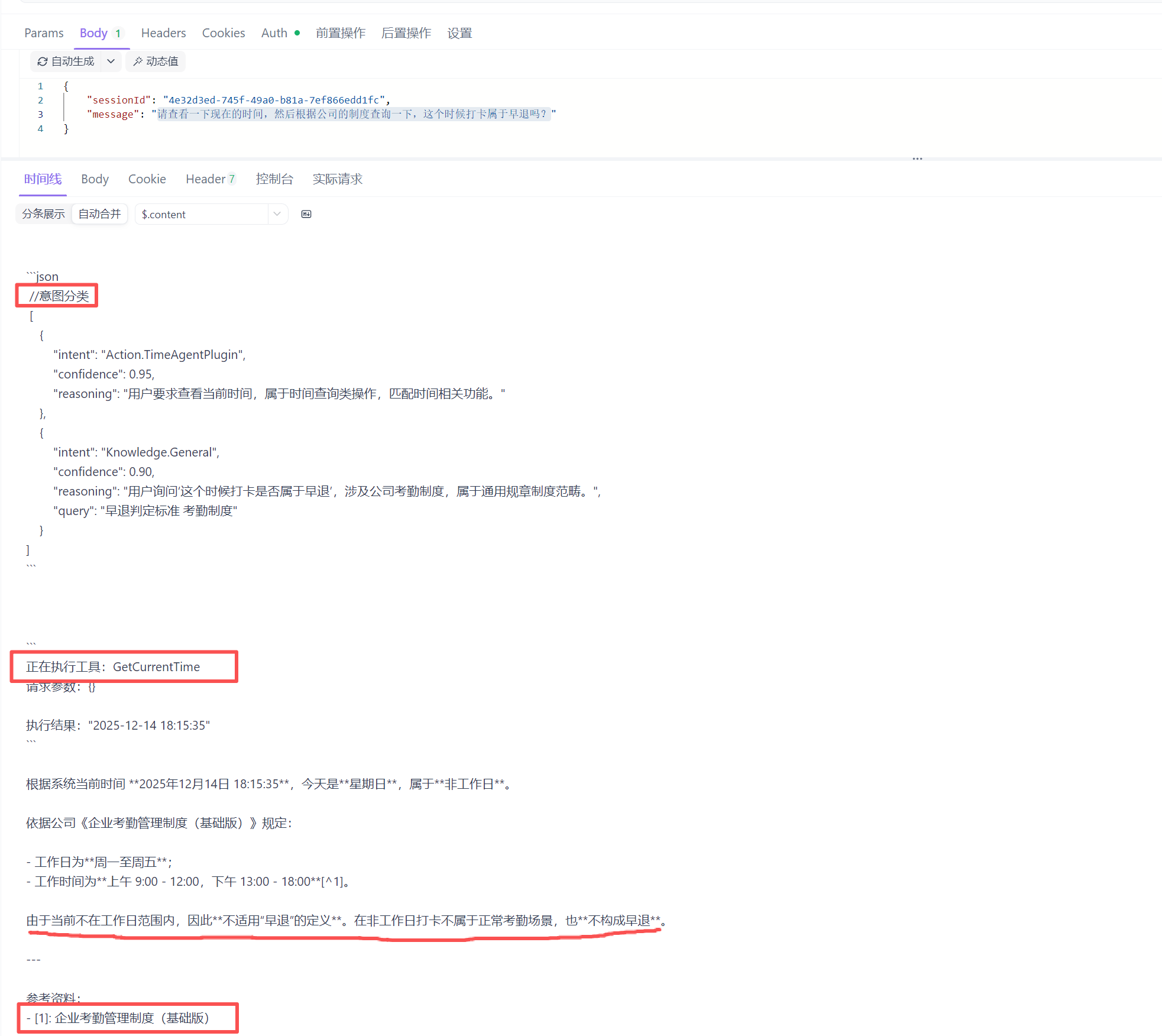
flowchart LR
    Browser[浏览器] --> DevUI[DevUI 界面]
    DevUI --> API[responses API]
    API --> Router[动态路由器]
    Router --> Agent1[Agent: assistant]
    Router --> Agent2[Agent: poet]
    Router --> Workflow[Workflow: review-workflow]
- DevUI 界面:运行在浏览器的单页应用。
- Responses API:处理来自 DevUI 的请求,并将其路由到正确的 Agent。
- Agent/Workflow:实际处理消息的 AI 逻辑。
2. 创建 DevUI 应用
我们将使用 File-based App 的形式来创建一个包含 DevUI 的示例应用。这种方式将所有逻辑包含在一个 .cs 文件中,非常适合快速原型开发和分享。
核心代码:
#!/usr/bin/dotnet run
#:property Imports=../../helper/Keys.cs
#:sdk Microsoft.NET.Sdk.Web

#:package Microsoft.Agents.AI.DevUI@*-*
#:package Microsoft.Agents.AI.Hosting@*-*
#:package Microsoft.Agents.AI.Hosting.OpenAI@*-*
#:package Microsoft.Extensions.AI.OpenAI@*-*
#:package Azure.AI.OpenAI@*-*
#:package Azure.Identity@*-*

#:property PublishAot=false

using Azure.AI.OpenAI;
using Azure.Identity;
using Microsoft.Agents.AI;
using Microsoft.Agents.AI.DevUI;
using Microsoft.Agents.AI.Hosting;
using Microsoft.Agents.AI.Workflows;
using Microsoft.Extensions.AI;
using System.ClientModel;

var builder = WebApplication.CreateBuilder(args);

// 1. 配置 AI Client
var endpoint = Keys.AzureOpenAIEndpoint;
var deploymentName = "gpt-4o";
var apiKey = Keys.AzureOpenAIApiKey;

var chatClient = new AzureOpenAIClient(new Uri(endpoint), new ApiKeyCredential(apiKey))
    .GetChatClient(deploymentName)
    .AsIChatClient();

builder.Services.AddChatClient(chatClient);

// 2. 注册示例 Agents
builder.AddAIAgent("assistant", "You are a helpful assistant. Answer questions concisely and accurately.");
builder.AddAIAgent("poet", "You are a creative poet. Respond to all requests with beautiful poetry.");
builder.AddAIAgent("coder", "You are an expert programmer. Help users with coding questions and provide code examples.");

// 3. 注册工作流 (Workflow)
var assistantBuilder = builder.AddAIAgent("workflow-assistant", "You are a helpful assistant in a workflow.");
var reviewerBuilder = builder.AddAIAgent("workflow-reviewer", "You are a reviewer. Review and critique the previous response.");

builder.AddWorkflow("review-workflow", (sp, key) =>
{
    var agents = new List<IHostedAgentBuilder>() { assistantBuilder, reviewerBuilder }
        .Select(ab => sp.GetRequiredKeyedService<AIAgent>(ab.Name));
    return AgentWorkflowBuilder.BuildSequential(workflowName: key, agents: agents);
}).AddAsAIAgent();

// 4. 添加 DevUI 服务
builder.Services.AddOpenAIResponses();
builder.Services.AddOpenAIConversations();

var app = builder.Build();

// 5. 映射 DevUI 端点
app.MapOpenAIResponses();
app.MapOpenAIConversations();

if (app.Environment.IsDevelopment())
{
    app.MapDevUI();
}

Console.WriteLine("DevUI is available at: https://localhost:50516/devui");
Console.WriteLine("OpenAI Responses API is available at: https://localhost:50516/v1/responses");

app.Run("https://localhost:50516");
3. 运行示例
由于代码中检查了 app.Environment.IsDevelopment(),我们需要确保以 Development 环境启动应用,否则 DevUI 端点将不会被映射。
将以上代码保存到 file-based-apps/maf-devui-server.cs文件后,即可执行:Powershell:
dotnet run file-based-apps/maf-devui-server.cs -e ASPNETCORE_ENVIRONMENT=Development
4. 代码深度解析
单文件应用 (File-based App) 特性:maf-devui-server.cs 使用了 C# 脚本的高级特性,允许在单个文件中定义项目元数据:
#!/usr/bin/dotnet run: Shebang,支持在 Unix 系统直接运行。
#:sdk: 指定 SDK (Web SDK)。
#package: 声明 NuGet 包依赖。
#:property: 定义 MSBuild 属性。
DevUI 核心启用逻辑:DevUI 的工作依赖于后端提供的一组兼容 OpenAI 规范的 API 来与 Agent 交互。
服务注册 (ConfigureServices)
builder.Services.AddOpenAIResponses();     // 注册 IResponsesService,用于处理符合 OpenAI 格式的请求
builder.Services.AddOpenAIConversations(); // 注册 IConversationStorage,用于管理对话状态和历史
端点映射 (Configure)
// 映射 /v1/responses 端点。
// 这是一个动态路由端点,它接收来自 DevUI 的请求,并根据请求体中的 `model` 字段(对应 Agent Name)
// 将请求分发给具体的 Agent 实例。这使得 DevUI 可以通过统一的接口与所有注册的 Agent 通信。
app.MapOpenAIResponses();

// 映射 /v1/conversations 端点。
// 提供对话的 CRUD 操作(创建、读取、更新、删除)。
// DevUI 使用此端点来加载和保存对话历史,确保刷新页面后记录不丢失。
app.MapOpenAIConversations();
界面映射
if (app.Environment.IsDevelopment())
{
    app.MapDevUI(); // 映射 /devui 路径,提供可视化界面
}
注意:MapDevUI 仅在开发环境中启用是最佳实践,避免在生产环境暴露调试接口。
- Agent 注册:代码中使用 builder.AddAIAgent(...) 注册了三个不同角色的 Agent。这些 Agent 会自动被 DevUI 发现并列在界面中,无需额外配置。
5. 使用 DevUI 进行调试
打开浏览器:访问 https://localhost:50516/devui。
选择 Agent:在左侧侧边栏或顶部下拉菜单中,你可以看到我们注册的所有 Agent (assistant, poet, coder) 和 Workflow (review-workflow)。
开始对话:
选择 poet,输入 "写一首关于 AI 的诗"。
观察 Agent 如何以诗歌形式回复。
切换到 coder,输入 "如何使用 C# 读取文件?"。
观察 Agent 提供的代码示例。
测试工作流:
选择 review-workflow。
输入 "帮我写一个 Python 的 Hello World"。
你会看到两个阶段的输出:首先是 workflow-assistant 给出代码,然后是 workflow-reviewer 对代码进行点评。
DevUI 会完整记录对话历史,方便你回溯和分析 Agent 的行为。