通信协议:西门子
2026-03-08 19:23:54一、西门子S7协议
1. 西门子PLC设备
PLC:系列 LOGO、200、200Smart、300、400、1200、1500
2. 西门子PLC存储区
存储区分类
- I:输入、Q:输出、AI:模拟量输入、V/DB:变量存储区 Modbus 线圈状态Q 输入线圈I 输入寄存器AI 保持型寄存V
- AQ:模拟量输出、M:位存储区、T:定时器存储区、C:计数器存储区、HC:高速计数器、AC:累加器、SM:特殊存储器、L:局部存储区、S:顺序控制继电器 S7
访问规则
类型:bit、Byte、Word、Dword 对应数组
访问地址:最小存储是字节
I0.0 Q1.3 MB10 MW10 M10.0 VW100 V100.1 DB1.DBX100.5 位地址最大:7
3. 通信协议
Modbus协议/OPC
功能有限 NModbus4
S7
- 私有协议,非公开
- 功能强大,大部分功能都能完成
- 通信模式:主从(客/服,单边通信)、伙伴(双边通信,PLC->PLC)
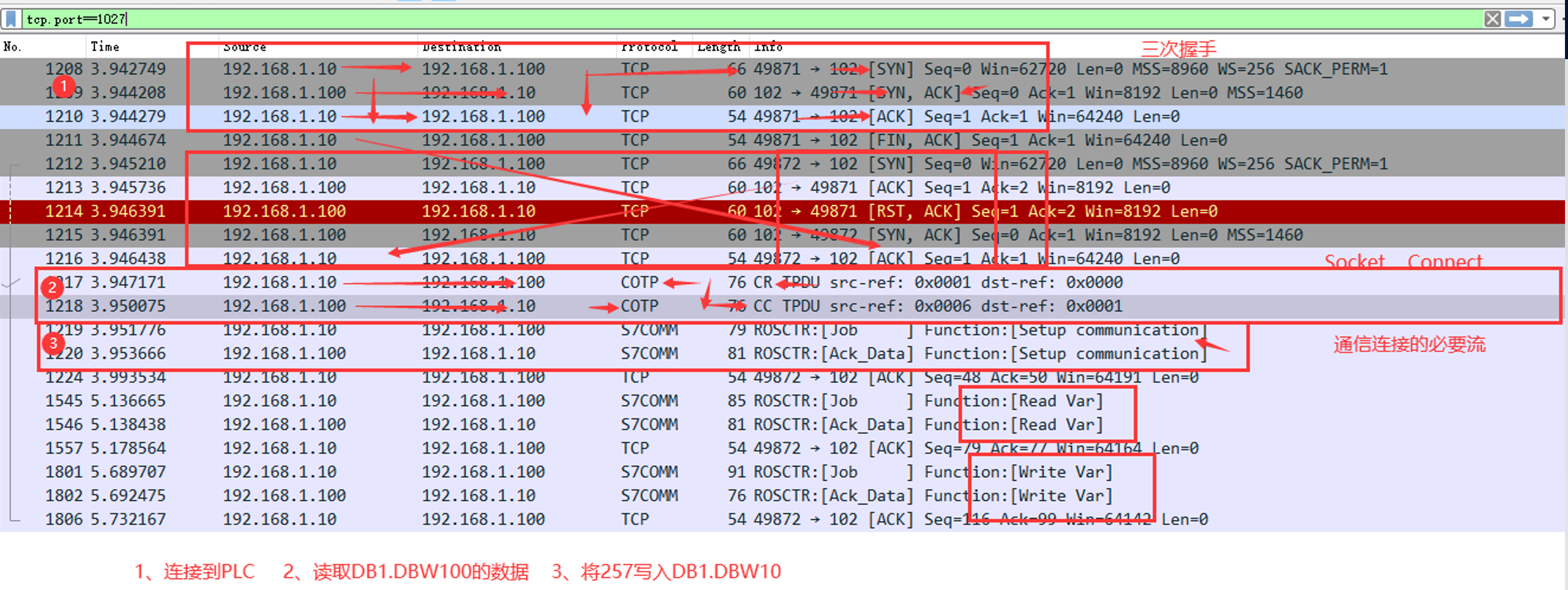
请求流程,可以使用 Wireshark 监控通信过程,S7.NET库测试使用/sharp7
建立TCP连接 Socket.Connect
发送访问请求 COTP
交换通信信息 Setup Communication
执行相关操作 ….
4. S7COMM-COTP报文
COTP报文
- 第一次交互
- 请求与响应
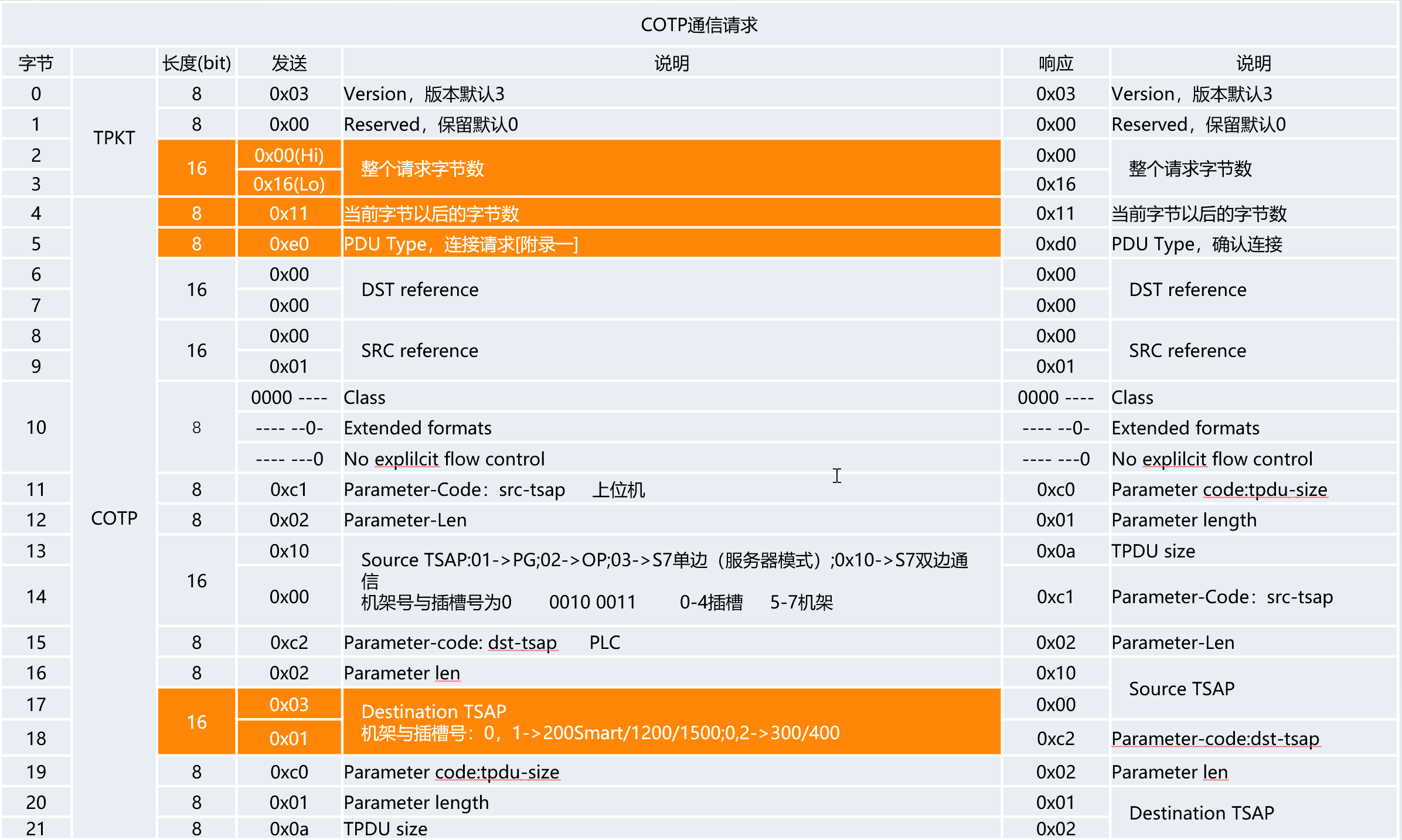
byte[] bytes = new byte[] {
    // TPKT
    0x03,
    0x00,
    0x00,0x16,

    // COTP
    0x11,
    0xe0, // 表示连接请求
    0x00,0x00,
    0x00,0x01,
    0x00,

    // 0xc0
    0xc0,
    0x01,
    0x0a,// 2的10次方   1024

    // 0xc1  通信源对应的相关配置  PC
    0xc1,
    0x02,
    0x10, // S7双边模式   也可以选择01- PG    02   OP
    0x00, // 不需要设置机架和插槽

    // 0xc2
    0xc2,
    0x02,
    0x03, // S7单边模式
    0x01  // 如果机架插槽为0,0  0x00   机架*32+插槽   (机架<<5)+插槽
};
socket.Send(bytes);
// 接收COTP CC结果
socket.Receive(bytes, 0, bytes.Length, SocketFlags.None);
关于TSAP:
- 2Byte,绝大部分都是2Byte
- 28Byte,如果遇到28Byte,下面内容可以参考,主要针对目的设备
- byte[4] 表示是S7子网ID第1部分的高字节
- byte[5]表示这个ID的低字节
- byte[8]表示S7子网ID第2部分高字节
- byte[9]第10个字节表示这个ID的低字节(一般子网ID是这个格式:0000-0000)
- byte[10]表示Profibus DP地址
- byte[26]表示连接资源的价值
- byte[17]表示机架号和插槽号的计算结果
关于插槽和机架:
| plc | rack | slot |
|---|---|---|
| s7-200smart | 0 | 1 |
| s7-300 | 0 | 2 |
| s7-400/WIN AC | 见硬件组态 | 见硬件组态 |
| s7-1200/1500 | 0 | 0/1 |
5. S7COMM-SetupCommunication报文
Setup Communication报文
- 第二次交互
- 请求与响应
PDU
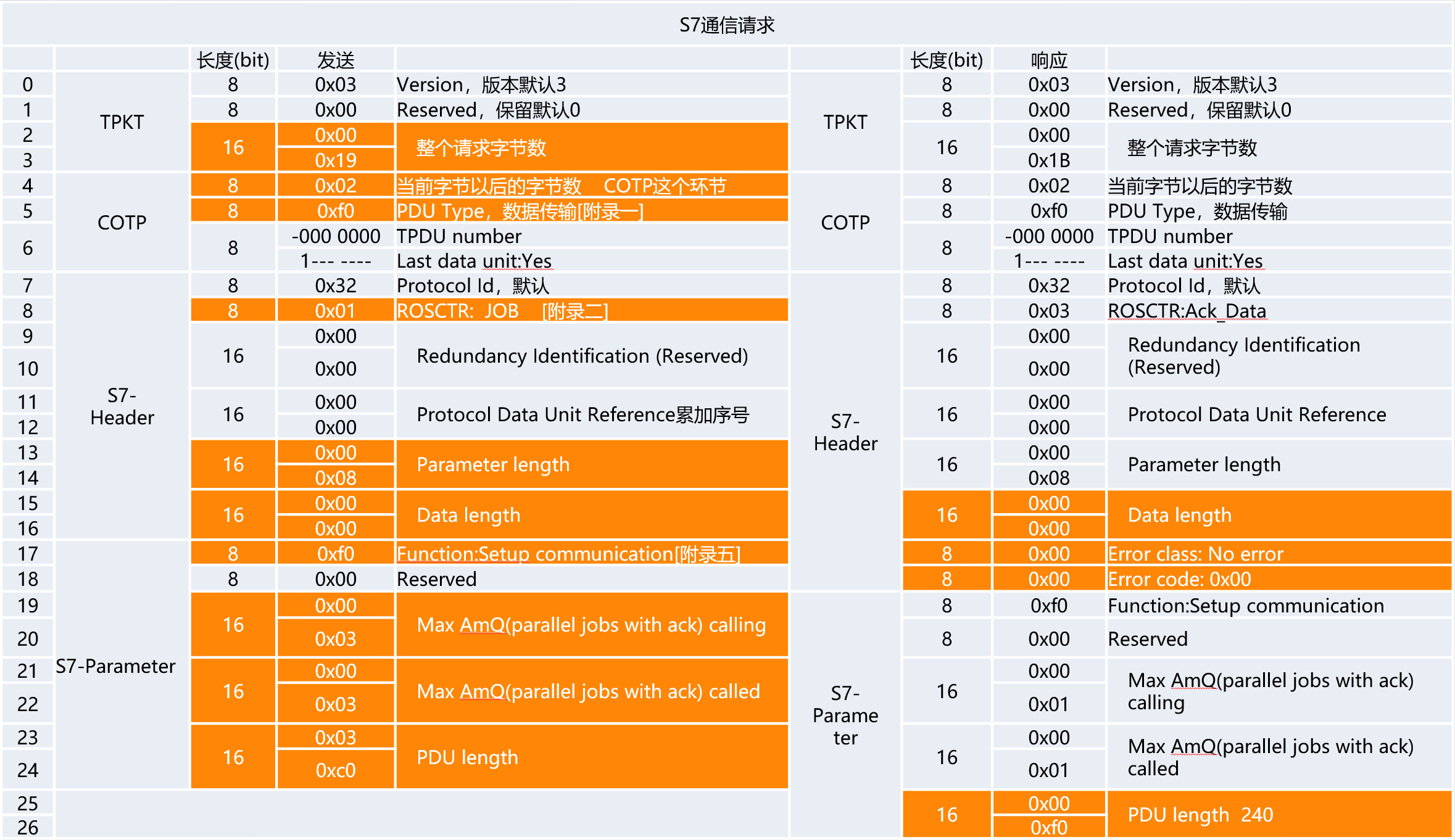
bytes = new byte[] {
    // TPKT
    0x03,
    0x00,
    0x00,0x19,

    // COTP
    0x02, // 在COTP这个环节,当前字节以后的字节数
    0xf0, // 表示数据传输
    0x80,

    // S7 - Header
    0x32, // 协议ID  默认0x32
    0x01, // 向PLC发送一个Job请求

    0x00,0x00,

    0x00,0x00, // 累加序号
    // Parameter 长度
    0x00,0x08,
    // Data 长度
    0x00,0x00,

    // S7 - Parameter
    0xf0, // Setup Communication   Funcion
    0x00,

    0x00,0x01,  // 任务处理队列长度
    0x00,0x01,  // 任务处理队列长度

    0x03,0xc0 //  PDU 长度     960    PLC  反馈   240  480  960
};
socket.Send(bytes);

byte[] resp = new byte[27];
socket.Receive(resp);
ushort pdu = BitConverter.ToUInt16(new byte[] { resp[26], resp[25] });
6. S7COMM-Read报文
数据请求与响应
- Parameter:地址/类型描述
- Data:类型描述
地址请求
- I0.5 Q0.4
- MB10 M5.5
- VW100 DB1.DBD0
- DB1.DBX0.3
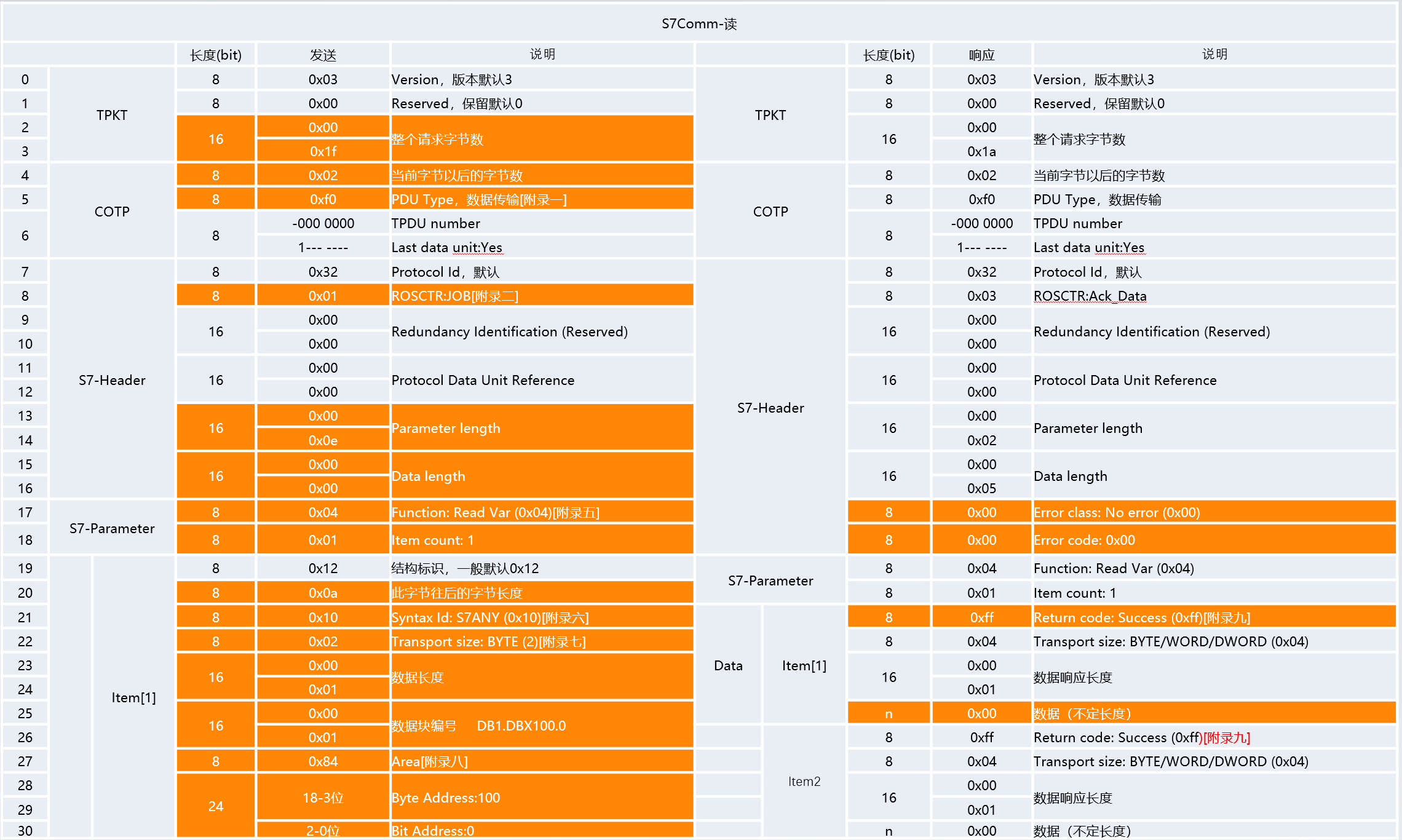
static void S7Read()
{
    // 1、读取单个连续地址
    // 读取 DB1.DBW100 - 10 地址的数据请求报文   连续读取同区域数据
    byte[] bytes = new byte[] {
        // TPKT  - 4bytes
        0x03,
        0x00,
        0x00,0x1f,  // 十进制:31

        // COTP
        0x02,
        0xf0,//数据传输
        0x80,

        // S7 - Header
        0x32, // 协议ID  默认0x32
        0x01, // 向PLC发送一个Job请求

        0x00,0x00,

        0x00,0x01, // 累加序号
        // Parameter 长度
        0x00,0x0e,
        // Data 长度
        0x00,0x00,

        // S7 - Parameter
        0x04, // 向PLC发送一个读变量的请求
        0x01, // Item的数量     Item中包含了请求的地址以及类型相关信息

        // S7 - Parameter - Item
        0x12,
        0x0a,// 当前Item部分,此字节往后还有10个字节
        0x10,
        0x02,// 传输数据类型  02:BYTE    04:Word
        0x00,0x14, // 读取的数量

        // DB100   0x00,0x64
        // V-》DB1
        0x00,0x01,  // 对应DB块的编号,如果区域不是DB,这里写0
        // 存储区
        0x84,// DataBlock ->  V       0x81  I区,
        // 变量地址  100 Byte  -2   100 101  占三个字节
        0x00,0x03,0x20

        // 0000 0000  0000 0011  0010 0000     // 表达字节+位信息
        // DB1.DBX100.5    0x64   0110 0100       0-7   101
        // 0x00 0x03 0x20
    };

    // 2、读取多个不同区域地址
    // 读取 DB1.DBW100 - 10   Byte
    // 读取 DB1.DBW150 - 5    Word
    // 读取 Q0.5-3       位   Bit   01
    // 读取不同区域的数据可不可以?
    // 读取不同类型的数据可不可以?
    // 支持做不同区域的读取,但是这里读取位数据的时候   只能是一个
    bytes = new byte[] {
        // TPKT  - 4bytes
        0x03,
        0x00,
        0x00,0x37,  // 十进制:31+12   43  37

        // COTP
        0x02,
        0xf0,//数据传输
        0x80,

        // S7 - Header
        0x32, // 协议ID  默认0x32
        0x01, // 向PLC发送一个Job请求

        0x00,0x00,

        0x00,0x01, // 累加序号
        // Parameter 长度
        0x00,0x26,
        // Data 长度
        0x00,0x00,

        // S7 - Parameter
        0x04, // 向PLC发送一个读变量的请求
        0x03, // Item的数量     Item中包含了请求的地址以及类型相关信息

        // S7 - Parameter - Item  - 1
        0x12,
        0x0a,// 当前Item部分,此字节往后还有10个字节
        0x10,
        0x02,// 传输数据类型  02:BYTE    04:Word
        0x00,0x14, // 读取的数量

        // DB100   0x00,0x64
        // V-》DB1
        0x00,0x01,  // 对应DB块的编号,如果区域不是DB,这里写0
        // 存储区
        0x84,// DataBlock ->  V       0x81  I区,
        // 变量地址  100 Byte  -2   100 101  占三个字节
        0x00,0x03,0x20,

        // S7 - Parameter - Item  -3
        // 如果请求的位数据在中间Item而不在最的话,那么这个数据返回的时候会多一个Fill Bytes字节
        0x12,
        0x0a,// 当前Item部分,此字节往后还有10个字节
        0x10,
        0x01,// 传输数据类型  01:BIT   02:BYTE    04:Word
        0x00,0x01, // 读取的数量

        0x00,0x00,
        // 存储区
        0x82,
        // 变量地址  0.5 Bit
        // 0000 0000   0000 0000    0000 0101
        0x00,0x00,0x06,

        // S7 - Parameter - Item  -2
        0x12,
        0x0a,// 当前Item部分,此字节往后还有10个字节
        0x10,
        0x04,// 传输数据类型  02:BYTE    04:Word
        0x00,0x05, // 读取的数量

        0x00,0x01,
        // 存储区
        0x84,
        // 变量地址  150 Byte
        0x00,0x04,0xB0
    };

    // 3、单独请求位地址
    // 单独请求Q0.5地址数据
    // 注意:就算是单个位区域数据请求,也得是一个状态一个状态的获取,但是可以按照字节获取
    bytes = new byte[] {
        // TPKT  - 4bytes
        0x03,
        0x00,
        0x00,0x37,  // 十进制:31+12   43  37  55-24=31   1F

        // COTP
        0x02,
        0xf0,//数据传输
        0x80,

        // S7 - Header
        0x32, // 协议ID  默认0x32
        0x01, // 向PLC发送一个Job请求

        0x00,0x00,

        0x00,0x01, // 累加序号
        // Parameter 长度
        0x00,0x26,
        // Data 长度
        0x00,0x00,

        // S7 - Parameter
        0x04, // 向PLC发送一个读变量的请求
        0x03, // Item的数量     Item中包含了请求的地址以及类型相关信息

        // S7 - Parameter - Item
        // 如果请求的位数据在中间Item而不在最的话,那么这个数据返回的时候会多一个Fill Bytes字节

        // Q0.5
        0x12,
        0x0a,// 当前Item部分,此字节往后还有10个字节
        0x10,
        0x01,// 传输数据类型  01:BIT   02:BYTE    04:Word
        0x00,0x01, // 读取的数量

        0x00,0x00,
        // 存储区
        0x82,
        // 变量地址  0.5 Bit
        // 0000 0000   0000 0000    0000 0101
        0x00,0x00,0x05,

        // Q0.6
        0x12,
        0x0a,// 当前Item部分,此字节往后还有10个字节
        0x10,
        0x01,// 传输数据类型  01:BIT   02:BYTE    04:Word
        0x00,0x01, // 读取的数量

        0x00,0x00,
        // 存储区
        0x82,
        // 变量地址  0.5 Bit
        // 0000 0000   0000 0000    0000 0101
        0x00,0x00,0x06,

        //Q0.7
        0x12,
        0x0a,// 当前Item部分,此字节往后还有10个字节
        0x10,
        0x01,// 传输数据类型  01:BIT   02:BYTE    04:Word
        0x00,0x01, // 读取的数量

        0x00,0x00,
        // 存储区
        0x82,
        // 变量地址  0.5 Bit
        // 0000 0000   0000 0000    0000 0101
        0x00,0x00,0x07
    };

    // 4、请求字符串数据
    // "Hello" -> 0x48 0x65 0x6C 0x6C 0x6F
    bytes = new byte[] {
        // TPKT  - 4bytes
        0x03,
        0x00,
        0x00,0x1F,

        // COTP
        0x02,
        0xf0,//数据传输
        0x80,

        // S7 - Header
        0x32, // 协议ID  默认0x32
        0x01, // 向PLC发送一个Job请求

        0x00,0x00,

        0x00,0x01, // 累加序号
        // Parameter 长度
        0x00,0x0E,
        // Data 长度
        0x00,0x00,

        // S7 - Parameter
        0x04, // 向PLC发送一个读变量的请求
        0x01, // Item的数量     Item中包含了请求的地址以及类型相关信息

        // S7 - Parameter - Item
        // 如果请求的位数据在中间Item而不在最的话,那么这个数据返回的时候会多一个Fill Bytes字节

        0x12,
        0x0a,// 当前Item部分,此字节往后还有10个字节
        0x10,
        0x02,// 传输数据类型  01:BIT   02:BYTE    04:Word
        0x00,0x0C, // 读取的数量

        0x00,0x01,
        // 存储区
        0x84,
        // 变量地址  0.5 Bit
        // 0000 0000   0000 0000    0101 0000
        0x00,0x00,0x00
    };

    socket.Send(bytes);// 读取地址变量数据的请求
}
7. S7COMM-Write报文
数据请求与响应
- Parameter:地址/类型描述
- Data:类型描述
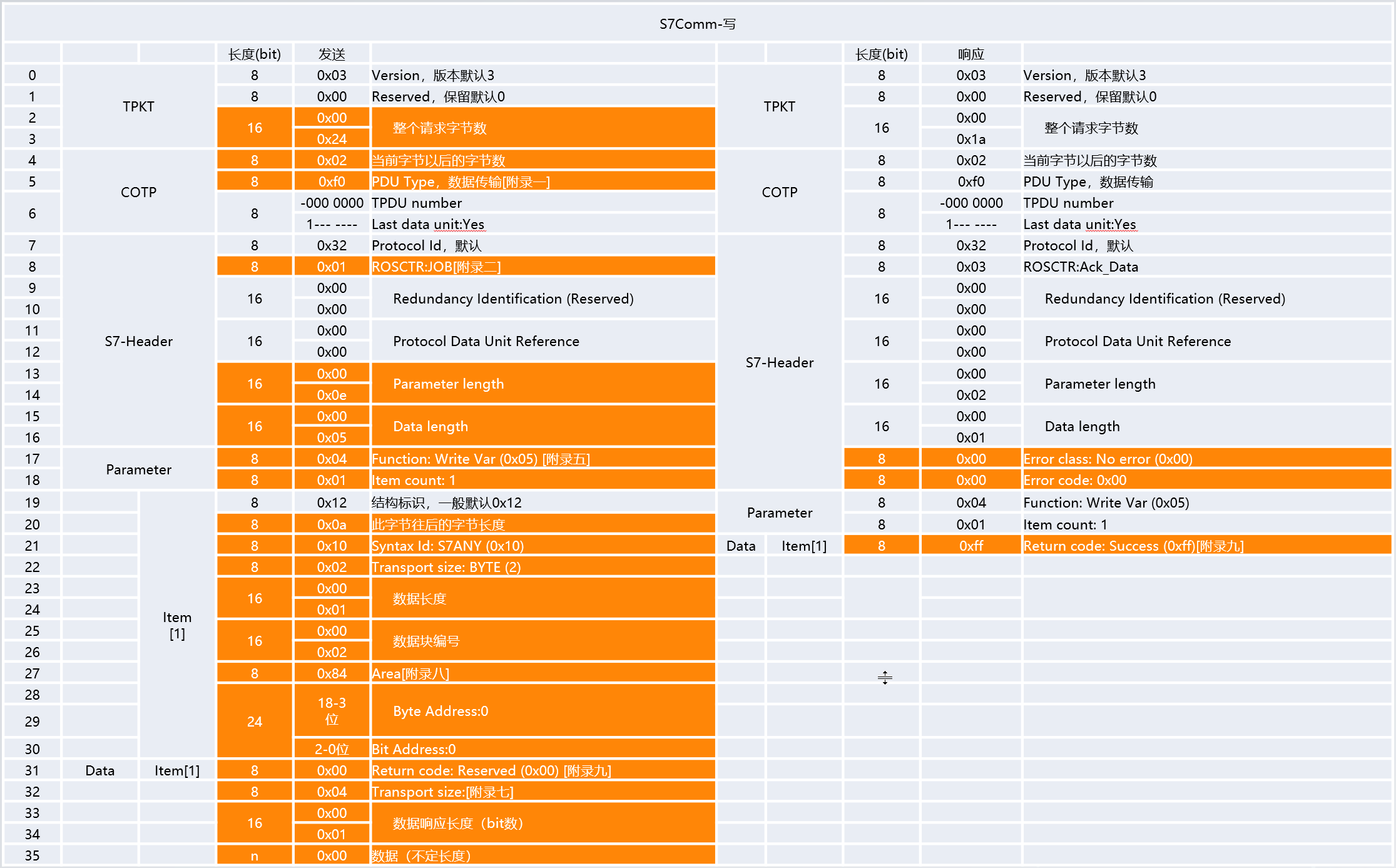
static void S7Write()
{
    // 1、修改任务类型  04读   05写
    // 2、相关长度Item个数    DBW20
    //           Data长度
    //           整个报文长度
    byte[] bytes = new byte[] {
        // TPKT  - 4bytes
        0x03,
        0x00,
        0x00,0x4A,  // 十进制:38+17=56   56+17=73  49**************************

        // COTP
        0x02,
        0xf0,
        0x80,

        // S7 - Header
        0x32,
        0x01,
        0x00,0x00,
        0x00,0x01, // 累加序号

        // Parameter 长度***************
        0x00,0x26,   //26+12=38   -32  26
        // Data 长度********************
        0x00,0x13, // 5

        // S7 - Parameter
        0x05, // 向PLC发送一个写变量的请求   04:读  05:写
        0x03, // Item的数量     **********************************

        // S7 - Parameter - Item-1   DBW20 - 22
        0x12,
        0x0a,
        0x10,
        0x04,// 传输数据类型  02:BYTE    04:Word
        0x00,0x02, // 读取的数量

        0x00,0x01,
        // 存储区
        0x84,
        0x00,0x00,0xA0,  // 20.0

        // 0000 0000  0000 0000  1010 0000

        // S7 - Parameter - Item-2   Q0.5
        0x12,
        0x0a,
        0x10,
        0x01,// 传输数据类型  01:Bit  02:BYTE    04:Word
        0x00,0x01, // 读取的数量

        0x00,0x00,
        // 存储区  Q0.5
        0x82,
        0x00,0x00,0x05,

        // S7 - Parameter - Item-3   Q0.6
        0x12,
        0x0a,
        0x10,
        0x01,// 传输数据类型  01:Bit  02:BYTE    04:Word
        0x00,0x01, // 读取的数量

        0x00,0x00,
        // 存储区  Q0.6
        0x82,
        0x00,0x00,0x06,

        // S7 - Data - Item-1
        0x00,
        0x04,
        0x00, 0x20,    // 长度按照位长度来计算     16
        0x02,0x9C,0x02,0x9D,


        // S7 - Data - Item-2  0.5
        0x00,
        0x03,   // 数据类型
        0x00, 0x01,    // 长度   字节数*8
        0x01,
        0x00,  // Fill bytes

        // S7 - Data - Item-3   0.6
        0x00,
        0x03,          // 数据类型
        0x00, 0x01,    // 长度   字节数*8
        0x01

        // 这里是否可以写多个状态?  尽量一次发送多个请求
        // ***这里不能做多个位的写入,会报0x03的异常***
    };

    socket.Send(bytes);
}
8. S7COMM-Run报文
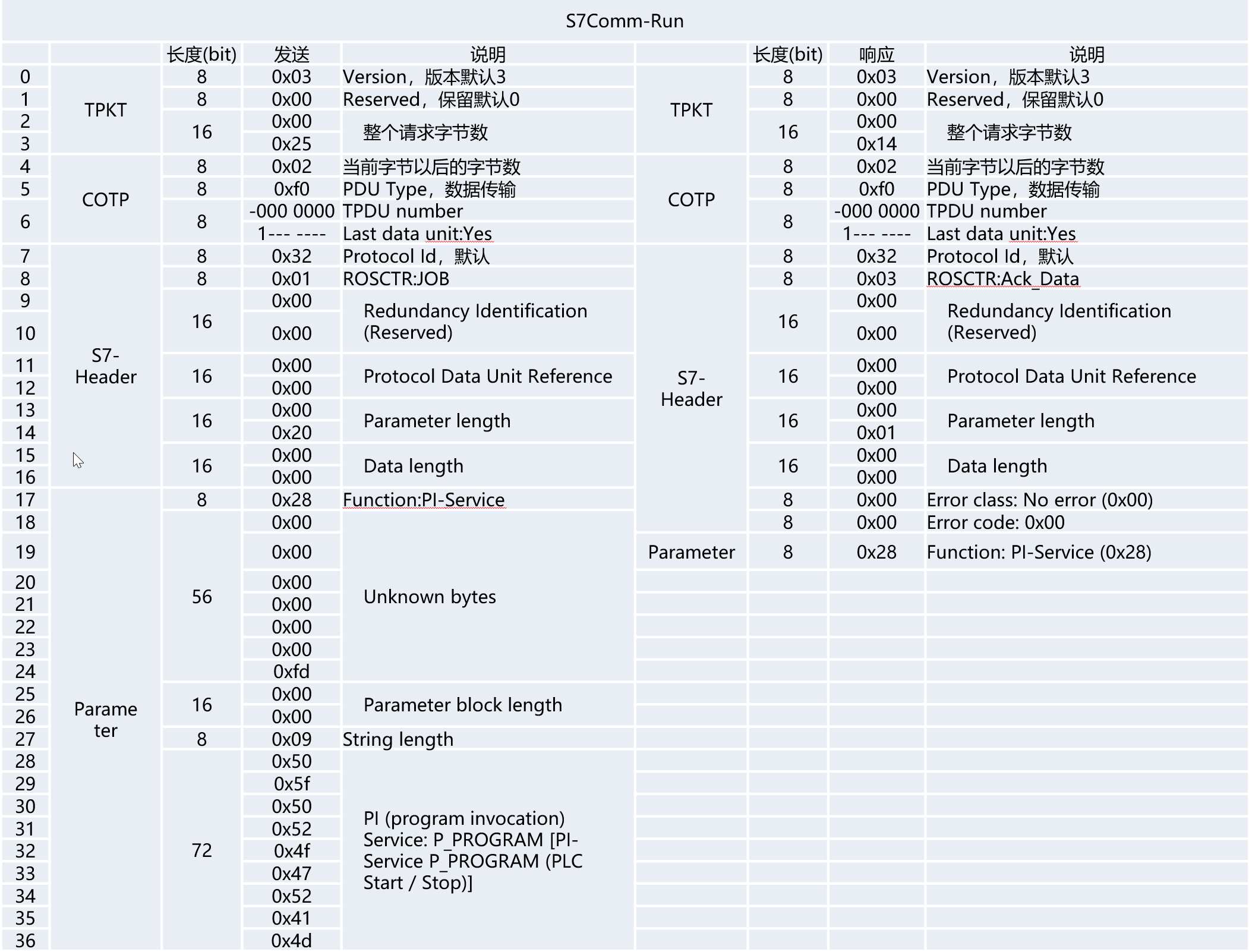
byte[] bytes = new byte[] {
    // TPKT
    0x03,
    0x00,
    0x00,0x25, // 37

    // COTP
    0x02,
    0xf0,
    0x80,

    // S7-Header
    0x32,
    0x01,
    0x00,0x00,0x00,0x00,

    // Parameter Length
    0x00,0x14,  // 10#20
    // Data Length
    0x00,0x00,

    // S7-Parameter
    0x28,// 控制PLC启动
    0x00,0x00,0x00,0x00,0x00,0x00,0xfd,

    0x00,0x00,
    0x09,
    // P_PROGRAM
    0x50,0x5F,0x50,0x52,0x4f,0x47,0x52,0x41,0x4d
};

socket.Send(bytes);
9. S7COMM-Stop报文
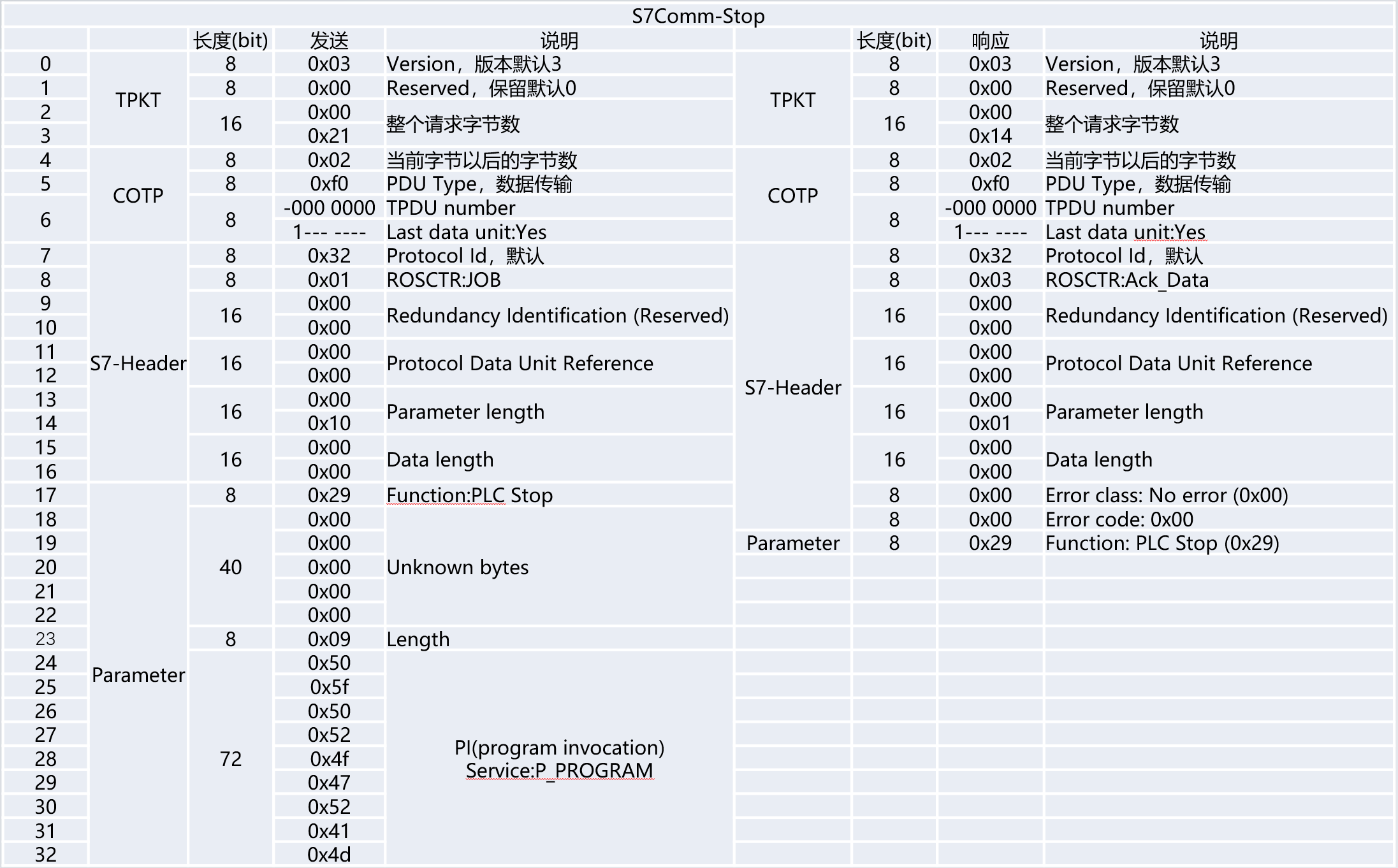
byte[] bytes = new byte[] {
	// TPKT
    0x03,
    0x00,
    0x00,0x21, // 37

    // COTP
    0x02,
    0xf0,
    0x80,

    // S7-Header
    0x32,
    0x01,
    0x00,0x00,0x00,0x00,

    // Parameter Length
    0x00,0x10,  // 10#20
    // Data Length
    0x00,0x00,

    // S7-Parameter
    0x29,// 控制PLC停止
    0x00,0x00,0x00,0x00,0x00,

    //0x00,0xfd,   相对启动来讲,多了这4个字节
    //0x00,0x00,

    0x09,
    // P_PROGRAM
    0x50,0x5F,0x50,0x52,0x4f,0x47,0x52,0x41,0x4d
};

socket.Send(bytes);
10. S7COMM-时间读写报文
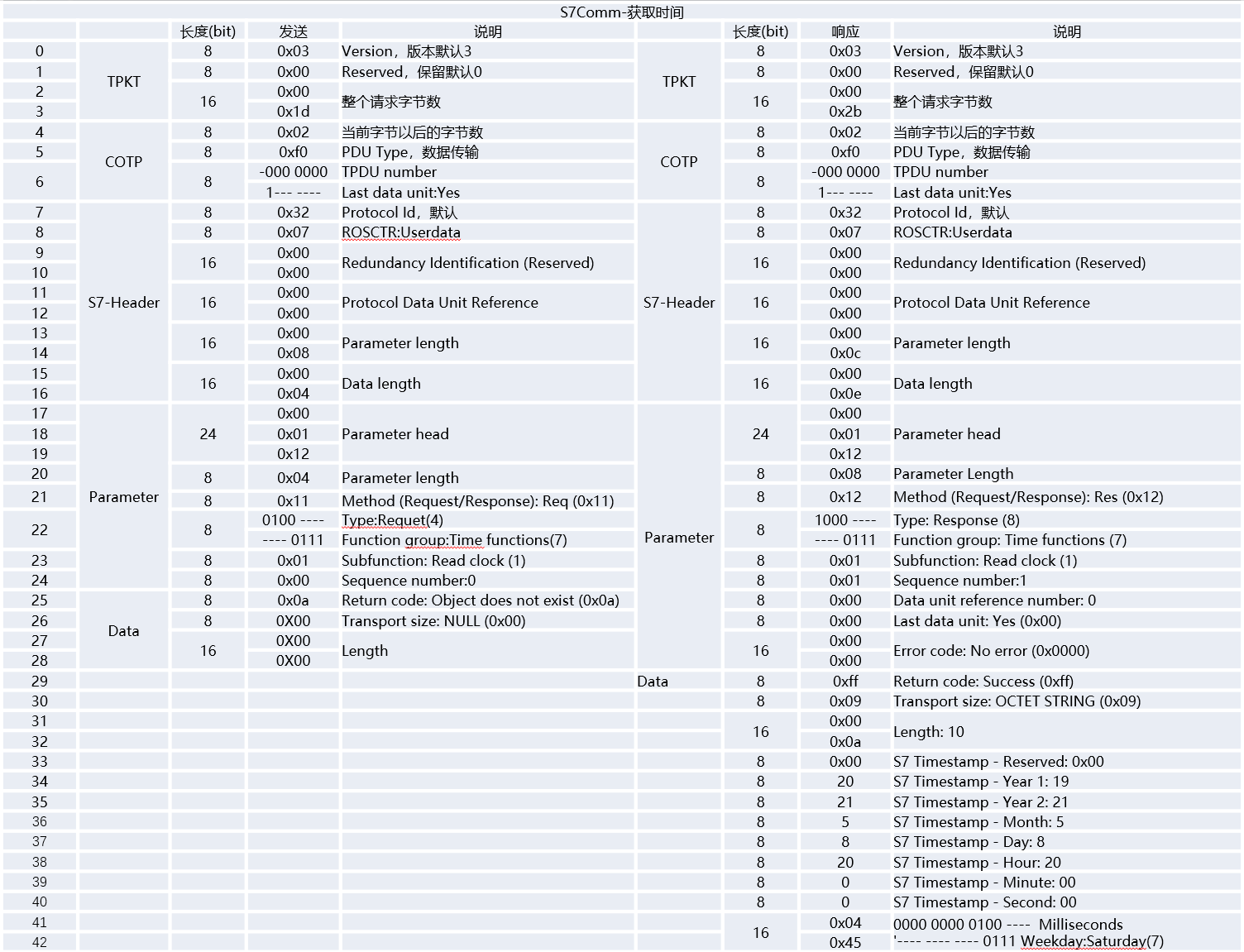
byte[] bytes = new byte[] {
    // TPKT
    0x03,
    0x00,
    0x00,0x1d, // 37

    // COTP
    0x02,
    0xf0,
    0x80,

    // S7-Header
    0x32,
    0x07,//UserData
    0x00,0x00,0x00,0x00,

    // Parameter Length
    0x00,0x8,  // 10#20
    // Data Length
    0x00,0x04,

    // S7-Parameter
    0x00,0x01,0x12,
    0x04,// Parameter部分后续还有4个字节的内容
    0x11,
    // 0100 0111
    0x47,
    0x01,// Read Clock
    0x00,

    // S7-Data
    0x0a,
    0x00,
    0x00,0x00
};
socket.Send(bytes);
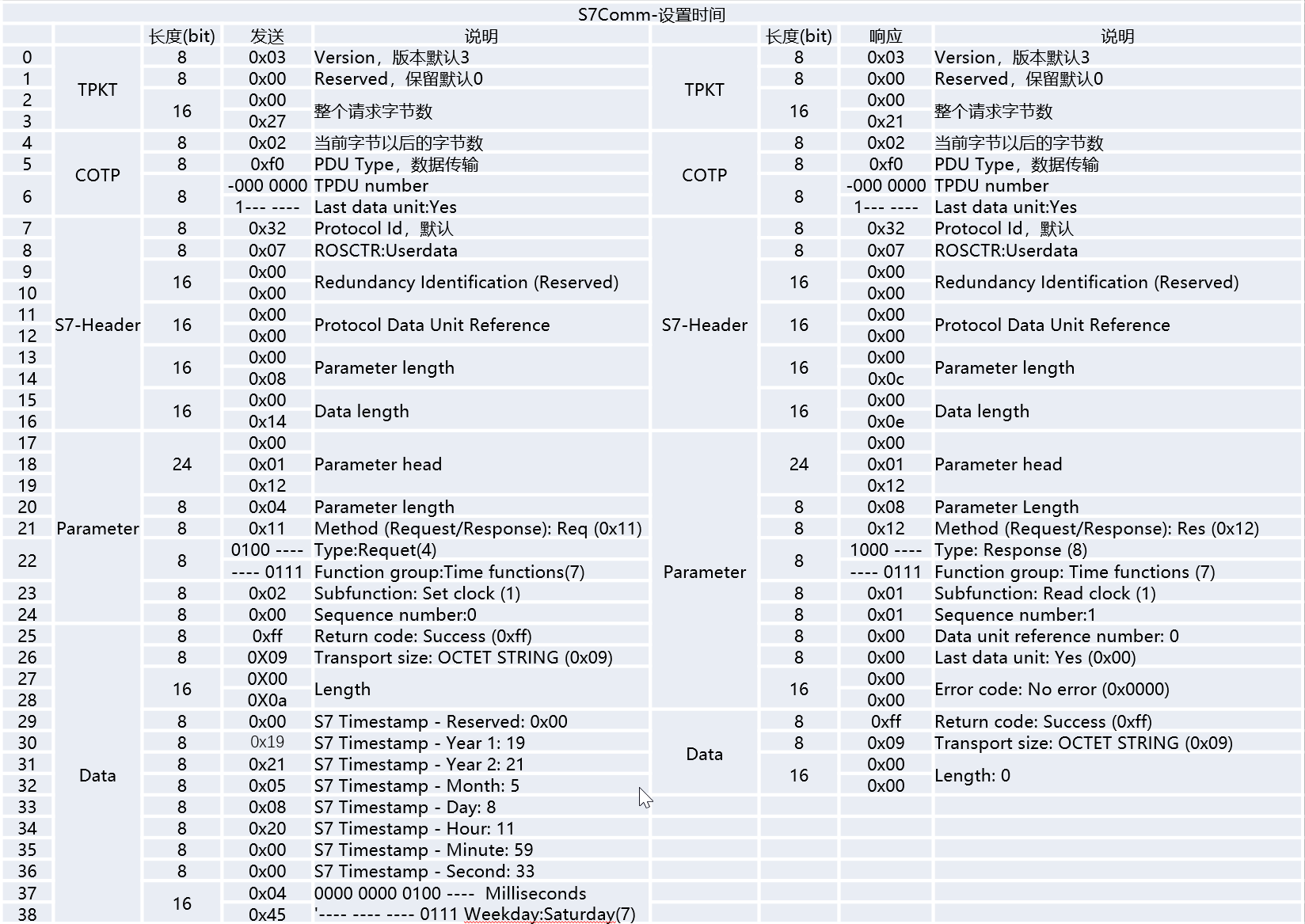
// 2025-10-01 20:05:00 4
byte[] bytes = new byte[] {
    // TPKT
    0x03,0x00,
    0x00,0x27, // 39

    // COTP
    0x02,
    0xf0,
    0x80,

    // S7-Header
    0x32,
    0x07,// UserData
    0x00,0x00,0x00,0x00,

    // Parameter Length
    0x00,0x08,
    // Data Length
    0x00,0x0E, // 14


    // S7-Paramter
    0x00,0x01,0x12,
    0x04,
    0x11,
    0x47,

    0x02,// Set Clock
    0x00,

    // S7-Data
    0xff,
    0x09,
    0x00,0x0a,// 后续有10个长度的字节
    0x00,
    0x19,
    // Year:25
    0x25,
    // Month:10
    0x10,
    // Day:01
    0x01,
    // Hour:20
    0x20,
    // Minute:05
    0x05,
    // Second:00
    0x00,
    // 毫秒:0  和星期
    0x00,0x04
    // 0000 0000   0000 0  100
};
socket.Send(bytes);
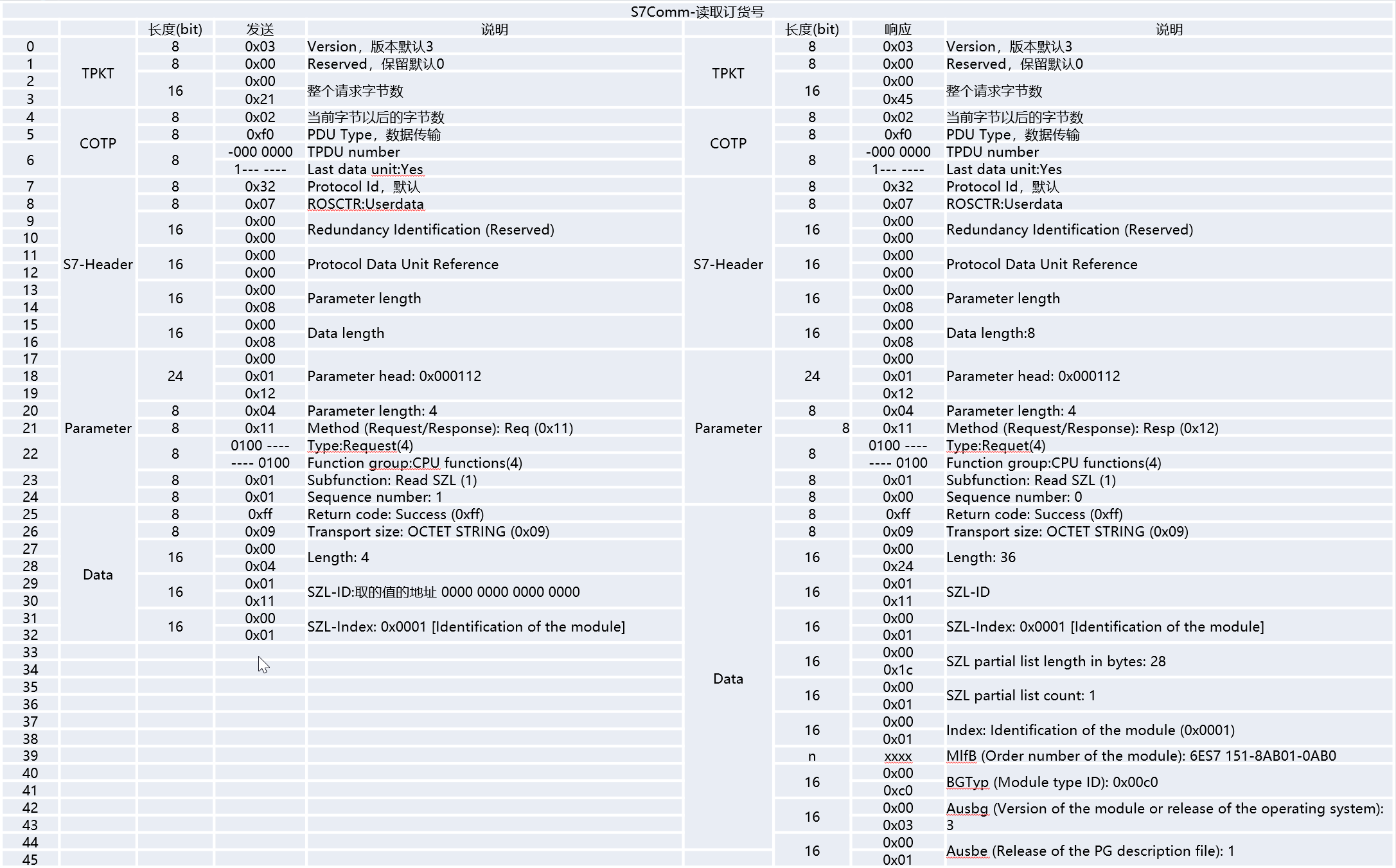
11. S7COMM-SZL报文
系统状态列表(德语:System-ZustandsListen,英语:System-Status-Lists)
系统数据、CPU中的模块状态数据、模拟的诊断数据、诊断缓冲区
- 消息服务
- 诊断信息
- 告警信息
12. S7COMM-其他
S7COMM-Userdata-获取系统块
列举一下块的类型
读取块的信息
S7COMM-上传下载
文件处理
StartUpload、Upload、EndUpload
StartDownload、Download、EndDownload
程序块激活
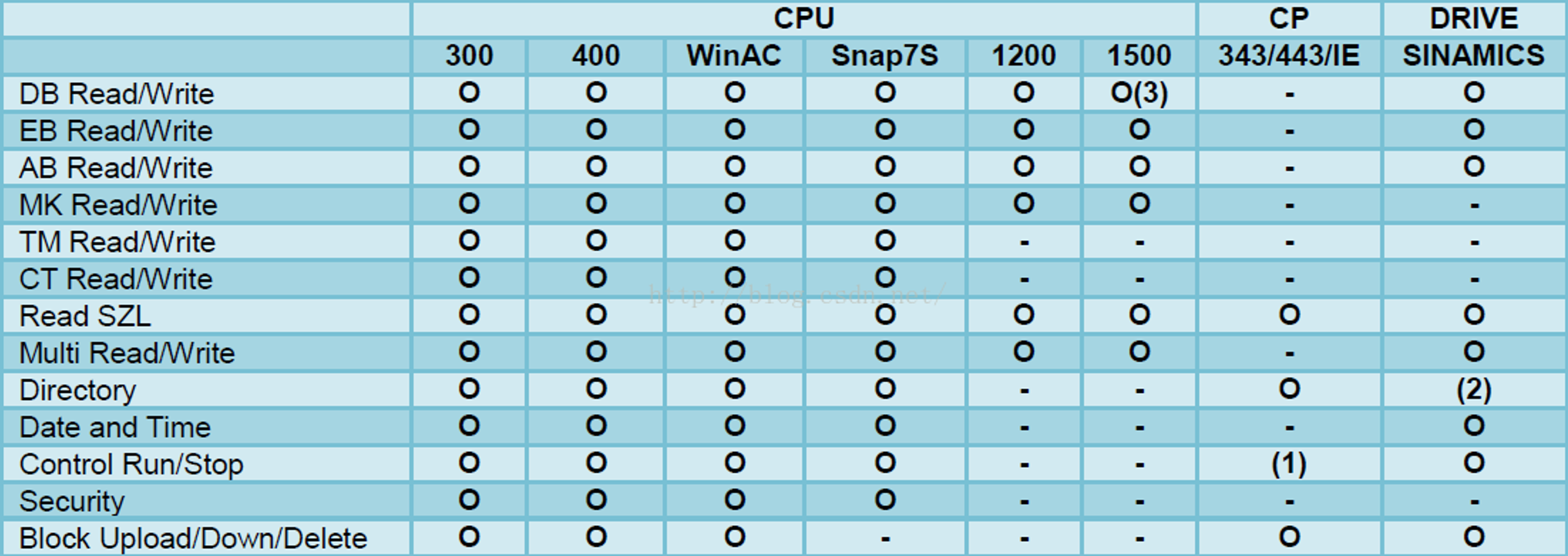
控制支持情况
附录
- 附录一,COTP->PDU type已知枚举值
| 0xe0 | 连接请求 |
|---|---|
| 0xd0 | 连接确认 |
| 0x08 | 断开请求 |
| 0x0c | 断开确认 |
| 0x05 | 拒绝访问 |
| 0x01 | 加急数据 |
| 0x02 | 加急数据确认 |
| 0x04 | 用户数据 |
| 0x07 | TPDU错误 |
| 0xf0 | 数据传输 |
- 附录二,S7Header->ROSCTR已知枚举值
| 0x01 | Job request。主站发送请求 |
|---|---|
| 0x02 | Ack。从站响应请求不带数据 没有专门的Data部分 |
| 0x03 | Ack_Data。从站响应请求并带有数据 带专门的Data部分报文 |
| 0x07 | Userdata。原始协议的扩展。读取编程/调试、SZL读取、安全功能、时间设置等 |
- 附录三、S7Header->Error class已知枚举值
| 0x00 | 无错误 |
|---|---|
| 0x81 | 应用程序关系错误 |
| 0x82 | 对象定义错误 |
| 0x83 | 无资源可用错误 |
| 0x84 | 服务处理错误 |
| 0x85 | 请求错误(如果有错,此码较多) |
| 0x87 | 访问错误 |
- 附录四,S7Parameter->Error code已知枚举值
| 0x0000 | 无错误 | 0x8500 | L7PDU大小错误 |
|---|---|---|---|
| 0x0110 | 无效块类型编号 | 0xD401 | L7无效SZL ID |
| 0x0112 | 无效参数 | 0xD402 | L7无效索引 |
| 0x011A | PG资源错误 | 0xD403 | L7 DGS连接已宣布 |
| 0x011B | PLC重新外包错误 | 0xD404 | L7 最大用户NB |
| 0x011C | 协议错误 | 0xD405 | L7 DGS功能参数语法错误 |
| 0x011F | 用户缓冲区太短 | 0xD406 | L7无信息 |
| 0x0141 | 请求错误 | 0xD601 | L7 PRT 函数参数语法错误 |
| 0x01C0 | 版本不匹配 | 0xD801 | L7 无效变量地址 |
| 0x01F0 | 末实施 | 0xD802 | L7 未知请求 |
| 0x8001 | L7无效CPU状态 | 0xD803 | L7 无效请求状态 |
- 附录五,S7Parameter->Function已知枚举值
| 0x00 | CPU服务 |
|---|---|
| 0xF0 | 设置通信 |
| 0x04 | 读取变量 |
| 0x05 | 写变量 |
| 0x1A | 请求下载 |
| 0x1B | 下载块 |
| 0x1C | 下载结束 |
| 0x1D | 开始上传 |
| 0x1E | 上传 |
| 0x1F | 结束上传 |
| 0x28 | PLC 控制 启动 |
| 0x29 | PLC 停止 |
- 附录六,S7Parameter->Item->Syntax Id已知枚举值
| 0x10 | S7ANY:Address data S7-Any pointer-like DB1.DBX10.2 |
|---|---|
| 0x13 | PBC-R_ID:R_ID for PBC |
| 0x15 | ALARM_LOCKFREE:Alarm lock/free dataset |
| 0x16 | ALARM_IND:Alarm indication dataset |
| 0x19 | ALARM_ACK:Alarm acknowledge message dataset |
| 0x1a | ALARM_QUERYREQ:Alarm query request dataset |
| 0x1c | NOTIFY_IND:Notify indication dataset |
| 0xa2 | DRIVEESANY:seen on Drive ES Starter with routing over S7 |
| 0xb2 | 1200SYM:Symbolic address mode of S7-1200 |
| 0xb0 | DBREAD:Kind of DB block read, seen only at an S7-400 |
| 0x82 | NCK:Sinumerik NCK HMI access |
- 附录七,S7Parameter->Item->Transport size常见值
| Parameter ITEM | |||
|---|---|---|---|
| 0x01 | BIT | 0x0A | TOD(Time of day 32位) |
| 0x02 | Byte | 0x0B | TIME(IEC时间32位) |
| 0x03 | CHAR | 0x0C | S5TIME(Simatic时间16位) |
| 0x04 | WORD | 0x0F | DATE AND TIME |
| 0x05 | INT | 0x1C | COUNTER |
| 0x06 | DWORD | 0x1D | TIMER |
| 0x07 | DINT | 0x1E | IEC TIMER |
| 0x08 | REAL | 0x1F | IEC COUNTER |
| 0x09 | DATE | 0x20 | HS COUNTER |
| DATA Item | |
|---|---|
| 0x00 | NULL |
| 0x03 | BIT |
| 0x04 | BYTE/WORD/DWORD |
| 0x05 | INTEGER |
| 0x07 | REAL |
| 0x09 | OCTET STRING |
- 附录八,S7Parameter->Item->Area常见值
| 0x03 | System info of 200 family | 200系列系统信息 |
|---|---|
| 0x05 | System flags of 200 family | 200系列系统标志 |
| 0x06 | Analog inputs of 200 family | 200系列模拟量输入 |
| 0x07 | Analog outputs of 200 family | 200系列模拟量输出 |
| 0x80 | Direct peripheral access (P) | 直接访问外设 |
| 0x81 | Inputs (I) | 输入(I) |
| 0x82 | Outputs (Q) | 输出(Q) |
| 0x83 | M |
| 0x84 | Data blocks (DB) | 数据块(DB) V |
| 0x85 | Instance data blocks (DI) | 背景数据块(DI) |
| 0x86 | Local data (L) | 局部变量(L) |
| 0x87 | Unknown yet (V) | 全局变量(V) |
| 0x1c | S7 counters (C) | S7计数器(C) |
| 0x1d | S7 timers (T) | S7定时器(T) |
| 0x1e | IEC counters (200 family) | IEC计数器(200系列) |
| 0x1f | IEC timers (200 family) | IEC定时器(200系列) |
- 附录九,S7Data->Item->Return code已知枚举值
| 0xff | 成功 |
|---|---|
| 0x00 | Reserved | 未定义,预留 |
| 0x01 | 硬件错误 |
| 0x03 | 对象不允许访问 |
| 0x05 | 地址越界,无效地址,所需的地址超出此PLC的极限 |
| 0x06 | 请求的数据类型与存储类型不一致 |
| 0x07 | 日期类型不一致 |
| 0x0a | 对象不存在 |
- 附录十,Userdata已知枚举值
| 0x0 | 转换工作模式(Mode-transition) |
|---|---|
| 0x1 | 工程师命令调度(Programmer commands) |
| 0x2 | 循环读取(Cyclic data) |
| 0x3 | 块功能(Block functions) |
| 0x4 | CPU功能(CPU functions) |
| 0x5 | 安全功能(Security) |
| 0x6 | PBC BSEND/BRECV |
| 0x7 | 时间功能(Time functions) |
| 0xf | NC编程(NC programming) |
- 附录十一,PI service names已知枚举值
| _INSE | PI-Service_INSE(Activates a PLC module)。激活设备上下载的块,参数是块的名称 |
|---|---|
| _DELE | 工程师命令调度(Programmer commands)。从设备的文件系统中删除一个块,该参数是块的名称 |
| P_PROGRAM | 循环读取(Cyclic data)。设置设备的运行状态(启动、停止、复位) |
| _MODU | 块功能(Block functions)。压缩PLC内存 |
| _GARB | CPU功能(CPU functions)。将RAM复制到ROM,参数包含文件系统标识符(A/E/P) |
- 附录十二,文件系统
| P | 被动模块。Passive (copied,but not chained) module |
|---|---|
| A | 有源嵌入式模块。Active embedded module |
| B | 有源和无源模块。Active as well as passive module |
二、西门子S7通信库封装
1. 功能清单
- 连接、断开
- 读取、写入
- 启动、停止
- 获取时间、设置时间
2. 定义枚举与数据字典
- 定义枚举
public enum Areas
{
    I = 0x81,
    Q = 0x82,
    DB = 0x84,
    V = 0x84,
    M = 0x83
}

public enum ParameterVarType
{
    BIT = 0x01,
    BYTE = 0x02,
    CHAR = 0x03,
    WORD = 0x04,
    INT = 0x05,
    DWORD = 0x06,
    DINT = 0x07,
    REAL = 0x08,
    DATE = 0x09
}

public enum DataVarType
{
    NULL = 0x00,
    BIT = 0x03,
    BYTE = 0x04,
    WORD = 0x04,
    DWORD = 0x04,
    INTERGER = 0x05,
    REAL = 0x07,
    OCTETSTRING = 0x09
}
- 定义2个数据字典,用于判断返回状态和错误信息
public static class Status
{
    public static Dictionary<ushort, string> HeaderErrors = new Dictionary<ushort, string>()
    {
        { 0x0110,"无效块类型编号" },
        { 0x0112,"无效参数" },
        { 0x011A,"PG资源错误" },
        { 0x011B,"PLC重新外包错误" },
        { 0x011C,"协议错误" },
        { 0x011F,"用户缓冲区太短" },
        { 0x0141,"请求错误" },
        { 0x01C0,"版本不匹配" },
        { 0x01F0,"末实施" },
        { 0x8001,"L7无效CPU状态" },
        // .......自行补齐
    };

    public static Dictionary<byte, string> DataReturnCode = new Dictionary<byte, string>()
    {
        { 0xff,"请求成功"},
        { 0x01,"硬件错误"},
        { 0x03,"对象不允许访问"},
        { 0x05,"地址越界,所需的地址超出此PLC的极限"},
        { 0x06,"请求的数据类型与存储类型不一致"},
        { 0x07,"日期类型不一致"},
        { 0x0a,"对象不存在"}
    };
}
3. 封装实体
西门子S7通信过程中,无论是读取还是写入,它是支持批量通信的,而每个读取或写入都至少需要知道“存储区、地址、类型、数量或数据”等基本信息。
因此我们可以为读或写,定义一个统一的数据实体对象
// 需要读取一个地址下的特定类型的数据,读N个
public class DataParameter
{
    public Areas Area { get; set; }

    public ushort DBNumber { get; set; } = 0;

    // 请求的时候   byte
    public ParameterVarType PVarType { get; set; }

    public DataVarType DVarType { get; set; }

    public int ByteAddress { get; set; }

    public byte BitAddress { get; set; }

    public int Count { get; set; } = 1;

    public byte[] DataBytes { get; set; } = new byte[0];
}
4. 连接与断开
我们知道连接到PLC,需要经过3次握手、COTP和Communication。这3步需要一气呵成,任何一个环节出问题都会导致连接不上。
连上之后,后续的操作也需要使用同一个socket对象。
因此,在写通信库前,我们需要准备全局的私有socket对象,以及pduSize的长度(用来判断是否消息过长)。
public class S7Client
{
    private Socket? socket;

    //通信方PLC的PDU长度
    private int pduSize = 0;

    /// <summary>
    /// 连接到PLC
    /// </summary>
    public void Connect(string ip, byte rack, byte slot, int timeout = 5000)
    {
        socket = new Socket(SocketType.Stream, ProtocolType.Tcp);
        socket.ReceiveTimeout = timeout;
        socket.Connect(ip, 102);	//102是固定端口

        // COTP
        byte[] bytes = new byte[] {
            // TPKT
            0x03,
            0x00,
            0x00,0x16,

            // COTP
            0x11,
            0xe0,
            0x00,0x00,
            0x00,0x01,
            0x00,

            // 0xc0
            0xc0,
            0x01,
            0x0a,

            // 0xc1
            0xc1,
            0x02,
            0x10, // S7双边通信
            0x00,

            // 0xc2
            0xc2,
            0x02,
            0x03, // S7单边模式
            //  如果机架插槽为0,0  0x00   机架*32+插槽   (机架<<5)+插槽
            (byte)(rack*32+slot)
        };

        this.SendAndReceive(bytes);

        // Setup Communication
        bytes = new byte[] {
            // TPKT
            0x03,
            0x00,
            0x00,0x19,

            // COTP
            0x02,
            0xf0,
            0x80,

            // S7 - Header
            0x32,
            0x01,

            0x00,0x00,

            0x00,0x00,
            // Parameter 长度
            0x00,0x08,
            // Data 长度
            0x00,0x00,

            // S7 - Parameter
            0xf0, // Setup Communication   Funcion
            0x00,

            0x00,0x01,  // 任务处理队列长度
            0x00,0x01,  // 任务处理队列长度

            0x03,0xc0 //  PDU 长度     960    PLC  反馈   240  480  960
        };

        byte[] resp = this.SendAndReceive(bytes);
        if (resp[14] != 0x00)
            throw new Exception("连接异常:Setup Communication失败");

        pduSize = BitConverter.ToUInt16(new byte[] { resp[22], resp[21] });
    }

    public void Disconnect()
    {
        if (socket == null) return;

        socket.Disconnect(true);
        socket.Close();
        socket = null;
    }

    private byte[] SendAndReceive(byte[] reqBytes)
    {
        socket.Send(reqBytes);

        byte[] resp = new byte[4];
        socket.Receive(resp, 0, resp.Length, SocketFlags.None);

        int len = resp[2] * 256 + resp[3] - 4;
        resp = new byte[len];
        socket.Receive(resp, 0, resp.Length, SocketFlags.None);

        return resp;
    }
}
5. 读取数据
- 实体转Byte,根据我们前面封装的DataParameter实体,读取数据时会传入不定长度的DataParameter对象,我们先提供一个实体对象转Byte数组的方法
private byte[] GetS7Parameters(DataParameter[] variable)
{
    List<byte> result = new List<byte>();
    int sum = 0;
    foreach (DataParameter dp in variable)
    {
        int num = 1;
        if (dp.PVarType == ParameterVarType.WORD)
            num = 2;
        if (dp.PVarType == ParameterVarType.DWORD)
            num = 4;
        num *= dp.Count;
        num += num % 2;
        sum += num;

        //每一个item的报文
        byte[] dp_bytes = new byte[] {
            0x12,
            0x0a,
            0x10,
            (byte)dp.PVarType,
            (byte)(dp.Count / 256 % 256),
            (byte)(dp.Count % 256),

            (byte)(dp.DBNumber / 256 % 256),
            (byte)(dp.DBNumber % 256),
            // 存储区
            (byte)dp.Area,

            (byte)(((dp.ByteAddress << 3) + dp.BitAddress) / 256 / 256 % 256),
            (byte)(((dp.ByteAddress << 3) + dp.BitAddress) / 256 % 256),
            (byte)(((dp.ByteAddress << 3) + dp.BitAddress) % 256)
        };

        result.AddRange(dp_bytes);
    }
    // 报异常/自动分组
    if (sum > (pduSize - 50))
        throw new Exception("请确认请求数据量");

    return result.ToArray();
}
- 实现读取方法,核心理解
- 长度的计算
- 异常检查
public void Read(params DataParameter[] variable)
{
    byte[] ps = this.GetS7Parameters(variable);

    byte[] bytes = new byte[] {
        // COTP
        0x02,
        0xf0,//数据传输
        0x80,

        // S7 - Header
        0x32, // 协议ID  默认0x32
        0x01, // 向PLC发送一个Job请求

        0x00,0x00,

        0x00,0x01, // 累加序号
        // Parameter 长度
        //0x00,0x0e,
        (byte)((ps.Length+2)/256%256),
        (byte)((ps.Length+2)%256),
        // Data 长度
        0x00,0x00,

        // S7 - Parameter
        0x04, // 向PLC发送一个读变量的请求
        (byte)variable.Length, // Item的数量     Item中包含了请求的地址以及类型相关信息
    };

    List<byte> req_bytes = new List<byte>()
    {
        0x03,
        0x00,
        (byte)((ps.Length+bytes.Length+4)/256%256),
        (byte)((ps.Length+bytes.Length+4)%256),
    };
    req_bytes.AddRange(bytes);
    req_bytes.AddRange(ps);

    byte[] resp = this.SendAndReceive(req_bytes.ToArray());

    /// 做异常检查
    /// 0x0112
    ushort header_error_code = (ushort)(resp[13] << 8 + resp[14]);
    if (header_error_code != 0)
    {
        throw new Exception(Status.HeaderErrors[header_error_code]);
    }

    int offset = 17;
    for (int i = 0; i < variable.Length; i++)
    {
        // 第一个ITEM的返回状态
        if (resp[offset] != 0xff)//21
        {
            throw new Exception(Status.DataReturnCode[resp[offset]]);
        }
        offset++;//22
        // 后续有多少个数据字节   位数 / 8 = 字节数
        // byte  Word  DWord   bit
        int data_bytes_len = resp[offset + 1] * 256 + resp[offset + 2];
        if (resp[offset] == 0x04)
            data_bytes_len /= 8;

        byte[] data_bytes = resp.ToList().GetRange(offset + 3, data_bytes_len).ToArray();
        variable[i].DataBytes = data_bytes;

        // 包含了Item1的的有字节数  再往后偏移一个字节
        // 数据字节数 + 状态字节和字节数字节 + 往后偏移一个 + FillBytes字节
        // (data_bytes.Length % 2)当数据字节为奇数个时,添加一个FillBytes字节
        offset += data_bytes_len + 2 + 1 + (data_bytes.Length % 2);
    }
}
- 测试读取
static void CustomLib_ReadTest()
{
    S7Lib.S7Client client = new S7Lib.S7Client();
    client.Connect("192.168.1.100", 0, 0);
    {
        // 一交性读取多个不同区域的数据
        // DB1.DBW100
        DataParameter dataParameter = new DataParameter();
        dataParameter.Area = Areas.DB;
        dataParameter.DBNumber = 1;
        dataParameter.PVarType = ParameterVarType.DWORD;
        dataParameter.Count = 2;
        dataParameter.ByteAddress = 12;

        // DB1.DBB10
        DataParameter dataParameter2 = new DataParameter();
        dataParameter2.Area = Areas.DB;
        dataParameter2.DBNumber = 1;
        dataParameter2.PVarType = ParameterVarType.BYTE;
        dataParameter2.Count = 3;
        dataParameter2.ByteAddress = 10;

        // Q0.5
        DataParameter dataParameter3 = new DataParameter();
        dataParameter3.Area = Areas.Q;
        dataParameter3.PVarType = ParameterVarType.BIT;
        //dataParameter3.Count = 1;// 对于位的操作,数据只能是1,多了是处理不了的
        //dataParameter3.ByteAddress = 0;
        dataParameter3.BitAddress = 5;

        //这里顺序可以交换
        DataParameter[] dps = new DataParameter[] {
            dataParameter3,
            dataParameter,
            dataParameter2,
        };
        client.Read(dps);

        foreach (var item in dps)
        {
            Console.WriteLine(string.Join(" ", item.DataBytes.Select(b => b.ToString("X2"))));
        }

    }
    Console.WriteLine("读取完成");
}
实现按地址读取,我们只实现一个地址的读取,读取格式如:
- I I0.0 IB0 IW0 ID0
- Q Q0.0 QB.....
- M
- V V10.5 VB10 VW10 VD10
- DB DB1.DBX0.0 DB1.DBB0 DB1.DBW0 DB1.DBD0
关键步骤:
- Read方法内部直接调用前面实现好的Read方法,关键是解析DataParameter
- 定义2个数据字典,用来处理数据类型
- 核心是GetVariable方法
public byte[] Read(string variable, int count = 1)
{
    DataParameter parameter = GetVariable(variable, count);

    this.Read(parameter);
    return parameter.DataBytes;
}

// 只对一个地址进行处理
// DB1.DBW100
// Read("DB1.DBW100",2)
/// I      I0.0         IB0        IW0        ID0
/// Q      Q0.0         QB.....
/// M
/// V      V10.5        VB10       VW10       VD10
/// DB     DB1.DBX0.0   DB1.DBB0   DB1.DBW0   DB1.DBD0
private Dictionary<string, ParameterVarType> ParamVarDic = new Dictionary<string, ParameterVarType>
{
    { "X",ParameterVarType.BIT},
    { "B",ParameterVarType.BYTE},
    { "W",ParameterVarType.WORD},
    { "D",ParameterVarType.DWORD},
};
private Dictionary<char, Areas> AreaDic = new Dictionary<char, Areas>
{
    {'I',Areas.I },
    {'Q',Areas.Q },
    {'M',Areas.M },
    {'V',Areas.DB }
};

private DataParameter GetVariable(string variable, int count)
{
    DataParameter parameter = new DataParameter();
    parameter.Count = count;

    string str = variable.Substring(0, 2);

    if (str.ToUpperInvariant() == "DB")
    {
        parameter.Area = Areas.DB;

        string[] vs = variable.Split(".");
        // vs[0]:DB1    DB100   1000  123
        // vs[1]:DBX0
        // vs[2]:0

        // DB编号出来
        if (!ushort.TryParse(vs[0].Substring(2), out ushort db_num))
            throw new Exception("地址错误,无法解析");
        parameter.DBNumber = db_num;

        // 获取请求的数据类型
        string st = vs[1].Substring(2, 1);
        //ParameterVarType pv = ParamVarDic[st];
        parameter.PVarType = ParamVarDic[st];

        // 获取请求的Byte地址
        if (!int.TryParse(vs[1].Substring(3), out int byte_addr))
            throw new Exception("地址错误,无法解析");
        parameter.ByteAddress = byte_addr;

        // 获取请求的位地址
        if (vs.Length == 3)
        {
            if (!byte.TryParse(vs[2], out byte bit_addr))
                throw new Exception("地址错误,无法解析");
            parameter.BitAddress = bit_addr;

            parameter.Count = 1;
        }
    }
    else if ("IQMV".Contains(variable[0]))
    {
        // 根据第一个字符进行区域判断
        parameter.Area = AreaDic[variable[0]];
        // 如果是针对V区  这里设置为1   其他需要为0
        parameter.DBNumber = (ushort)(variable[0] == 'V' ? 1 : 0);


        string[] vs = variable.Split(".");
        if (vs.Length == 2)
        {
            // 按位操作
            parameter.PVarType = ParameterVarType.BIT;

            //vs[0].Substring(1);// Byte地址
            if (!int.TryParse(vs[0].Substring(1), out int byte_addr))
                throw new Exception("地址错误,无法解析");
            parameter.ByteAddress = byte_addr;
            //vs[1];// Bit地址
            if (!byte.TryParse(vs[1], out byte bit_addr))
                throw new Exception("地址错误,无法解析");
            parameter.BitAddress = bit_addr;

            parameter.Count = 1;
        }
        else
        {
            // VB10  VW10  VD10
            // 按Byte/Word/DWord
            string st = variable.Substring(1, 1);
            parameter.PVarType = ParamVarDic[st];

            // Byte地址
            if (!int.TryParse(variable.Substring(2), out int byte_addr))
                throw new Exception("地址错误,无法解析");
            parameter.ByteAddress = byte_addr;
        }
    }
    else
    {
        throw new Exception("地址格式不支持,无法解析");
    }

    return parameter;
}
- 测试按地址读取
byte[] data_bytes = client.Read("VW100", 2);
//byte[] data_bytes = client.Read("DB1.DBB100", 6);
//byte[] data_bytes = client.Read("Q0.5");
Console.WriteLine(string.Join(" ", data_bytes.Select(b => b.ToString("X2"))));
6. 写入数据
数据写入跟读取一下,参数也是DataParameter实体。区别是写入数据除了需要解析Parameter,还需要解析Data。
- 实现GetS7Datas方法
private byte[] GetS7Datas(DataParameter[] variable)
{
    List<byte> data = new List<byte>();
    for (int i = 0; i < variable.Length; i++)
    {
        DataParameter parameter = variable[i];

        int bit = 1;
        if ((byte)parameter.DVarType == 0x04)
            bit = 8;

        List<byte> d_tmep = new List<byte> {
            // S7 - Data - Item-1
            0x00,
            (byte)parameter.DVarType,  // 类型 BIT/BYTE/WORD/DWORD
            // 04  长度*8    03  不需要*8
            (byte)(parameter.DataBytes.Length * bit / 256),
            (byte)(parameter.DataBytes.Length * bit % 256)
        };
        d_tmep.AddRange(parameter.DataBytes);
        // 考虑Fill Byte
        // 但是如果这是最后一个Item,就不需要加这个Fill Byte
        if ((parameter.DataBytes.Length % 2) == 1 &&
            i < variable.Length - 1)
        {
            d_tmep.Add(0x00);
        }

        data.AddRange(d_tmep);
    }

    return data.ToArray();
}
- 实现数据写入
public void Write(params DataParameter[] variable)
{
    byte[] ps = this.GetS7Parameters(variable);
    byte[] ds = this.GetS7Datas(variable);

    byte[] bytes = new byte[] {
        // COTP
        0x02,
        0xf0,
        0x80,

        // S7 - Header
        0x32,
        0x01,
        0x00,0x00,
        0x00,0x01,

        // Parameter 长度***************
        (byte)((ps.Length+2)/256%256),
        (byte)((ps.Length+2)%256),
        // Data 长度********************
        (byte)(ds.Length/256),
        (byte)(ds.Length%256),

        // S7 - Parameter
        0x05,
        (byte)variable.Length, // Item的数量     **********************************
    };

    List<byte> req_bytes = new List<byte>()
    {
        0x03,
        0x00,
        (byte)((4+bytes.Length+ps.Length+ds.Length)/256%256),
        (byte)((4+bytes.Length+ps.Length+ds.Length)%256),
    };
    req_bytes.AddRange(bytes);
    req_bytes.AddRange(ps);
    req_bytes.AddRange(ds);

    byte[] resp = this.SendAndReceive(req_bytes.ToArray());

    ushort header_error_code = (ushort)(resp[13] << 8 + resp[14]);
    if (header_error_code != 0)
    {
        throw new Exception(Status.HeaderErrors[header_error_code]);
    }

    int offset = 17;
    for (int i = 0; i < variable.Length; i++)
    {
        // 第一个ITEM的返回状态
        if (resp[offset] != 0xff)//21
        {
            throw new Exception(Status.DataReturnCode[resp[offset]]);
        }
        offset++;//22
    }
}
- 测试写入
static void CustomLib_WriteTest()
{
    S7Lib.S7Client client = new S7Lib.S7Client();
    client.Connect("192.168.1.100", 0, 0);
    client.Connect("192.168.174.128", 0, 0);

    // 一交性写入多个不同区域的数据
    // DB1.DBW100  : 123
    DataParameter dataParameter = new DataParameter();
    dataParameter.Area = Areas.DB;
    dataParameter.DBNumber = 1;
    dataParameter.PVarType = ParameterVarType.BYTE;
    dataParameter.Count = 2;
    dataParameter.ByteAddress = 100;
    dataParameter.DataBytes = new byte[] { 0x00, 0x7B };//123
    dataParameter.DVarType = DataVarType.BYTE;

    // DB1.DBB10 : 123\124\125
    DataParameter dataParameter2 = new DataParameter();
    dataParameter2.Area = Areas.DB;
    dataParameter2.DBNumber = 1;
    dataParameter2.PVarType = ParameterVarType.WORD;
    dataParameter2.Count = 3;
    dataParameter2.ByteAddress = 10;
    dataParameter2.DataBytes = new byte[] { 0x00, 0x7B, 0x00, 0x7C, 0x00, 0x7D };//123-124-125
    dataParameter2.DVarType = DataVarType.BYTE;

    // Q0.5 : 0
    DataParameter dataParameter3 = new DataParameter();
    dataParameter3.Area = Areas.Q;
    dataParameter3.PVarType = ParameterVarType.BIT;
    dataParameter3.BitAddress = 5;
    dataParameter3.DataBytes = new byte[] { 0x00 };
    dataParameter3.DVarType = DataVarType.BIT;

    DataParameter[] dps = new DataParameter[] {
        dataParameter,
        dataParameter2,
        dataParameter3,
    };
    client.Write(dps);

    Console.WriteLine("写入完成");
}
- 按地址写入,跟按地址读取一样,我们扩展一个按地址写入的方法。由于基础方法已经封装好,按地址写入的实现就非常简单
public void Write(string variable, byte[] datas)
{
    DataParameter parameter = GetVariable(variable, 1);
    if (parameter.PVarType == ParameterVarType.BYTE)
        parameter.Count = datas.Length;
    else if (parameter.PVarType == ParameterVarType.WORD)
        parameter.Count = datas.Length / 2;
    else if (parameter.PVarType == ParameterVarType.DWORD)
        parameter.Count = datas.Length / 4;

    parameter.DVarType = DataVarType.BYTE;
    if (parameter.PVarType == ParameterVarType.BIT)
        parameter.DVarType = DataVarType.BIT;

    parameter.DataBytes = datas;

    this.Write(parameter);
}
- 测试按地址写入
client.Write("VW20", new byte[] { 0x00, 0x0A });
client.Write("VB22", new byte[] { 0x0B, 0x0C });
client.Write("DB1.DBB22", new byte[] { 0x0B, 0x0C });
client.Write("Q0.6", new byte[] { 0x01 });
7. 报文内容解析
之前实现modbus解析的时候,实现了一套报文内容的解析方法。我们这里也为S7库扩展这两个方法,实现原理跟modbus一样。
// 提供一些数据解析功能(1、读取出来的字节进行数据转换;2、将数据转换成字节)
public List<T> GetDatas<T>(byte[] bytes)
{
    List<T> datas = new List<T>();
    if (typeof(T) == typeof(bool))
    {
        foreach (byte b in bytes)
        {
            dynamic d = (b == 0x01);
            datas.Add(d);
        }
    }
    // 字符串   长度 _ XXXXXXXXXXX
    // 这个处理逻辑不支持200Smart的字符串处理
    else if (typeof(T) == typeof(string))
    {
        //byte[0]   254  字符串的有效空间
        //byte[1]   有效字符的字节数
        byte[] str_bytes = bytes.ToList().GetRange(2, bytes[1]).ToArray();
        dynamic d = Encoding.UTF8.GetString(str_bytes);
        datas.Add(d);
    }
    // 严格的字节2、4、8个数的这种情况
    // 这里一次将统一数据类型进行处理,不支持多类型的转
    else
    {
        // short  ushort  int16  uint16  = 2
        // int   uint   int32  uint32  float  = 4
        // double int64  uint64  = 8
        int size = Marshal.SizeOf<T>();

        Type tBitConverter = typeof(BitConverter);
        MethodInfo[] mis = tBitConverter.GetMethods(BindingFlags.Public | BindingFlags.Static);
        if (mis.Count() <= 0) return datas;
        MethodInfo? mi = mis.FirstOrDefault(m => m.ReturnType == typeof(T) &&  m.GetParameters().Count() == 2);
        if(mi == null)
            throw new Exception($"类型错误:无法解析{typeof(T)}类型");

        // 作用直接根据这个长度进行原始字节的截取  然后进行相应类型的转换
        for (int i = 0; i < bytes.Length; i += size)
        {
            byte[] data_bytes = bytes.ToList().GetRange(i, size).ToArray();

            // 根据当前指定的数据类型进行动态选择方法[反射]
            //
            // BitConverter  小端
            if (BitConverter.IsLittleEndian)
            {
                Array.Reverse(data_bytes);
            }
            dynamic v = mi.Invoke(tBitConverter, new object[] { data_bytes, 0 })!;
            datas.Add(v);
        }
    }

    return datas;
}

public byte[] GetBytes<T>(params T[] values)
{
    List<byte> bytes = new List<byte>();
    if (typeof(T) == typeof(bool))
    {
        foreach (var v in values)
        {
            bytes.Add((byte)(bool.Parse(v.ToString()) ? 0x01 : 0x00));
        }
    }
    else if (typeof(T) == typeof(string))
    {
        byte[] str_bytes = Encoding.UTF8.GetBytes(values[0].ToString());
        bytes.AddRange(str_bytes);
    }
    else
    {
        foreach (var v in values)
        {
            dynamic d = v;
            byte[] v_bytes = BitConverter.GetBytes(d);
            if (BitConverter.IsLittleEndian)
            {
                Array.Reverse(v_bytes);
            }
            bytes.AddRange(v_bytes);
        }

    }

    return bytes.ToArray();
}
使用
List<float> str = client.GetDatas<float>(dataParameter.DataBytes.ToArray());

byte[] datas1 = client.GetBytes<short>(-20, 1000, 666);
byte[] datas2 = client.GetBytes<float>(-20.2f, 6.5f, 66.6f);
8. 启动与停止
// 功能有限制   200Smart/300/400有用
public void Run()
{
    byte[] bytes = new byte[] {
        // TPKT
        0x03,
        0x00,
        0x00,0x25, // 37

        // COTP
        0x02,
        0xf0,
        0x80,

        // S7-Header
        0x32,
        0x01,
        0x00,0x00,0x00,0x00,

        // Parameter Length
        0x00,0x14,  // 10#20
        // Data Length
        0x00,0x00,

        // S7-Parameter
        0x28,// 控制PLC启动
        0x00,0x00,0x00,0x00,0x00,0x00,0xfd,

        0x00,0x00,
        0x09,
        // "P_PROGRAM"
        0x50,0x5F,0x50,0x52,0x4f,0x47,0x52,0x41,0x4d
    };

    byte[] resp = this.SendAndReceive(bytes);

    ushort header_error_code = (ushort)(resp[13] << 8 + resp[14]);
    if (header_error_code != 0)
    {
        throw new Exception(Status.HeaderErrors[header_error_code]);
    }
}

public void Stop()
{
    byte[] bytes = new byte[] {
        // TPKT
        0x03,
        0x00,
        0x00,0x21, // 37

        // COTP
        0x02,
        0xf0,
        0x80,

        // S7-Header
        0x32,
        0x01,
        0x00,0x00,0x00,0x00,

        // Parameter Length
        0x00,0x10,  // 10#20
        // Data Length
        0x00,0x00,

        // S7-Parameter
        0x29,// 控制PLC停止
        0x00,0x00,0x00,0x00,0x00,

        //0x00,0xfd,   相对启动来讲,多了这4个字节
        //0x00,0x00,

        0x09,
        // P_PROGRAM
        0x50,0x5F,0x50,0x52,0x4f,0x47,0x52,0x41,0x4d
    };

    byte[] resp = this.SendAndReceive(bytes);

    ushort header_error_code = (ushort)(resp[13] << 8 + resp[14]);
    if (header_error_code != 0)
    {
        throw new Exception(Status.HeaderErrors[header_error_code]);
    }
}
9. 获取和设置时间
public void SetTime(DateTime time)
{
    // "25"  0x25
    // "2026" : 0x20 0x26  // 这个方法在Framework环境下无效,只能一个一个转
    byte year = Convert.FromHexString((time.Year - 2000).ToString("00"))[0];
    byte month = Convert.FromHexString(time.Month.ToString("00"))[0];
    byte day = Convert.FromHexString(time.Day.ToString("00"))[0];
    byte hour = Convert.FromHexString(time.Hour.ToString("00"))[0];
    byte minute = Convert.FromHexString(time.Minute.ToString("00"))[0];
    byte second = Convert.FromHexString(time.Second.ToString("00"))[0];

    byte[] bytes = new byte[] {
        // TPKT
        0x03,0x00,
        0x00,0x27, // 39

        // COTP
        0x02,
        0xf0,
        0x80,

        // S7-Header
        0x32,
        0x07,// UserData
        0x00,0x00,0x00,0x00,

        // Parameter Length
        0x00,0x08,
        // Data Length
        0x00,0x0E, // 14

        // S7-Paramter
        0x00,0x01,0x12,
        0x04,
        0x11,
        0x47,

        0x02,// Set Clock
        0x00,

        // S7-Data
        0xff,
        0x09,
        0x00,0x0a,// 后续有10个长度的字节
        0x00,
        0x19,
        // Year:25
        year,
        // Month:10
        month,
        // Day:01
        day,
        // Hour:20
        hour,
        // Minute:05
        minute,
        // Second:00
        second,
        // 毫秒:0  和星期
        0x00,0x00
        // 0000 0000   0000 0  100
    };

    byte[] resp = this.SendAndReceive(bytes);

    ushort header_error_code = (ushort)(resp[23] << 8 + resp[24]);
    if (header_error_code != 0)
    {
        throw new Exception(Status.HeaderErrors[header_error_code]);
    }
    else if (resp[25] != 0xff)
    {
        // 这里虽说有异常  但是时间已经设置成功,这里不做检查
        //throw new Exception(Status.DataReturnCode[resp[25]]);
    }
}

public DateTime GetTime()
{
    byte[] bytes = new byte[] {
        // TPKT
        0x03,
        0x00,
        0x00,0x1d, // 37

        // COTP
        0x02,
        0xf0,
        0x80,

        // S7-Header
        0x32,
        0x07,//UserData
        0x00,0x00,0x00,0x00,

        // Parameter Length
        0x00,0x8,  // 10#20
        // Data Length
        0x00,0x04,

        // S7-Parameter
        0x00,0x01,0x12,
        0x04,// Parameter部分后续还有4个字节的内容
        0x11,
        // 0100 0111
        0x47,
        0x01,// Read Clock
        0x00,

        // S7-Data
        0x0a,
        0x00,
        0x00,0x00
    };

    byte[] resp = this.SendAndReceive(bytes);

    ushort header_error_code = (ushort)(resp[23] << 8 + resp[24]);
    if (header_error_code != 0)
    {
        throw new Exception(Status.HeaderErrors[header_error_code]);
    }
    else if (resp[25] != 0xff)
    {
        throw new Exception(Status.DataReturnCode[resp[25]]);
    }
    else
    {
        // 年
        byte b_year = resp[31];
        // 0x0A   "0A"   "10"
        if (!int.TryParse("20" + b_year.ToString("X2"), out int year))
        {
            throw new Exception("时间转换失败");
        }
        // 月
        byte m_byte = resp[32];
        if (!int.TryParse(m_byte.ToString("X2"), out int month))
        {
            throw new Exception("时间转换失败");
        }
        // 日
        byte dayByte = resp[33];
        if (!int.TryParse(dayByte.ToString("X2"), out int day))
        {
            throw new Exception("时间转换失败");
        }
        // 时
        byte hourByte = resp[34];
        if (!int.TryParse(hourByte.ToString("X2"), out int hour))
        {
            throw new Exception("时间转换失败");
        }
        // 分
        byte minuteByte = resp[35];
        if (!int.TryParse(minuteByte.ToString("X2"), out int minute))
        {
            throw new Exception("时间转换失败");
        }
        // 秒
        byte secondByte = resp[36];
        if (!int.TryParse(secondByte.ToString("X2"), out int second))
        {
            throw new Exception("时间转换失败");
        }

        DateTime dt = new DateTime(year, month, day, hour, minute, second);
        return dt;
    }
}